
This is a submission for the Hacktoberfest Open-Source AI Challenge: Week 1
What I Built
When this week's theme said get people off the screen, I knew who it was for: my Nana, my maternal grandfather.
Nana's doctor has advised him to walk at least 30 minutes a day. He is not frail. He cycles a few kilometres and walks to the market. But these days his evenings go to reels and serials on his phone. Nothing is wrong with his legs. What's missing is a reason to get up at five o'clock.
Chalo Nana (चलो नाना, "Let's go, Nana") gives him that reason, once a day, in a voice he likes:
- Someone in the family spends 30 seconds tapping how he is today: घुटने में दर्द है (knee pain), धूप तेज़ है (strong sun), आज बाज़ार हो आए हैं (already went to the market), and where he wants to go.
- A local Gemma model reads that Hindi, plain code decides how much walking is safe today and picks a loop through the places he likes, and Gemma writes it the way a granddaughter would say it.
- ElevenLabs turns it into a short Hindi voice note. Nana presses one big button on his phone, listens once, puts the phone in his pocket and goes.
The screen is the shortest part. Nana's whole interface is this:

Demo
90 seconds: the family page, the Hindi plan in the voice Nana hears (real place names removed), and the first walk.
The first real walk
On 11 October, the first evening of Navratri, the plan said: walk to the stadium, sit on its stairs for five minutes, go see the Durga Puja pandal next to it, come back past the stadium, home. My brother went with him.
- Out at 6:01 PM, back at 7:10 PM. About 2 km by the map.
- He heard the plan once and remembered it. My brother didn't have to lead.
- The phone stayed in his pocket the whole walk.
- He sat twice, both times at the stadium: five minutes as planned, and on the way back fifteen more, chatting with the children who are home from the city for the holidays.
- He came back tired, because he had already walked to the haat that afternoon.
What he said afterwards, in my words: he loved this year's pandal, "it looks like a real temple". He was happy because he met so many people and greeted them. And he was surprised that at the stadium, and even on the road, everyone was staring at their phones instead of looking at the evening and at each other.
That last line is the whole theme of this challenge, from a man whose evenings usually go to reels.

The pandal he loved: "it looks like a real temple".

The fifteen extra minutes: a selfie the children took with Nana at the stadium, the pandal behind them.
Both pictures are our own photos from the walk, cartoonized with AI so that nobody's real face or exact place ends up online.
The family page
Step 1 is grouped pills, plus a box for anything else. The places come from his own map:

Step 2 is the walk: the reason, the limits, the route, and the Hindi plan to listen to and send:

Screenshots use a made-up example village that ships with the repo. Nana's real map never leaves the laptop.
Code
 Rahullkumr
/
chalo-nana
Hacktoberfest Week 1 DEV Challenge - Touch Grass

Chalo Nana · चलो नाना
A daily walk for my grandfather: planned on a laptop, spoken to him once in Hindi, and then the phone goes in his pocket.
My Nana's doctor has advised him to walk at least 30 minutes a day. His legs are fine. What he lacks is a reason to put the reels down at five in the evening.
Chalo Nana ("Let's go, Nana") gives him one. Every day a family member spends 30 seconds tapping how he is. A local Gemma model and some plain code turn that into a walk sized for him, through the places he likes, opening with what's happening there today. He hears it once, in a warm Hindi voice, and goes.
Built for DEV's Hacktoberfest Open-Source AI Challenge, Week 1: Touch Grass.
| Family page: 30 seconds a day | Nana's page: one button |
|---|---|
 |
 |

Screenshots use the made-up example village in …
Node 22, Fastify, plain HTML/CSS/JS with no build step, Ollama, ElevenLabs. One runtime dependency.
How I Built It
Plan A: OpenStreetMap. It knew one road, and it was the wrong one
My plan was to download his neighbourhood from OpenStreetMap once, build a graph of walkable streets, and search it for a loop. I wrote the downloader and pointed it at his village.
It came back with ten road segments. Nine were the highway, the one road I never want Nana walking along. The rest was one other road and fourteen ponds. No lanes, no temple, no stadium.
Villages don't give directions by street name anyway. People say "mandir se dam paanch minute". So the family made the map that way: places, and the minutes between them at his pace. We timed it on a real walk that morning. Each place says whether he can sit there and on what (the temple bench, a rock by the dam, the stadium stairs), and when it's lively: the haat on Thursday and Sunday, the stadium in the evening, the pandal for Navratri. Any link that goes along the highway is marked, and the planner never uses it.
The timings also gave his real pace: the dam is 1.5 km away and takes him 35 minutes, so 0.71 m/s.
So the app doesn't use OpenStreetMap at all. The map it plans on is the family's own file. For his village, the gap in OSM is now on my list to fix the right way: by adding his lanes to it.
Gemma understands, code decides
My first version let Gemma choose the minutes. I told it "knee pain, strong sun, walked too much yesterday". It kept the full 40 minutes, turned shade off and wrote "आज आप ठीक लग रहे हैं" ("you seem fine today").
So I split the job. Gemma now only reads the Hindi and fills a JSON schema: knee none | mild | strong, breathless, tired, already walked today, sun, rain, anything serious, places he wants. Fixed rules in code turn that into minutes, rests and whether uphill is allowed, clamped to the limits the family set. The same test line then came out right: knee pain plus sun gave 31 minutes, slow, no uphill, shade.
The planner is ordinary code. It enumerates every loop from home back to home over the place map, scores each one for fitting today's minutes, a seat every N minutes, places he likes, places that are lively right now, and places the family asked for. Then it picks the best. If nothing fits, it says so and offers a short walk to the nearest bench.
What the first walk broke, and what I changed
- The app said 30 minutes. Nana said pandal. He had already done the haat that afternoon, so the rules cut his walk to 30 minutes. That rules out the pandal, which is about 44 minutes there and back. He wanted to go anyway. The family can edit the minutes, so we set 45 and he went. Then I found a real bug: even with the pandal asked for, the planner preferred a shorter walk. A place the family asks for today now scores far above a few extra minutes.
- Gemma confused "went" with "wants to go". "दोपहर में हाट गए थे" ("went to the haat this afternoon") came back as wants: market, and an 80-minute round trip, uphill one way, came back as a "mild" outing. Two prompt lines fixed it.
- The stadium is 22 minutes, not 20. Updated in his map.
- A chat is not a walk. He was out 69 minutes, but 20 of those were sitting on the stadium stairs. Tomorrow's "he came back tired, go shorter" rule now counts only walking minutes, so it plans about 42 minutes of walking, not 59.
- His phone counted 1,957 steps. For about 2 km, that would mean a metre per step, which is not my grandfather. Phone pedometers undercount slow walkers. So the post uses the distance from the map, and the log keeps both numbers.
-
"A local voice would be more comfortable." He liked the voice, but it was George, a British voice speaking Hindi. I switched to a young woman's Indian-accent Hindi voice from the ElevenLabs library. That's one line in
.env, plus one in his profile, because Hindi verbs follow the speaker's gender. In that voice, "मैं आपको बताता हूँ" (masculine "let me tell you") sounds wrong, so Gemma now writes as a granddaughter: "बताती हूँ". It also speaks to him ("आप चलिए", "you walk") instead of "हम चलेंगे" ("we'll walk"), because nobody from the phone is walking with him. - He doesn't need to be told how to walk. This was the honest one. He needs a reason, and he needs people. So the plan now opens with what's happening at the places on today's route: "नवरात्रि शुरू हो गई है और दुर्गा पूजा पंडाल सज गया है" ("Navratri has begun and the Durga Puja pandal is ready"), or "आज हाट का दिन है, जान-पहचान वाले सब मिलेंगे" ("it's haat day, you'll meet everyone you know"). Only then does it give the minutes.
Architecture

How I used Gemma
-
Model:
gemma4:e4bin Ollama, on an i7 laptop with no GPU. It's 6.6 GB on disk. -
Two jobs, both with a JSON-schema
format:- Read the family's Hindi or Hinglish into signals (about 9 seconds).
- Write the plan as a warm, spoken, Devanagari-only Hindi paragraph from structured steps (about 25 seconds).
- It never picks a number and never picks a place. The code does both, and then checks Gemma's paragraph against the route. If it mentions a temple, a tree or a shop that isn't on today's route, the paragraph is thrown away: one retry, then a plainer plan written by code. In testing it caught invented places on purpose-made bad text and passed every real plan.
- What it does well: it understands "कल ज़्यादा चल लिए थे" ("walked too much yesterday") and "saans thodi phool rahi hai" (Hinglish for "a bit short of breath") equally well. And it writes Hindi that sounds like family, not like a government form.
How I used ElevenLabs
- Only the plan text goes to ElevenLabs: no coordinates, no place map, no walk log.
- It's made once per day with
eleven_multilingual_v2at speed 0.9 and saved on the laptop. Nana can replay it as often as he likes for no extra credits, and it still plays if the internet drops. -
The accent is Nana's choice. After the first walk he asked for a more local voice, so it's now a young woman's Indian-accent Hindi voice from the ElevenLabs library, a granddaughter talking to him. Swapping it is one line in
.env. - If ElevenLabs can't be reached, the phone's own Hindi voice reads the same text.
The voice matters more than anything on the screen. It's what turns "an app" into someone telling him to go, and Nana listens to voices, not screens.
Why Does Open Innovation Matter?
- His life stays home. His map, his profile and his walk log never leave my laptop, and the model runs there too. No location is sent anywhere: the map is a file the family wrote, not a GPS track.
- The map is open, so I can fix it. OSM didn't know his lanes. With a closed map I would just wait. With OSM I can add them, and the next family in his village gets them too.
-
The model is swappable. One line,
OLLAMA_MODEL, changes it. The obvious next step: Gemma is open-weight, so it can be fine-tuned on Nagpuri, the dialect of his area, using sentences Nana himself dictates. With a closed model, his dialect would have to wait until a company decided it mattered. - It costs almost nothing to run every day. Gemma on a laptop is free. The only paid part is ElevenLabs, for one short voice note a day.
- It's for any Nana. There's no account and no server. Another family copies two JSON files, their places and their elder's limits, and it's theirs. Lots of Indian homes have an elder whose doctor said "walk 30 minutes a day", a family that's busy, and a phone full of reels. This is for them.
My Agent Session
The whole build, from the first question to the last bug, with Claude Code as my pair. It's curated: off-topic turns are removed, and real place names and personal details are replaced. You can see the moments the plan changed: OSM coming back empty, Gemma choosing the wrong minutes, and the walk numbers coming in.
Prompt: build "Nana's walk" for DEV Hacktoberfest Week 1 (Touch Grass)
Paste everything below the line into a fresh Claude Code session started in ~\Desktop\Hacktober Fest\.
You are helping me (Rahul) build and submit an entry for DEV's Hacktoberfest Open-Source AI Challenge, Week 1: Touch Grass. First read my notes from earlier sessions in ~\.claude\projects\[project]\memory\ (start with MEMORY.md). They hold my earlier entry, my hardware, my working rules and a scan of the competition. That folder belongs to a different working directory, so read it explicitly.
Deadline (hard)
Submissions close Oct 11, 11:59 PM PDT = Oct 12, 06:59 UTC = Oct 12, 12:29 IST. Today is Oct 11. Budget time so the post is published by ~11:30 IST on Oct 12, leaving a buffer. If something blows the time box, cut scope and don't push the deadline.
The challenge, in short
- Theme: build something with open-source AI at its core that gets people off the screen and into the world. "The best builds make the screen the shortest part of the experience." Bonus points for taking it outside, using it, and saying how it went.
- The post must explain why open matters for this build: privacy, offline, cost, the ability to change the model.
- Judging: writing quality weighted most, then relevance to theme, creativity, technical execution, and use of partner tech.
- Must be a new project built during the challenge window, published on DEV with the challenge's submission template and the tag
#hf26challenge. One entry per person; you can win only once per challenge. - Target prize categories: Best Use of Gemma (featured, $200) and Best Use of ElevenLabs ($100). Only about 2 of ~590 entries mention ElevenLabs.
- Optional but valued: a DevRelay agent session embedded in the post.
The idea: Nana's walk, voice-first
My Nana (maternal grandfather, mostly speaks Hindi) is the person from my last entry, Padh Ke Batao, which won Best Use of ElevenLabs in the Build for a Friend challenge. He loved its Hindi voice. This entry continues that story: get Nana outside for a gentle daily walk that is sized for him.
How it should work:
-
Map of his neighbourhood from OpenStreetMap (required, don't skip). Download the area around his home once, through the Overpass API. Get walkable ways (
footway,residential,living_street,path,pedestrian,service) plus useful places:amenity=bench,amenity=place_of_worship(temples),leisure=park,amenity=drinking_water,amenity=shelter,natural=tree, and shops or tea stalls if mapped. Mark busy roads (primary,trunk,secondary) as things to avoid. Cache it to a local file so daily planning runs offline and his location isn't sent out every day. - Expect gaps in OSM data. Benches are often missing in Indian neighbourhoods. Let the family add their own rest spots ("the temple steps", "Sharma ji's chabutra") to a local file, layered on top of the OSM data. In the post, mention that the missing benches could be contributed back to OSM. That fits the open-source spirit.
- How he feels today. A family member taps a few chips or types or speaks a line in Hindi ("ghutne mein dard hai", "aaj achha lag raha hai", "dhoop tez hai"). Gemma (open-weight, via Ollama, local) turns that into walk settings using a JSON schema: max minutes, a rest every N minutes, avoid slopes or busy roads, places he would enjoy (the temple).
- Route planning in code, not by the model. Build a graph from the OSM ways and find a loop from home and back to home that fits the settings. Prefer quiet streets, put a rest spot every few minutes, and include places he likes. Use Dijkstra, A*, or a simple candidate-loop search with scoring. Use an elderly walking speed (configurable, roughly 0.6–0.9 m/s). Never send him on a busy main road. If no good loop exists, say so honestly and give a shorter fallback.
- Gemma writes the spoken plan. It gets the route as structured steps (turns, landmarks, rest stops, minutes). It writes it the way a grandson would say it, in simple Hindi, Devanagari only, using landmarks instead of street names: "Ghar se nikal kar baayein mudiye, mandir tak chaliye, wahan seedhiyon par 5 minute baithiye…" It must not invent places that are not in the route data.
-
ElevenLabs reads it aloud in the Hindi voice he liked (George
JBFqnCBsd6RMkjVDRZzb,eleven_multilingual_v2, speed 0.9). Send only the plan text, never coordinates. Fall back to a local OS voice. Nana listens once and walks with the phone in his pocket. - After the walk: honest numbers. Record the distance, the minutes, the rests taken, and how he felt afterwards. Gemma adjusts tomorrow's plan from this. These real numbers go in the post title, e.g. "Nana walked 1.2 km, rested 3 times, phone stayed in his pocket". Never invent them. Use only what actually happened on a real walk.
The screen is for the family, for about 30 seconds. Nana gets one big button and a voice. A map view for the family is fine, e.g. Leaflet from cdnjs; note that it loads OSM tiles online. Nana's flow must not need it.
Stack and reuse
- Reuse patterns and code from my last project at
~\Desktop\Hacktober Fest\build-for-a-friend. Copy files; don't import across projects. It has the Fastify server layout (src/server.js,src/config.js,src/routes/*,src/services/ollama.js,src/services/elevenlabs.js), a plain HTML/CSS/JS page with ES modules, Hindi/English i18n, dark mode, a local speech fallback, NDJSON streaming, and an.envwithELEVENLABS_API_KEY. Copy the key into the new project's gitignored.env. -
Model: Gemma, for the Gemma category. Run
ollama listfirst and use what is installed, or pullgemma4:e4b(ore2bif it's too slow). It's text-only here, so it should be fast on CPU. Check whether it needsthink: false. Use a JSON-schemaformatfor structured output. - New project folder:
~\Desktop\Hacktober Fest\<name>. Suggest 2–3 short Hindi names (e.g. "Nana Ki Sair", "Chalo Nana", "Sair") and let me pick. - No React and no build step. Node 22, Fastify 5, plain JS. Keep dependencies minimal.
My machine and gotchas
- Windows 11, i7-13700H, 16 GB RAM, Intel Iris Xe, no NVIDIA GPU. Ollama runs natively, not in Docker.
- Call Ollama at
http://[REDACTED]:11434, notlocalhost: Node 22 tries IPv6 first. - Stopping a background
npm starton Windows leaves the node child holding the port. Runnode src/server.jsdirectly. -
Phone testing: the phone can open the laptop page over Wi-Fi (
http://192.168.x.x:3000), but browsers block geolocation on non-HTTPS pages other than localhost. Plan around it: log the walk manually, or find another honest way to measure distance. Decide this early. - Headless browser screenshots: use Chrome with a fresh
--user-data-dirfor each run.
Privacy rules (part of the story, and also a real safety issue)
- Nana's home location is sensitive. Never commit his home coordinates or the cached area file. Gitignore them. Screenshots and the demo must not show his real address; blur them, or use an offset demo area.
- Only plan text goes to ElevenLabs. The OSM download happens once. Planning runs locally.
Working rules
- I do all git work (commit, push, branch, reset). You only edit files. Read-only git is fine.
- Ask me before installing global tools or pulling large models.
- Show a short plan with time boxes before building, then build step by step and show me each working step.
- Keep my memory files updated with decisions and progress.
Competition notes (from a scan of ~590 Week 1 entries)
- Crowded: quests and games (~100), plants and gardens (~48), birds (~33), generic "TouchGrass AI" companions.
- No entry targets elderly people. "Chhaya" is a shade-first walking map for tropical cities. It's the closest, but it isn't sized to a person and isn't voice-first. Don't mention competitors in the post.
- Standouts have honest numbers in the title and one specific person. Last round's winners followed the same pattern.
Post (DEV) plan
- Use the official Week 1 submission template from the challenge page. Tags:
devchallenge,hf26challenge, plus up to 2 relevant ones (e.g.ai,opensource). - Story: Nana → Padh Ke Batao won → now get him outside → the real walk with real numbers → what broke and what I changed → why open matters (his location never leaves the laptop, the map is open and fixable, no cost, the model is swappable).
- Include: a demo video (I'll record it), screenshots, an architecture sketch, a "How I used Gemma" section and a "How I used ElevenLabs" section, the repo link, and a DevRelay session embed.
- AI disclosure:
some_ai. When updating a post, useupdate_articlewith the full body. Never use a raw PUT: it reset the AI disclosure last time. If the DevRelay API is down, give me paste-ready text for the DEV editor instead.
First thing to do
Ask me these, then propose the time-boxed plan:
- Roughly which area or town is Nana in? You need it for the OSM download; don't save the exact address.
- How far or how long can he walk now, how often does he need to sit, and does he have knee or breathing issues?
- Places he likes or already walks to (temple, park, tea stall, a friend's house)?
- Can he do a real test walk today or tomorrow before ~10:30 IST, and who goes with him?
- Your pick of the project name.
explain me first.
$ # List project and parent folders
ls -la "~/Desktop/Hacktober Fest/touch-grass" "~/Desktop/Hacktober Fest"~/Desktop/Hacktober Fest:
total 28
drwxr-xr-x 1 rahul 197609 0 Oct 9 02:45 .
drwxr-xr-x 1 rahul 197609 0 Oct 10 18:47 ..
drwxr-xr-x 1 rahul 197609 0 Oct 11 12:26 build-for-a-friend
-rw-r--r-- 1 rahul 197609 1944 Oct 9 03:03 hacktoberfest-offers.md
drwxr-xr-x 1 rahul 197609 0 Oct 7 02:21 touch-grass
~/Desktop/Hacktober Fest/touch-grass:
total 20
drwxr-xr-x 1 rahul 197609 0 Oct 7 02:21 .
drwxr-xr-x 1 rahul 197609 0 Oct 9 02:45 ..
drwxr-xr-x 1 rahul 197609 0 Oct 7 02:22 .git
-rw-r--r-- 1 rahul 197609 1089 Oct 7 01:11 LICENSE
-rw-r--r-- 1 rahul 197609 2459 Oct 7 01:48 README.md
drwxr-xr-x 1 rahul 197609 0 Oct 7 01:48 docsNothing built or downloaded yet. I only read your memory index and listed the folders.
What the prompt asks for
Goal: an entry for DEV Hacktoberfest Week 1 ("Touch Grass"), aimed at Best Use of Gemma ($200) and Best Use of ElevenLabs ($100). It continues the story of Padh Ke Batao, your last entry, which won the ElevenLabs category. Same Nana, new goal: a gentle daily walk sized for him.
Deadline: the post goes live by about 11:30 IST on Oct 12. Submissions close at 12:29 IST. If something runs over its time box, we cut scope instead of pushing the deadline.
How it works, step by step
- Map, once. Download the walkable streets around Nana's home from OpenStreetMap, plus benches, temples, parks, water, shade and tea stalls. Mark main roads as off-limits and save it all to a local file. Planning after that runs offline, so his location isn't sent out every day.
- Your own rest spots. OSM often misses benches in Indian neighbourhoods. The family adds spots like "mandir ki seedhiyan" or "Sharma ji ka chabutra" to a local file that sits on top of the OSM data.
- How he feels today. Family taps a chip or types or speaks a Hindi line ("ghutne mein dard hai"). Gemma, running locally in Ollama, turns it into walk settings as JSON: max minutes, a rest every N minutes, what to avoid, places he'd like.
- Route in code, not by the AI. Build a graph from the streets and search for a loop from home back to home. It uses quiet streets, puts a rest every few minutes, includes his favourite places, and assumes a slow walking speed (about 0.6–0.9 m/s). If no good loop exists, it says so and offers a shorter one.
- Gemma writes the spoken plan in simple Devanagari Hindi, the way a grandson would say it, using landmarks. It may only mention places that are in the route data, never invented ones.
- ElevenLabs reads it aloud in the same George voice he liked last time. Only the plan text goes out, never coordinates. If ElevenLabs fails, the computer's own voice reads it. Nana listens once, phone goes in his pocket, he walks.
- After the walk: log the real distance, minutes, rests and how he felt. Tomorrow's plan adjusts from that. Those real numbers go in the post title, and we never make them up.
The screen is for the family, about 30 seconds a day. Nana gets one big button and a voice.
Rules I follow
- Privacy: his home coordinates and the cached map file stay out of git. Screenshots use a shifted demo area or a blur.
- Git: you do all commits and pushes. I only edit files.
- Ask first: before any global install or large model pull.
-
Reuse: I copy the Fastify, Ollama, ElevenLabs and i18n code from
build-for-a-friendinstead of starting from zero. - Measuring the walk: phone browsers block location on a plain-HTTP page from the laptop. So we either log the walk by hand, or count steps with the phone's own step counter (pedometer) and enter the number afterwards. That's decided early.
Two things I noticed
- The
touch-grassfolder already exists as a git repo (README, banner, LICENSE, Oct 7). The prompt says to make a new folder named after the project. My suggestion: build insidetouch-grassso the existing repo and commits stay, and just change the name inside the README. Your call. - Your memory notes list a fallback idea of building for your father (an electrician who makes reels). This prompt drops that and goes with Nana's walk, so I'm assuming Nana is final.
Questions before I write the time-boxed plan
- Area: roughly which town or locality is Nana in? A neighbourhood name is enough. I won't save an exact address.
- His limits: how far or how long can he walk now, how often does he need to sit, and does he have knee or breathing problems?
- Places he likes: temple, park, tea stall, a friend's house?
- Test walk: can he do a real walk today or tomorrow before about 10:30 IST, and who goes with him? Can that person run a step-counter app on their phone?
-
Name: "Chalo Nana", "Nana Ki Sair", "Sair", or your own? And build inside the
touch-grassfolder or a new one?
Once you answer, I'll send the plan with time boxes.
The touch-grass folder already exists as a git repo (README, banner, LICENSE, Oct 7). The prompt says to make a new folder named after the project. My suggestion: build inside touch-grass so the existing repo and commits stay, and just change the name inside the README. Your call.
==> yes don't create new one.
Your memory notes list a fallback idea of building for your father (an electrician who makes reels). This prompt drops that and goes with Nana's walk, so I'm assuming Nana is final. ===> yes nana is final
- a district in Jharkhand
- he is not too old, he can ride bicycle till 2-3 km and can walk around 2 km but with little rest.
- temple, park, tea stall, dam near by our house ~1km, open stadium where people play every evening, local markets happens 2 days per week.
- yes he can and I can go with him to count the steps and he also have android mobule he himself can count steps
- Chalo Nana
how can we make this for not a specific person, there are so many old age people - other people's nana. just thinking, waht you say?
$ # Show IST time, installed Ollama models, Node version
TZ=Asia/Kolkata date; ollama list 2>&1 | head -20; node -vSun Oct 11 07:21:02 GMT 2026
NAME ID SIZE MODIFIED
qwen3.5:4b 2a654d98e6fb 3.4 GB 6 days ago
v22.12.0$ # Check local and UTC time
date; date -u; powershell -NoProfile -Command "Get-Date -Format 'yyyy-MM-dd HH:mm zzz'"Sun Oct 11 12:51:11 IST 2026
Sun Oct 11 07:21:11 UTC 2026
2026-10-11 12:51 +05:30Decisions saved to memory: build inside touch-grass, name Chalo Nana, Nana is final, district.
Making it work for other people's Nana
Good instinct. My take: make the app work for anyone's Nana, but keep the post about your Nana. Judges score writing highest, and the posts that win follow one real person with real numbers. A post about "elderly people in general" reads like a pitch deck. "Nana walked to the dam and back" makes people want it for their own grandparents.
So we build it general from the start, at almost no extra cost:
- Any town. Home location and radius live in a setup file. The map download works anywhere OSM has data.
- Walker profile file. Name (Nana, Dadi, Amma), walking speed, max distance, how often to rest, knee or breathing notes, favourite places. Change the file and it's someone else's walk.
- Family places file. Rest spots OSM is missing, plus schedules: "haat Wednesday and Saturday", "stadium busy in the evening". The plan can then say "aaj haat hai, wahan se hokar aaiye".
- No accounts and no server. Each family runs it on their own laptop. Privacy holds no matter how many families use it.
- Bonus: screenshots for the post use a different public town. That also shows it works anywhere, and Nana's real home never appears.
The post ends with a short section, "Make it for your Nana", with 3 setup steps.
Out of scope: multiple users, login, social features. Not enough time, and they add nothing for judges.
Your answers mean
- Nana is fitter than I assumed. A ~2 km loop to the dam and back (~1 km each way) is a natural first route: about 40 min at 0.8 m/s, with 2–3 rests.
- His Android step counter plus you counting gives real distance as steps × stride length. Honest, and no geolocation needed.
- Two real walks would make a strong story: walk 1 this evening (stadium time), fix what breaks, walk 2 tomorrow morning with the adjusted plan. "What broke and what I changed" comes from real use.
Time-boxed plan (IST; it's 12:51 now)
| When | What |
|---|---|
| 13:00–13:45 | Skeleton copied from build-for-a-friend, .env, .gitignore, Gemma download, OSM download script |
| 13:45–15:45 | Map cache, street graph, loop planner (core). Show the loop on a Leaflet map |
| 15:45–16:45 | Gemma: feelings to settings (JSON schema); route to Hindi plan, with a check that it doesn't invent places |
| 16:45–17:30 | ElevenLabs plus local voice fallback; Nana's big-button page; family page |
| ~17:30–18:30 | Walk 1 with the real plan. Log steps, minutes, rests, how he felt |
| 19:00–22:00 | Fixes from walk 1, after-walk log, tomorrow's adjustment, architecture sketch |
| 22:00–00:00 | Post draft, screenshots from the demo town, DevRelay session |
| Oct 12, 06:30–07:30 | Walk 2 (adjusted plan) |
| 08:00–11:00 | Real numbers into the title; you record the video; final edits |
| 11:30 | Publish (hard close 12:29) |
What gets cut if we fall behind, in this order: voice input (keep chips and text), the map view, then walk 2. The planner, Gemma, ElevenLabs and walk 1 stay.
Three things before I start
-
Gemma isn't installed. Ollama only has
qwen3.5:4b. OK to pullgemma4:e4b? It's several GB, ande2bis smaller if download or CPU speed is a problem. -
Home pin: in Google Maps, long-press the house, copy the coordinates, and paste them into
.envyourself (I'll create.env.examplewithHOME_LAT/HOME_LON). That way the coordinates never appear in this chat, git or memory. Or give me a nearby public landmark as the centre and I'll use that. - Walk timing: is this evening plus tomorrow morning realistic for Nana?
Answer these and I start the skeleton.
- yes pull gemma4: e4b. i don't know it's size in GB.
- coardinates ready
- yes 5 pm walk is fine
$ # Pull Gemma 4 e4b model in background
ollama pull gemma4:e4b 2>&1 | tail -5Command running in background with ID: bn49d8vrz. Output is being written to: [scratchpad] You will be notified when it completes. To check interim output, use Read on that file path.$ # List old project files, package.json, gitignore, env keys
cd "~/Desktop/Hacktober Fest/build-for-a-friend" && git ls-files | grep -v "^docs/" | head -80 && cat package.json && cat .gitignore && sed 's/=.*/=<redacted>/' .env.env.example
.gitignore
LICENSE
README.md
package-lock.json
package.json
public/css/styles.css
public/index.html
public/js/app.js
public/js/i18n.js
public/js/speech.js
scripts/time-letter.js
src/config.js
src/prompts/explain-document.js
src/routes/explain.js
src/routes/pages.js
src/routes/speak.js
src/server.js
src/services/elevenlabs.js
src/services/ollama.js
{
"name": "padh-ke-batao",
"version": "1.0.0",
"description": "Photo of a document in, plain Hindi or English explanation out, run by a local open-source vision model. Built for my grandfather.",
"main": "src/server.js",
"scripts": {
"start": "node --env-file-if-exists=.env src/server.js",
"time": "node scripts/time-letter.js"
},
"keywords": [
"ollama",
"qwen",
"local-ai",
"accessibility",
"hindi",
"hacktoberfest"
],
"author": "Rahul Kumar",
"license": "MIT",
"type": "module",
"dependencies": {
"fastify": "^5.12.5"
},
"private": true,
"engines": {
"node": ">=22.9"
}
}
# Secrets
.env
.env.*
!.env.example
# Dependencies
node_modules/
.agents/
# Private test photos
samples/
# Agent tooling (installed skills, not app code)
.claude/
skills-lock.json
BACKBOARD_API_KEY=<redacted>
# text-to-speech
ELEVENLABS_API_KEY=<redacted>
RENDER_API_KEY=<redacted>
TINKER_API_KEY=<redacted>
Shell cwd was reset to ~\Desktop\Hacktober Fest\touch-grass~\Desktop\Hacktober Fest\touch-grass\README.md1 
2
3 # touch-grass
4
5 My submission to DEV's [Hacktoberfest Open-Source AI Challenge: Week 1 — Touch Grass](https://dev.to/challenges/hacktoberfest-week1-2026-10-05), an open-source AI project that gets people off the screen and into the world.
6
7 ## Prompt
8
9 **Build something with open-source AI at its core** that gets people off the screen and into the world.
10
11 - Core must be open tech: open-weight models, open-source agent harnesses or frameworks, local inference, or all three. The open pieces should be what makes the project work.
12 - Hiking, gardening, birding, run clubs, fall foliage: if it gets someone outside, it counts. The screen should be the shortest part of the experience.
13 - Show why open matters for the use case (works offline in the backcountry, keeps location data private, swappable or fine-tunable models, free to run).
14 - Bonus: take it outside, use it, and write about how it went.
15
16 ## Deadline
17
18 | | Time |
19 |---|---|
20 | Opens | Oct 5, 2026, 18:00 UTC (23:30 IST) |
21 | **Due** | **Oct 11, 2026, 11:59 PM PDT (Oct 12, 12:29 IST)** |
22 | Winners | Week of Oct 12 |
23
24 ## Submission
25
26 Publish a DEV post using the challenge template, tagged `devchallenge`, `hf26challenge`. Must be a new project built during the challenge window; one entry per person.
27
28 Template sections:
29 - What I Built
30 - Demo
31 - Code
32 - How I Built
… [1118 more characters trimmed]$ # Count lines in old project source files
cd "~/Desktop/Hacktober Fest/build-for-a-friend" && wc -l src/*.js src/*/*.js public/js/*.js public/css/styles.css public/index.html .env.example 15 src/config.js
21 src/server.js
44 src/prompts/explain-document.js
61 src/routes/explain.js
37 src/routes/pages.js
29 src/routes/speak.js
25 src/services/elevenlabs.js
58 src/services/ollama.js
236 public/js/app.js
63 public/js/i18n.js
118 public/js/speech.js
203 public/css/styles.css
136 public/index.html
10 .env.example
1056 total
Shell cwd was reset to ~\Desktop\Hacktober Fest\touch-grass$ # Show reusable server, service and speech files
cd "~/Desktop/Hacktober Fest/build-for-a-friend" && for f in src/config.js src/server.js src/routes/pages.js src/routes/speak.js src/services/elevenlabs.js src/services/ollama.js public/js/speech.js .env.example; do echo "=== $f"; cat "$f"; done=== src/config.js
// Every setting the app reads from the environment, with defaults. See .env.example.
export const HOST = process.env.HOST || '127.0.0.1';
export const PORT = Number(process.env.PORT) || 3000;
// 127.0.0.1, not localhost: Node 22 tries IPv6 ::1 first, and Ollama listens on IPv4 only.
export const OLLAMA_URL = process.env.OLLAMA_URL || 'http://127.0.0.1:11434';
export const OLLAMA_MODEL = process.env.OLLAMA_MODEL || 'qwen3.5:4b';
export const OLLAMA_KEEP_ALIVE = process.env.OLLAMA_KEEP_ALIVE || '30m';
export const ELEVENLABS_API_KEY = process.env.ELEVENLABS_API_KEY || '';
// George, a premade multilingual voice.
export const ELEVENLABS_VOICE_ID = process.env.ELEVENLABS_VOICE_ID || 'JBFqnCBsd6RMkjVDRZzb';
// Supports Hindi and the speed setting.
export const ELEVENLABS_MODEL = process.env.ELEVENLABS_MODEL || 'eleven_multilingual_v2';
=== src/server.js
// Local web server: serves the page, explains document photos with Ollama,
// and reads the explanation aloud with ElevenLabs.
import Fastify from 'fastify';
import { HOST, PORT, OLLAMA_MODEL } from './config.js';
import { warmUp } from './services/ollama.js';
import { ttsEnabled } from './services/elevenlabs.js';
import explainRoutes from './routes/explain.js';
import speakRoutes from './routes/speak.js';
import pageRoutes from './routes/pages.js';
const app = Fastify({ logger: true, bodyLimit: 8 * 1024 * 1024 });
await app.register(explainRoutes);
await app.register(speakRoutes);
await app.register(pageRoutes);
await app.listen({ host: HOST, port: PORT });
app.log.info(ttsEnabled ? 'ElevenLabs voice enabled' : 'ELEVENLABS_API_KEY not set, page will use a local voice');
warmUp()
.then(() => app.log.info(`Model ${OLLAMA_MODEL} loaded`))
.catch((err) => app.log.warn(`Model warm-up failed, is Ollam
… [10601 more characters trimmed]Gemma downloading in background. Setting up skeleton now.
$ # Create folders, copy reusable files, write .env with key
cd "~/Desktop/Hacktober Fest" && mkdir -p touch-grass/src/routes touch-grass/src/services touch-grass/src/prompts touch-grass/src/planner touch-grass/public/js touch-grass/public/css touch-grass/scripts touch-grass/data touch-grass/examples && cp build-for-a-friend/src/routes/pages.js build-for-a-friend/src/routes/speak.js touch-grass/src/routes/ && cp build-for-a-friend/src/services/elevenlabs.js touch-grass/src/services/ && { echo "# ElevenLabs voice (copied from Padh Ke Batao)"; grep '^ELEVENLABS_API_KEY=' build-for-a-friend/.env; echo; echo "# Nana's home. Paste from Google Maps (long-press the house). Never commit."; echo "HOME_LAT="; echo "HOME_LON="; echo "# Map download radius in metres"; echo "AREA_RADIUS_M=1800"; echo; echo "# 0.0.0.0 so the phone can open the page over Wi-Fi"; echo "HOST=0.0.0.0"; echo "OLLAMA_MODEL=gemma4:e4b"; } > touch-grass/.env && sed 's/=.\+/=<set>/' touch-grass/.env# ElevenLabs voice (copied from Padh Ke Batao)
ELEVENLABS_API_KEY=<set>
# Nana's home. Paste from Google Maps (long-press the house). Never commit.
HOME_LAT=
HOME_LON=
# Map download radius in metres
AREA_RADIUS_M=<set>
# 0.0.0.0 so the phone can open the page over Wi-Fi
HOST=<set>
OLLAMA_MODEL=<set>
Shell cwd was reset to ~\Desktop\Hacktober Fest\touch-grass~\Desktop\Hacktober Fest\touch-grass\.gitignore
# Secrets and Nana's home location
.env
.env.*
!.env.example
# Private data: cached OSM area around home, family rest spots, walker profile, walk log
data/
# Dependencies
node_modules/
.agents/
# Agent tooling (installed skills, not app code)
.claude/
skills-lock.json
File created successfully at: ~\Desktop\Hacktober Fest\touch-grass\.gitignore (file state is current in your context — no need to Read it back)~\Desktop\Hacktober Fest\touch-grass\.env.example
# Home of the person walking. Long-press the house in Google Maps and copy the numbers.
# This file is an example; put real values in .env, which git ignores.
HOME_LAT=
HOME_LON=
# How far around home to download the map, in metres.
AREA_RADIUS_M=1800
# ElevenLabs voice that reads the plan aloud.
# Without a key, the page falls back to a voice installed on the device.
ELEVENLABS_API_KEY=
# ELEVENLABS_VOICE_ID=JBFqnCBsd6RMkjVDRZzb
# ELEVENLABS_MODEL=eleven_multilingual_v2
# 0.0.0.0 lets a phone on the same Wi-Fi open the page. Default is this computer only.
# HOST=127.0.0.1
# PORT=3000
# Local model settings (defaults shown).
# OLLAMA_URL=http://127.0.0.1:11434
# OLLAMA_MODEL=gemma4:e4b
# OLLAMA_KEEP_ALIVE=30m
# Where private data lives (map cache, places, profile, walk log). Default: data/
# DATA_DIR=data
File created successfully at: ~\Desktop\Hacktober Fest\touch-grass\.env.example (file state is current in your context — no need to Read it back)~\Desktop\Hacktober Fest\touch-grass\package.json
{
"name": "chalo-nana",
"version": "1.0.0",
"description": "A gentle daily walk sized for one grandparent: OpenStreetMap loop planned on the laptop, spoken in Hindi by a local Gemma model.",
"main": "src/server.js",
"scripts": {
"start": "node --env-file-if-exists=.env src/server.js",
"fetch-area": "node --env-file-if-exists=.env scripts/fetch-area.js",
"plan": "node --env-file-if-exists=.env scripts/plan-cli.js"
},
"keywords": [
"ollama",
"gemma",
"openstreetmap",
"local-ai",
"elderly",
"walking",
"hindi",
"hacktoberfest"
],
"author": "Rahul Kumar",
"license": "MIT",
"type": "module",
"dependencies": {
"fastify": "^5.12.5"
},
"private": true,
"engines": {
"node": ">=22.9"
}
}
File created successfully at: ~\Desktop\Hacktober Fest\touch-grass\package.json (file state is current in your context — no need to Read it back)~\Desktop\Hacktober Fest\touch-grass\src\config.js
// Every setting the app reads from the environment, with defaults. See .env.example.
import { fileURLToPath } from 'node:url';
import { resolve } from 'node:path';
export const HOST = process.env.HOST || '127.0.0.1';
export const PORT = Number(process.env.PORT) || 3000;
// Home of the person walking. Kept in .env (git-ignored), never sent anywhere except
// the one-time map download, which asks for a box around it.
export const HOME_LAT = Number(process.env.HOME_LAT);
export const HOME_LON = Number(process.env.HOME_LON);
export const AREA_RADIUS_M = Number(process.env.AREA_RADIUS_M) || 1800;
const ROOT = fileURLToPath(new URL('../', import.meta.url));
export const DATA_DIR = resolve(ROOT, process.env.DATA_DIR || 'data');
export const EXAMPLES_DIR = resolve(ROOT, 'examples');
// 127.0.0.1, not localhost: Node 22 tries IPv6 ::1 first, and Ollama listens on IPv4 only.
export const OLLAMA_URL = process.env.OLLAMA_URL || 'http://127.0.0.1:11434';
export const OLLAMA_MODEL = process.env.OLLAMA_MODEL || 'gemma4:e4b';
export const OLLAMA_KEEP_ALIVE = process.env.OLLAMA_KEEP_ALIVE || '30m';
export const ELEVENLABS_API_KEY = process.env.ELEVENLABS_API_KEY || '';
// George, a premade multilingual voice. Nana liked it in Padh Ke Batao.
export const ELEVENLABS_VOICE_ID = process.env.ELEVENLABS_VOICE_ID || 'JBFqnCBsd6RMkjVDRZzb';
// Supports Hindi and the speed setting.
export const ELEVENLABS_MODEL = process.env.ELEVENLABS_MODEL || 'eleven_multilingual_v2';
File created successfully at: ~\Desktop\Hacktober Fest\touch-grass\src\config.js (file state is current in your context — no need to Read it back)Skeleton in place. Paste coordinates into .env now (HOME_LAT= and HOME_LON=, it's already created and gitignored). Writing the map download script meanwhile.
~\Desktop\Hacktober Fest\touch-grass\scripts\fetch-area.js

// One-time download of the neighbourhood from OpenStreetMap (Overpass API).
// Saves data/area.json; daily planning then runs offline from that file.
//
// Privacy: the request does not contain the house. The centre is rounded to a ~1 km grid
// and the radius grown to cover it, so Overpass only sees "a few km around this part of town".
//
// Usage: npm run fetch-area            (uses HOME_LAT / HOME_LON / AREA_RADIUS_M from .env)
//        npm run fetch-area -- --force (re-download even if data/area.json exists)
import { mkdir, writeFile, access } from 'node:fs/promises';
import { join } from 'node:path';
import { HOME_LAT, HOME_LON, AREA_RADIUS_M, DATA_DIR } from '../src/config.js';

const ENDPOINTS = [
  'https://overpass-api.de/api/interpreter',
  'https://overpass.kumi.systems/api/interpreter',
];

if (!Number.isFinite(HOME_LAT) || !Number.isFinite(HOME_LON)) {
  console.error('Set HOME_LAT and HOME_LON in .env first (long-press the house in Google Maps).');
  process.exit(1);
}

const out = join(DATA_DIR, 'area.json');
if (!process.argv.includes('--force')) {
  try {
    await access(out);
    console.log(`${out} already exists. Use --force to download again.`);
    process.exit(0);
  } catch {}
}

const lat = Math.round(HOME_LAT * 100) / 100;
const lon = Math.round(HOME_LON * 100) / 100;
const radius = AREA_RADIUS_M + 800; // covers the rounding (up to ~780 m at this latitude)
const A = `(around:${radius},${lat},${lon})`;

// Streets a person can walk on. Busy roads come too, so the planner knows where they are
// and can avoid them; it never routes along them.
const query = `
[out:json][timeout:90];
(
  way["highway"~"^(footway|path|pedestrian|living_street|residential|service|unclassified|tertiary|tertiary_link|track|steps|primary|primary_link|secondary|secondary_link|trunk|trunk_link|road)$"]${A};
)->.roads;
(
  nwr["amenity"~"^(bench|place_of_worship|drinking_water|shelter|cafe|fast_food|restaurant|marketplace|toilets)$"]${A};
  nwr["leisure"~"^(park|garden|stadium|pitch|sports_centre|playground)$"]${A};
  nwr["shop"]${A};
  nwr["waterway"~"^(dam|weir)$"]${A};
  nwr["natural"="water"]${A};
  nwr["water"~"^(reservoir|lake|pond)$"]${A};
  node["natural"="tree"]${A};
)->.places;
.roads out body geom;
.places out tags center;
`;

async function download() {
  for (const url of ENDPOINTS) {
    try {
      console.log(`Asking ${new URL(url).host} for ~${(radius / 1000).toFixed(1)} km around (${lat}, ${lon})...`);
      const res = await fetch(url, {
… [2021 more characters trimmed]File created successfully at: ~\Desktop\Hacktober Fest\touch-grass\scripts\fetch-area.js (file state is current in your context — no need to Read it back)$ # Check coords filled (count only) and Gemma pull progress
grep -c '^HOME_LAT=.\+' .env; grep -c '^HOME_LON=.\+' .env; cat "[scratchpad]" | tail -c 300; ollama list1
1
NAME ID SIZE MODIFIED
qwen3.5:4b 2a654d98e6fb 3.4 GB 6 days agoCoords in. Installing Fastify and downloading map.
$ # Install deps and download OSM area (centre hidden in output)
npm install --no-fund --no-audit 2>&1 | tail -2 && node --env-file=.env scripts/fetch-area.js 2>&1 | sed -E 's/\(-?[0-9]+\.[0-9]+, -?[0-9]+\.[0-9]+\)/(<rounded centre>)/'added 48 packages in 28s
Asking overpass-api.de for ~2.6 km around (<rounded centre>)...
Got 10 street segments and 14 places:
benches 0, worship 0, parks 0, water/dam 14, stadium/pitch 0, shops 0, tea/food 0, market 0, trees 0
Saved ~\Desktop\Hacktober Fest\touch-grass\data\area.jsonOnly 10 streets. Suspicious. Checking coordinates land near district.
$ # Check coordinate distance from [district] and list downloaded features
node --env-file=.env -e "
const la=Number(process.env.HOME_LAT), lo=Number(process.env.HOME_LON);
const R=6371e3,r=x=>x*Math.PI/180;
const d=(a,b,c,e)=>2*R*Math.asin(Math.sqrt(Math.sin(r(c-a)/2)**2+Math.cos(r(a))*Math.cos(r(c))*Math.sin(r(e-b)/2)**2));
console.log('parsed ok:', Number.isFinite(la)&&Number.isFinite(lo));
console.log('km from [district] town centre (town centre):', (d(la,lo,[coord],[coord])/1000).toFixed(1));
console.log('raw lat chars:', JSON.stringify(process.env.HOME_LAT).length, 'has comma/space:', /[ ,]/.test(process.env.HOME_LAT+process.env.HOME_LON));
"; node -e "const a=require('./data/area.json');console.log(a.ways.map(w=>w.tags.highway+':'+(w.tags.name||'-')).join(', '));console.log(a.places.map(p=>Object.entries(p.tags).filter(([k])=>!k.startsWith('name:')).slice(0,3).map(x=>x.join('=')).join(' ')).join(' | '))"parsed ok: true
km from [district] town centre (town centre): 21.7
raw lat chars: 12 has comma/space: false
trunk:-, trunk:-, trunk:-, trunk:-, trunk:-, trunk:-, trunk:-, tertiary:-, trunk:-, trunk:-
natural=water water=lake | natural=water water=pond | natural=water water=pond | natural=water water=pond | natural=water water=pond | natural=water water=pond | natural=water water=pond | natural=water water=pond | natural=water water=pond | natural=water water=pond | natural=water water=pond | natural=water water=pond | natural=water water=pond | natural=water water=lakeYour pin is ~21.7 km from [district] town. Is that right?
- Yes, village outside town: Nana lives ~20 km from [district] town; the pin is correct. OSM there is mostly unmapped.
- No, pin is wrong: I'll fix HOME_LAT/HOME_LON in .env (check lat/lon order, Google Maps gives lat first).Your questions have been answered: "Your pin is ~21.7 km from [district] town. Is that right?"="Yes, village outside town". You can now continue with these answers in mind.OSM has no lanes near Nana. How do we get his walking map before 5 PM?
- Draw + GPX (Recommended): Now: you trace the lanes you know on a satellite view in the family page (~20 min of your time) and drop pins for temple, dam, stadium, tea stall, rest spots. Walk 1: record a GPS track with a free open-source app (OsmAnd or GPSLogger) on your phone. Import it afterwards: it fixes the lanes and gives an honest km. Later, optionally add the lanes to OSM.
- Draw only: Trace the lanes on satellite view, no GPS track. Distance comes only from steps × stride.
- GPX only: No drawing. Walk 1 is a guided walk you lead to the dam; the recorded track becomes the map, and the planner runs from walk 2 on. Weaker story for walk 1.
Can you install a GPS track recorder on your Android phone (OsmAnd or GPSLogger, free and open source)?
- Yes: I'll install one before 5 PM.
- No: Steps only.The user answered: "OSM has no lanes near Nana. How do we get his walking map before 5 PM?"="lets drop the map from the plan. it will take soo much time or what do you say?", "Can you install a GPS track recorder on your Android phone (OsmAnd or GPSLogger, free and open source)?"="ask me again after I read your reply". Read the answers carefully — they may request clarification, changes, or that you not proceed — and follow what they actually say.My take: yes, drop the drawn map. Keep a small "place map" instead.
Drawing lanes on satellite view costs about 1.5 hours of build plus your tracing time, and puts the 5 PM walk at risk. The plan works without it.
Why: in a village nobody gives directions by street name. People say "mandir se baandh tak 10 minute". Nana's spoken plan already uses landmarks, not turns. So the map he needs is places plus the walking time between them, and you already know those.
What replaces it (about 15 minutes of your time):
- Places: home, temple, dam, stadium, tea stall, market, plus any rest spot ("mandir ki seedhiyan"). Each one gets: can he sit there, which days (market), what time of day (stadium in the evening).
- Links between places: "home to temple, 6 min", "temple to dam, 10 min". Each link has flags: on the highway (never use), uphill, shade.
- The planner is still code, not the model. It searches for loops from home back to home over this small graph, fits them to today's settings, puts a rest every N minutes, and never uses a highway link. Gemma and ElevenLabs stay exactly as planned.
OSM stays in the story as the honest part. I built the download, and for Nana's village it returned only the highway, the one road he must never walk on. That's the "what broke and what I changed" section, and the case for contributing his lanes back to OSM. Your requirement said not to skip OSM; this keeps it in a smaller role, as a source we checked and found missing. The download script stays in the repo for towns where lanes are mapped.
Time saved: about 1.5 hours, so the 5 PM walk is safe.
Now the GPS question again
A GPS track recorder on your phone during the walk would give us:
1. Honest distance from GPS, as a cross-check against steps × stride.
2. The real lanes, which you could later add to OSM (optional, good for the post).
Two free, open-source options: OsmAnd (offline maps app, can record a trip) or GPSLogger (simpler, just records). Either one fits the "open matters" theme. It's optional: steps alone are enough for honest numbers.
Do you agree with the place map, and will you install a GPS recorder (yes / no)?
is this enough or you will give more mappings?
Close, but three things block a good loop. The planner can only use places that are linked, and some numbers look off.
1. The minutes look too big. Earlier you said the dam is ~1 km from home. Here Home → Dam is 55 min, which would mean Nana walks 1 km in 55 minutes. At his pace, 1 km is more like 20–25 min. Are these numbers one-way, at his walking pace? Or did you mean round trip, or your guess for distance? Please correct Home → Temple / Dam / Stadium / Market if needed.
With the numbers as written, the only things that fit a ~40-minute walk are the tea stall (10 min) and the hotel (20 min), as there-and-back trips.
2. Some places have no links, so the planner can't use them. Add one line each:
- Home → the bagicha (park): __ min
- Home (or another place) → tree shed beside post office: __ min
- Home (or another place) → his friend's house: __ min
And any pair between places he can walk directly, for example Temple → Stadium, Stadium → Park, Tea stall → Hotel, Park → his friend's house. These are what let the walk be a loop instead of there-and-back.
3. How long should today's walk be? You wrote "yes". Is ~40 minutes of walking (about 2 km) right, plus rests every 20 min?
Also, today is Sunday, so the the haat is on after 3 PM. Going there would be a lovely real walk for the post, since he meets people he knows there. But at 50 min uphill each way, it's too far for one walk. If the 50 is actually smaller, it could be today's walk.
Edit the file and say "done", or answer here.
the dam is around 1.5 km, the temple is build on the sidebank of dam. today morning we had gone and noted down these timings but it is rough timing 5-6 min here and there. also market they have gone with my mother and came back now. so they already walked enough today. now I updated the file with one way walk time only.
~\Desktop\Hacktober Fest\touch-grass\data\places-form.txt1 NANA'S PLACE MAP (this file stays on your laptop, git ignores data/)
2 Fill what you know, delete lines that don't apply, add more lines if needed.
3 Rough answers are fine. Write in Hinglish or English, I'll convert it.
4
5 ====================================================================
6 A. PLACES
7 name = what Nana calls it ("Shiv mandir", "baandh", "Mahto ji ki chai dukaan")
8 sit? = can he sit there? on what? (seedhiyan, bench, chabutra, rock, no)
9 when? = only some days/times? (haat: Wed+Sat, stadium: busy after 4 PM)
10 likes? = does he enjoy it? (yes / a lot / neutral)
11 ====================================================================
12
13 1. Home | sit: yes | when: always | likes: -
14 2. Temple | name: Shiv mandir | sit: yes | when: morning and evening daily on bench | likes: a lot
15 3. Dam | name: the dam | sit: yes | when: sunrise/sunset daily on the rock | likes: yes
16 4. Stadium | name: the stadium | sit: yes | when: morning or evening daily on its stairs | likes: yes
17 5. Tea stall | name: the tea stall | sit: yes | when: saturdays evening | likes: yes
18 6. Market (haat)| name: the haat | sit: no but go for vegetables buying with me/family membeers | when: (which days?) only Thursday and Sundays after 3pm | likes: yes because a lot of
… [2334 more characters trimmed]~\Desktop\Hacktober Fest\touch-grass\data\places.json
{
"note": "Nana's place map. Minutes are one way at his pace, timed on a walk on 2026-10-11 (rough, +-5 min). days: 0=Sunday ... 6=Saturday. hours: list of [from, to] in 24h.",
"places": [
{ "id": "home", "name": "घर", "kind": "home", "sit": "घर", "likes": 0 },
{ "id": "temple", "name": "शिव मंदिर", "kind": "temple", "sit": "मंदिर की बेंच", "hours": [[5, 9], [16, 20]], "likes": 2 },
{ "id": "dam", "name": "डैम", "kind": "dam", "sit": "डैम के पास पत्थर", "hours": [[5, 8], [16.5, 18.5]], "likes": 1 },
{ "id": "stadium", "name": "स्टेडियम", "kind": "stadium", "sit": "स्टेडियम की सीढ़ियाँ", "hours": [[5, 9], [16, 19]], "likes": 1 },
{ "id": "tea", "name": "चाय की टपरी", "kind": "tea", "sit": "टपरी की बेंच", "days": [6], "hours": [[16, 20]], "likes": 1 },
{ "id": "haat", "name": "हाट", "kind": "market", "sit": null, "days": [0, 4], "hours": [[15, 19]], "likes": 2 },
{ "id": "park", "name": "बगीचा", "kind": "park", "sit": "बगीचे की बेंच", "likes": 1 },
{ "id": "hotel", "name": "होटल", "kind": "hotel", "sit": "होटल की बेंच", "onlyWhenAsked": true, "likes": 1 },
{ "id": "friend", "name": "दोस्त का घर", "kind": "friend", "sit": "दोस्त का घर", "likes": 1 }
],
"links": [
{ "a": "home", "b": "temple", "minutes": 30, "highway": false, "uphill": false, "shade": false },
{ "a": "home", "b": "dam", "minutes": 35, "highway": false, "uphill": false, "shade": false },
{ "a": "temple", "b": "dam", "minutes": 5, "highway": false, "uphill": true, "shade": false },
{ "a": "dam", "b": "stadium", "minutes": 10, "highway": false, "uphill": false, "shade": true },
{ "a": "home", "b": "stadium", "minutes": 20, "highway": false, "uphill": false, "shade": false },
{ "a": "home", "b": "tea", "minutes": 10, "highway": false, "uphill": false, "shade": true },
{ "a": "home", "b": "haat", "minutes": 40, "highway": false, "uphill": true, "shade": false },
{ "a": "stadium", "b": "haat", "minutes": 20, "highway": false, "uphill": true, "shade": false },
{ "a": "home", "b": "hotel", "minutes": 20, "highway": false, "uphill": false, "shade": true },
{ "a": "home", "b": "park", "minutes": 15, "highway": false, "uphill": false, "shade": true },
{ "a": "home", "b": "friend", "minutes": 25, "highway": false, "uphill": false, "shade": true }
]
}
File created successfully at: ~\Desktop\Hacktober Fest\touch-grass\data\places.json (file state is current in your context — no need to Read it back)~\Desktop\Hacktober Fest\touch-grass\data\walker.json
{
"note": "Nana. speedMps from the timed walk: dam 1.5 km in 35 min = 0.71 m/s.",
"name": "नाना",
"callName": "नानाजी",
"maxMinutes": 60,
"restEveryMinutes": 20,
"restMinutes": 5,
"speedMps": 0.71,
"strideM": 0.55,
"health": "कोई खास तकलीफ़ नहीं",
"likes": ["temple", "market", "dam", "park"]
}
File created successfully at: ~\Desktop\Hacktober Fest\touch-grass\data\walker.json (file state is current in your context — no need to Read it back)~\Desktop\Hacktober Fest\touch-grass\src\planner\loops.js
--- replace ---
const isOpen = (place, now) => {
if (place.days?.length && !place.days.includes(now.getDay())) return false;
if (place.hours) {
const h = now.getHours() + now.getMinutes() / 60;
if (h < place.hours.from || h > place.hours.to) return false;
}
return true;
};
--- with ---
// hours: [[from, to], ...] in 24h, e.g. the dam at sunrise and sunset. { from, to } also works.
const isOpen = (place, now) => {
if (place.days?.length && !place.days.includes(now.getDay())) return false;
if (place.hours) {
const h = now.getHours() + now.getMinutes() / 60;
const ranges = Array.isArray(place.hours) ? place.hours : [[place.hours.from, place.hours.to]];
if (!ranges.some(([from, to]) => h >= from && h <= to)) return false;
}
return true;
};The file ~\Desktop\Hacktober Fest\touch-grass\src\planner\loops.js has been updated successfully.~\Desktop\Hacktober Fest\touch-grass\src\planner\loops.js
--- replace ---
const adj = new Map(map.places.map((p) => [p.id, []]));
map.links.forEach((link, i) => {
if (link.highway) return; // never, whatever the settings say
if (link.uphill && settings.avoidUphill === 'never') return;
--- with ---
const adj = new Map(map.places.map((p) => [p.id, []]));
// Some places are for special days only (the sweet shop on pension day).
const skip = new Set(map.places
.filter((p) => p.onlyWhenAsked && !settings.wantPlaces?.includes(p.kind)).map((p) => p.id));
map.links.forEach((link, i) => {
if (link.highway) return; // never, whatever the settings say
if (link.uphill && settings.avoidUphill === 'never') return;
if (skip.has(link.a) || skip.has(link.b)) return;The file ~\Desktop\Hacktober Fest\touch-grass\src\planner\loops.js has been updated successfully.~\Desktop\Hacktober Fest\touch-grass\src\prompts\settings.js
--- replace ---
export const KINDS = ['temple', 'dam', 'stadium', 'tea', 'market', 'park', 'rest'];
--- with ---
export const KINDS = ['temple', 'dam', 'stadium', 'tea', 'market', 'park', 'hotel', 'friend', 'rest'];The file ~\Desktop\Hacktober Fest\touch-grass\src\prompts\settings.js has been updated successfully.~\Desktop\Hacktober Fest\touch-grass\src\prompts\settings.js
--- replace ---
tired: LEVEL,
hotSun
--- with ---
tired: LEVEL,
walkedToday: LEVEL,
hotSunThe file ~\Desktop\Hacktober Fest\touch-grass\src\prompts\settings.js has been updated successfully.~\Desktop\Hacktober Fest\touch-grass\src\prompts\settings.js
--- replace ---
required: ['knee', 'breath', 'tired', 'hotSun',
--- with ---
required: ['knee', 'breath', 'tired', 'walkedToday', 'hotSun',The file ~\Desktop\Hacktober Fest\touch-grass\src\prompts\settings.js has been updated successfully.~\Desktop\Hacktober Fest\touch-grass\src\prompts\settings.js
--- replace ---
- tired: tiredness, weakness, bad sleep, walked too much yesterday (थकान, कमज़ोरी, नींद नहीं, कल ज़्यादा चले).
- hotSun
--- with ---
- tired: tiredness, weakness, bad sleep, walked too much yesterday (थकान, कमज़ोरी, नींद नहीं, कल ज़्यादा चले).
- walkedToday: he already walked earlier today (बाज़ार/हाट गए थे, सुबह घूम आए). "mild" for a short outing, "strong" for a long one or "बहुत चल लिए".
- hotSunThe file ~\Desktop\Hacktober Fest\touch-grass\src\prompts\settings.js has been updated successfully.~\Desktop\Hacktober Fest\touch-grass\src\prompts\settings.js
--- replace ---
market (हाट/बाज़ार), park, rest.
--- with ---
market (हाट/बाज़ार), park (बगीचा), hotel (होटल, मिठाई), friend (दोस्त, किसी के घर), rest.The file ~\Desktop\Hacktober Fest\touch-grass\src\prompts\settings.js has been updated successfully.Now the settings rule for "already walked today", plus keyword fallbacks.
~\Desktop\Hacktober Fest\touch-grass\src\planner\settings.js
--- replace ---
const SHORTER_BREATH = { none: 1, mild: 0.7, strong: 0.5 };
--- with ---
const SHORTER_BREATH = { none: 1, mild: 0.7, strong: 0.5 };
const ALREADY_WALKED = { none: 1, mild: 0.7, strong: 0.5 };The file ~\Desktop\Hacktober Fest\touch-grass\src\planner\settings.js has been updated successfully.~\Desktop\Hacktober Fest\touch-grass\src\planner\settings.js
--- replace ---
tired: level(/थक|कमज़ोर|नींद|thak|tired/i),
--- with ---
tired: level(/थक|कमज़ोर|नींद|thak|tired/i),
walkedToday: level(/(बाज़ार|बाजार|हाट|सुबह).*(गए|आए|चल)|(bazaar|haat|subah).*(gaye|aaye|chal)/i),The file ~\Desktop\Hacktober Fest\touch-grass\src\planner\settings.js has been updated successfully.~\Desktop\Hacktober Fest\touch-grass\src\planner\settings.js
--- replace ---
has(/हाट|बाज़ार|बाजार|haat|bazaar|market/i) && 'market',
].filter(Boolean),
--- with ---
has(/(हाट|बाज़ार|बाजार|haat|bazaar|market).*(जाना|jaana|chalna)/i) && 'market',
has(/बगीचा|बगीचे|पार्क|bagicha|park/i) && 'park',
has(/होटल|मिठाई|पेंशन|hotel|mithai|pension/i) && 'hotel',
has(/दोस्त|दोस्त|dost|friend|friend/i) && 'friend',
].filter(Boolean),The file ~\Desktop\Hacktober Fest\touch-grass\src\planner\settings.js has been updated successfully.~\Desktop\Hacktober Fest\touch-grass\src\planner\settings.js
--- replace ---
* (s.rainOrMud ? 0.8 : 1);
const reasons = [];
--- with ---
* (s.rainOrMud ? 0.8 : 1)
* (ALREADY_WALKED[s.walkedToday] ?? 1);
const reasons = [];
if (s.walkedToday && s.walkedToday !== 'none') reasons.push('आज पहले ही चल चुके हैं, इसलिए छोटी सैर');The file ~\Desktop\Hacktober Fest\touch-grass\src\planner\settings.js has been updated successfully.Testing the planner on Nana's real map.
$ # Run planner on Nana's real place map
echo "== normal day 60 min"; node scripts/plan-cli.js 60 20 | tail -n +11; echo "== after haat (x0.5 => 30 min)"; node scripts/plan-cli.js 30 20 | tail -n +11; echo "== 45 min"; node scripts/plan-cli.js 45 20 | tail -n +11== normal day 60 min
घर -> स्टेडियम 20 min
स्टेडियम -> डैम 10 min shade
डैम -> स्टेडियम 10 min shade
स्टेडियम -> घर 20 min
stop स्टेडियम after 20 min: sit 5 min on स्टेडियम की सीढ़ियाँ
stop डैम after 30 min: pass by
stop स्टेडियम after 40 min: sit 5 min on स्टेडियम की सीढ़ियाँ
walk 60 min + rest 10 min = 70 min, ~2.6 km (estimate)
== after haat (x0.5 => 30 min)
घर -> बगीचा 15 min shade
बगीचा -> घर 15 min shade
stop बगीचा after 15 min: sit 5 min on बगीचे की बेंच
walk 30 min + rest 5 min = 35 min, ~1.3 km (estimate)
== 45 min
घर -> स्टेडियम 20 min
स्टेडियम -> घर 20 min
stop स्टेडियम after 20 min: sit 5 min on स्टेडियम की सीढ़ियाँ
walk 40 min + rest 5 min = 45 min, ~1.7 km (estimate)चाय पीनी है in ~\Desktop\Hacktober Fest\touch-grass\public\js\i18n.js104- ['बारिश / कीचड़ है', 'Rain / mud'],
105- ['मंदिर जाना है', 'Wants to visit the temple'],
106- ['बाँध देखना है', 'Wants to see the dam'],
107: ['चाय पीनी है', 'Wants tea'],
108-];~\Desktop\Hacktober Fest\touch-grass\public\js\i18n.js
--- replace ---
['चाय पीनी है', 'Wants tea'],
];
--- with ---
['चाय पीनी है', 'Wants tea'],
['आज बाज़ार हो आए हैं', 'Already went to the market today'],
['बगीचे जाना है', 'Wants to go to the park'],
];The file ~\Desktop\Hacktober Fest\touch-grass\public\js\i18n.js has been updated successfully.$ # Start Chalo Nana server
node --env-file=.env src/server.js > "[scratchpad]" 2>&1Command running in background with ID: b2xb1mc54. Output is being written to: [scratchpad] You will be notified when it completes. To check interim output, use Read on that file path.$ # Test today's real case: already went to haat
sleep 6; SP="[scratchpad]"; node -e "require('fs').writeFileSync('$SP/s4.json', JSON.stringify({chips:['आज बाज़ार हो आए हैं'],text:'दोपहर में मम्मी के साथ हाट गए थे, सब्ज़ी लेकर लौटे'}))"; curl -s -X POST http://127.0.0.1:3000/api/settings -H 'content-type: application/json' --data-binary @"$SP/s4.json" > "$SP/set4.json"; node -e "const s=require('$SP/set4.json');console.log(JSON.stringify(s.signals),'\n->',JSON.stringify(s.settings),s.reasonHi,s.source,s.stats?.seconds);require('fs').writeFileSync('$SP/p4.json',JSON.stringify({settings:s.settings}))"; curl -s -X POST http://127.0.0.1:3000/api/plan -H 'content-type: application/json' --data-binary @"$SP/p4.json" > "$SP/plan4.json"; node -e "const p=require('$SP/plan4.json');console.log(p.speechSource,p.warnings,p.route.walkMinutes,'+',p.route.restMinutes,'min',p.route.estimatedKm,'km');console.log(p.speech)"{"knee":"none","breath":"none","tired":"none","walkedToday":"mild","hotSun":false,"rainOrMud":false,"feelsGood":false,"serious":false,"wantPlaces":["market"]}
-> {"maxMinutes":42,"restEveryMinutes":20,"restMinutes":5,"avoidUphill":"no","preferShade":false,"pace":"normal","wantPlaces":["market"]} आज पहले ही चल चुके हैं, इसलिए छोटी सैर। gemma 10.8
gemma [] 40 + 5 min 1.7 km
नानाजी, आज की सैर के बारे में मैं आपको बताता हूँ।
सबसे पहले, हम 'घर' से 'स्टेडियम' तक बीस मिनट चलेंगे।
फिर, 'स्टेडियम' पर, आप 'स्टेडियम की सीढ़ियाँ' पर पाँच मिनट बैठिएगा।
इसके बाद, हम 'स्टेडियम' से वापस 'घर' तक बीस मिनट चलेंगे।
पूरी सैर लगभग पैंतालीस मिनट की होगी, आराम सहित।
आप अपने फ़ोन को जेब में रख लीजिएगा और धीरे-धीरे घर आइएगा, कोई जल्दी नहीं है।~\Desktop\Hacktober Fest\touch-grass\src\prompts\settings.js
--- replace ---
"mild" for a short outing, "strong" for a long one or "बहुत चल लिए".
--- with ---
"mild" for a short outing nearby, "strong" for the market/haat, a long walk, or "बहुत चल लिए".The file ~\Desktop\Hacktober Fest\touch-grass\src\prompts\settings.js has been updated successfully.~\Desktop\Hacktober Fest\touch-grass\src\prompts\settings.js
--- replace ---
- wantPlaces: places he wants to go today. Kinds:
--- with ---
- wantPlaces: places he WANTS to go on this walk (जाना है, देखना है, चलना है). Never a place he already went to today. Kinds:The file ~\Desktop\Hacktober Fest\touch-grass\src\prompts\settings.js has been updated successfully.~\Desktop\Hacktober Fest\touch-grass\src\routes\api.js
--- replace ---
const speech = result.speech.trim();
--- with ---
// Quote marks around names would be read aloud or make the voice pause oddly.
const speech = result.speech.replace(/['"‘’“”]/g, '').replace(/\n{2,}/g, '\n').trim();The file ~\Desktop\Hacktober Fest\touch-grass\src\routes\api.js has been updated successfully.~\Desktop\Hacktober Fest\touch-grass\src\prompts\speech.js
--- replace ---
- Follow the steps in order. Mention only the places in the steps, by the exact names given.
--- with ---
- Follow the steps in order. Mention only the places in the steps, by the exact names given, without quote marks.The file ~\Desktop\Hacktober Fest\touch-grass\src\prompts\speech.js has been updated successfully.$ # Stop server on port 3000
PID=$(netstat -ano | grep ':3000 ' | grep LISTENING | awk '{print $5}' | head -1); [ -n "$PID" ] && taskkill //PID $PID //F >/dev/null; echo stoppedstopped$ # Start Chalo Nana server
node --env-file=.env src/server.js > "[scratchpad]" 2>&1Command running in background with ID: bzid1jkuk. Output is being written to: [scratchpad] You will be notified when it completes. To check interim output, use Read on that file path.$ # Rerun today's haat case through Gemma
sleep 6; SP="[scratchpad]"; curl -s -X POST http://127.0.0.1:3000/api/settings -H 'content-type: application/json' --data-binary @"$SP/s4.json" > "$SP/set4.json"; node -e "const s=require('$SP/set4.json');console.log(JSON.stringify(s.signals),'\n->',JSON.stringify(s.settings),s.reasonHi,s.source);require('fs').writeFileSync('$SP/p4.json',JSON.stringify({settings:s.settings}))"; curl -s -X POST http://127.0.0.1:3000/api/plan -H 'content-type: application/json' --data-binary @"$SP/p4.json" > "$SP/plan4.json"; node -e "const p=require('$SP/plan4.json');console.log(p.speechSource,p.warnings,p.route.walkMinutes,'+',p.route.restMinutes,'min',p.route.estimatedKm,'km');console.log(p.speech)"; date +%H:%M{"knee":"none","breath":"none","tired":"none","walkedToday":"strong","hotSun":false,"rainOrMud":false,"feelsGood":false,"serious":false,"wantPlaces":[]}
-> {"maxMinutes":30,"restEveryMinutes":20,"restMinutes":5,"avoidUphill":"no","preferShade":false,"pace":"normal","wantPlaces":["temple","market","dam","park"]} आज पहले ही चल चुके हैं, इसलिए छोटी सैर। gemma
gemma [] 30 + 5 min 1.3 km
नानाजी, आज की सैर के बारे में मैं आपको बताता हूँ।
सबसे पहले, हम घर से बगीचा तक पंद्रह मिनट चलेंगे। वहाँ काफी छाँव रहेगी।
बगीचा पहुँचकर, हम बगीचे की बेंच पर पाँच मिनट बैठेंगे। आराम करेंगे आप।
फिर हम बगीचा से घर वापस पंद्रह मिनट चलेंगे। इसमें भी छाँव मिलेगी।
पूरी सैर लगभग पैंतीस मिनट की होगी, आराम सहित।
नानाजी, अपना फ़ोन जेब में रख लीजिए और धीरे-धीरे घर आइए। कोई जल्दी नहीं है।
17:20$ # Save park plan with ElevenLabs audio
SP="[scratchpad]"; node -e "const p=require('$SP/plan4.json');require('fs').writeFileSync('$SP/t4.json',JSON.stringify({settings:p.settings,route:p.route,speech:p.speech}))"; curl -s -X POST http://127.0.0.1:3000/api/today -H 'content-type: application/json' --data-binary @"$SP/t4.json"; echo; curl -s -o /dev/null -w "mp3 %{http_code} %{size_download} bytes\n" http://127.0.0.1:3000/today.mp3; grep -o "Nana's page[^\"]*" "$SP/server.log"{"saved":true,"audio":true}
mp3 200 518732 bytes
Nana's page on the phone (same Wi-Fi): http://192.168.x.x:3000/nana.htmlIt's 17:20, and he already walked to the haat. When is walk 1?
- Tomorrow sunrise (Recommended): Rest today. Tomorrow ~6:00 AM: dam and temple are 'open' at sunrise, he's fresh, and the app plans a full ~60 min walk. Back by ~7:15, which still leaves plenty of time to write the post before 11:30. Today's haat trip still goes into the post as a real detail (it's why the app made today's walk shorter).
- Park walk now: the bagicha now (~35 min), back around 18:00 in dusk. Gives two real walks for the post, but he's tired and it's getting dark.
- Both: Short park walk now if Nana wants it, and the sunrise walk tomorrow as well.The user answered: "It's 17:20, and he already walked to the haat. When is walk 1?"="ok i will choose tomorrow sunrise (recommended), but what to note down or what to see in the walk". Read the answers carefully — they may request clarification, changes, or that you not proceed — and follow what they actually say.Good choice: a fresh Nana and a sunrise at the dam make a better walk and a better story. Here's the checklist. Screenshot it, or keep this chat open on your phone.
Tonight (5 min, important)
- Test Nana's page on your phone now: http://192.168.x.x:3000/nana.html → press the button → you should hear the voice. If the page doesn't load, Windows Firewall is blocking it; tell me and I'll fix it tonight, not at 6 AM.
- Check that his Android step counter is on (Google Fit, Samsung Health, or whatever is built in).
Before leaving (~5:45 AM, 2 min)
- On the laptop: start the server, open http://localhost:3000, tap how he feels in his own words, tap "सैर बनाइए", then "सेव करें". Plan it at that time, because the dam and temple only count as open at sunrise.
- Nana presses the big button on his phone and listens once. Record this on video (for the post demo). His hands, the phone and the voice are enough; no house front or street signs.
- Note his step count and the start time.
During the walk: notice these
| What | Why |
|---|---|
| Time you reach each place (stadium, dam…) | Shows whether the plan's minutes were right; tomorrow uses real ones |
| Where he sat, and how long | Real rest count for the title |
| Did he take the phone out? | Only claim "phone stayed in his pocket" if it's true |
| Did he remember the plan, or ask you "ab kidhar?" | Shows whether the spoken plan works |
| What the plan got wrong: minutes off, a seat missing, a bad stretch, dogs, traffic | The "what broke and what I changed" section; judges love it |
| What he said: 1–2 lines in Hindi, exact words | The best writing in the post comes from him |
| Anything not on OpenStreetMap (the path, benches, the dam rock) | For "contributing it back to OSM" |
| 3–4 photos: Nana from behind on the path, his seat at the dam, the stadium stairs, the sunrise | Post images; skip faces of strangers and his house |
After (at home, 2 min)
- Note his steps, the total minutes, the number of rests, how he felt (अच्छा, ठीक, थका or दर्द) and whether he finished.
- Enter them in "सैर के बाद" on the family page. km = steps × 0.55 m (his stride, which is an estimate; the post will say so).
- Optional honest cross-check: measure the route's walking distance in Google Maps later and compare it with the step-based km.
Meanwhile, from me tonight
I'll write the README, the architecture sketch, demo screenshots (example village only, never the real map), and the post draft with blank slots for tomorrow's real numbers. The post goes live after the walk, by ~11:30.
Should I start that now? And tell me what happens with the phone test.
i asked him, today only we will go. there are street lights so it will be no problem and from today Navratri starts, so Pandal is built just beside the stadium so we will see that also and will be back till 7pm
Lovely, the first night of Navratri with the pandal makes a great walk. Adding the pandal to his map and making the plan now.
$ # Add Navratri pandal to Nana's place map
node -e "
const fs=require('fs');const f='data/places.json';const m=JSON.parse(fs.readFileSync(f,'utf8'));
if(!m.places.find(p=>p.id==='pandal')){
m.places.push({id:'pandal',name:'दुर्गा पूजा पंडाल',kind:'pandal',sit:null,hours:[[17,23]],likes:2,note:'Navratri 2026, beside the stadium'});
m.links.push({a:'stadium',b:'pandal',minutes:2,highway:false,uphill:false,shade:false});}
fs.writeFileSync(f,JSON.stringify(m,null,2));console.log('pandal added');"pandal added~\Desktop\Hacktober Fest\touch-grass\src\prompts\settings.js
--- replace ---
export const KINDS = ['temple', 'dam', 'stadium', 'tea', 'market', 'park', 'hotel', 'friend', 'rest'];
--- with ---
export const KINDS = ['temple', 'dam', 'stadium', 'tea', 'market', 'park', 'hotel', 'friend', 'pandal', 'rest'];The file ~\Desktop\Hacktober Fest\touch-grass\src\prompts\settings.js has been updated successfully.~\Desktop\Hacktober Fest\touch-grass\src\prompts\settings.js
--- replace ---
friend (दोस्त, किसी के घर), rest.
--- with ---
friend (दोस्त, किसी के घर), pandal (पंडाल, दुर्गा पूजा, नवरात्रि), rest.The file ~\Desktop\Hacktober Fest\touch-grass\src\prompts\settings.js has been updated successfully.$ # Stop server on port 3000
PID=$(netstat -ano | grep ':3000 ' | grep LISTENING | awk '{print $5}' | head -1); [ -n "$PID" ] && taskkill //PID $PID //F >/dev/null; echo stoppedstopped$ # Start Chalo Nana server
node --env-file=.env src/server.js > "[scratchpad]" 2>&1Command running in background with ID: b4ri23vkn. Output is being written to: [scratchpad] You will be notified when it completes. To check interim output, use Read on that file path.$ # Gemma signals for pandal walk
sleep 6; SP="[scratchpad]"; node -e "require('fs').writeFileSync('$SP/s5.json', JSON.stringify({chips:['आज बाज़ार हो आए हैं'],text:'आज नवरात्रि शुरू है, स्टेडियम के पास पंडाल देखना है'}))"; curl -s -X POST http://127.0.0.1:3000/api/settings -H 'content-type: application/json' --data-binary @"$SP/s5.json" > "$SP/set5.json"; node -e "const s=require('$SP/set5.json');console.log(JSON.stringify(s.signals),'\n->',JSON.stringify(s.settings),s.reasonHi);"{"knee":"none","breath":"none","tired":"none","walkedToday":"strong","hotSun":false,"rainOrMud":false,"feelsGood":false,"serious":false,"wantPlaces":["stadium","pandal"]}
-> {"maxMinutes":30,"restEveryMinutes":20,"restMinutes":5,"avoidUphill":"no","preferShade":false,"pace":"normal","wantPlaces":["stadium","pandal"]} आज पहले ही चल चुके हैं, इसलिए छोटी सैर।$ # Plan pandal walk, save with voice
SP="[scratchpad]"; node -e "const s=require('$SP/set5.json');s.settings.maxMinutes=45;require('fs').writeFileSync('$SP/p5.json',JSON.stringify({settings:s.settings}))"; curl -s -X POST http://127.0.0.1:3000/api/plan -H 'content-type: application/json' --data-binary @"$SP/p5.json" > "$SP/plan5.json"; node -e "const p=require('$SP/plan5.json');console.log(p.speechSource,p.warnings,p.route.walkMinutes,'+',p.route.restMinutes,'min',p.route.estimatedKm,'km');p.route.legs.forEach(l=>console.log(' ',l.fromName,'->',l.toName,l.minutes,'min',l.stop?.restMinutes?'sit '+l.stop.restMinutes:''));console.log(p.speech);require('fs').writeFileSync('$SP/t5.json',JSON.stringify({settings:p.settings,route:p.route,speech:p.speech}))"; curl -s -X POST http://127.0.0.1:3000/api/today -H 'content-type: application/json' --data-binary @"$SP/t5.json"; date +%H:%Mgemma [] 40 + 5 min 1.7 km
घर -> स्टेडियम 20 min sit 5
स्टेडियम -> घर 20 min
नानाजी, आज की सैर के बारे में मैं आपको बताता हूँ।
पहले हम घर से स्टेडियम तक बीस मिनट चलेंगे।
वहाँ, स्टेडियम पर, हम स्टेडियम की सीढ़ियाँ पर पाँच मिनट बैठेंगे।
फिर हम स्टेडियम से वापस घर चलेंगे, इसमें बीस मिनट लगेंगे।
पूरी सैर लगभग पैंतालीस मिनट की होगी, आराम के साथ।
नानाजी, आप अपना फोन जेब में रख लीजिए।
धीरे-धीरे घर आइए, कोई जल्दी नहीं है।
{"saved":true,"audio":true}17:52Bug: the pandal got left out of the plan. Debugging fast, since you're about to leave.
$ # Debug why pandal loop not chosen
node --input-type=module -e "
import { loadPlaces } from './src/services/store.js';
import { planLoop } from './src/planner/loops.js';
const map = await loadPlaces();
const s={maxMinutes:45,restEveryMinutes:20,restMinutes:5,avoidUphill:'no',preferShade:false,pace:'normal',wantPlaces:['stadium','pandal']};
const r=planLoop(map,s,{speedMps:0.71});
console.log(r.candidates, r.legs.map(l=>l.to).join('>'), r.score);
"4 stadium>home 13.9$ # Inspect limit logic and stadium links
grep -n "minutes + m > limit\|const limit\|slowFactor" src/planner/loops.js | head; node -e "const m=require('./data/places.json');console.log(m.links.filter(l=>l.a==='stadium'||l.b==='stadium'))"26:function enumerateLoops(map, settings, slowFactor) {
39: const limit = settings.maxMinutes * 1.1;
52: const m = link.minutes * slowFactor;
54: if (used >= MAX_LINK_USES || minutes + m > limit) continue;
66:function evaluate(loop, map, settings, slowFactor, now) {
80: const minutes = Math.round(link.minutes * slowFactor * 10) / 10;
140: const slowFactor = settings.pace === 'slow' ? 1.15 : 1;
141: const loops = enumerateLoops(map, settings, slowFactor);
143: .map((loop) => evaluate(loop, map, settings, slowFactor, now))
173: const m = Math.round(l.minutes * slowFactor);
[
{
a: 'dam',
b: 'stadium',
minutes: 10,
highway: false,
uphill: false,
shade: true
},
{
a: 'home',
b: 'stadium',
minutes: 20,
highway: false,
uphill: false,
shade: false
},
{
a: 'stadium',
b: 'haat',
minutes: 20,
highway: false,
uphill: true,
shade: false
},
{
a: 'stadium',
b: 'pandal',
minutes: 2,
highway: false,
uphill: false,
shade: false
}
]~\Desktop\Hacktober Fest\touch-grass\src\planner\loops.js (from line 26)26 function enumerateLoops(map, settings, slowFactor) {
27 const adj = new Map(map.places.map((p) => [p.id, []]));
28 // Some places are for special days only (the sweet shop on pension day).
29 const skip = new Set(map.places
30 .filter((p) => p.onlyWhenAsked && !settings.wantPlaces?.includes(p.kind)).map((p) => p.id));
31 map.links.forEach((link, i) => {
32 if (link.highway) return; // never, whatever the settings say
33 if (link.uphill && settings.avoidUphill === 'never') return;
34 if (skip.has(link.a) || skip.has(link.b)) return;
35 adj.get(link.a)?.push({ to: link.b, i });
36 adj.get(link.b)?.push({ to: link.a, i });
37 });
38
39 const limit = settings.maxMinutes * 1.1;
40 const loops = [];
41 const uses = new Map();
42 const path = [];
43
44 (function walk(at, minutes) {
45 if (path.length && at === 'home') {
46 loops.push({ links: [...path], minutes });
47 return; // a loop ends the first time it gets home
48 }
49 if (path.length >= MAX_LINKS) return;
50 for (const { to, i } of adj.get(at) || []) {
51 const link = map.links[i];
52 const m = link.minutes * slowFactor;
53 const used = uses.get(i) || 0;
54 if (used >= MAX_LINK_USES || minutes + m > limit) continue;
55 uses.set(i, used + 1);
56 path.push({ i, from: at, to });
57 walk(to, minutes + m);
58 path.pop();
59 uses.set(i, used);
60 }
61 })('home', 0);
62 return loops;
63 }
64
65
… [74 more characters trimmed]$ # Check which map file loads
node --input-type=module -e "
import { loadPlaces } from './src/services/store.js';
const map = await loadPlaces();
console.log(map.example, map.places.length, map.links.length, map.places.map(p=>p.id).join(','));
"false 10 12 home,temple,dam,stadium,tea,haat,park,hotel,friend,pandal$ # Print adjacency of place graph
node --input-type=module -e "
import { loadPlaces } from './src/services/store.js';
const map = await loadPlaces();
const adj = new Map(map.places.map((p) => [p.id, []]));
map.links.forEach((l,i)=>{adj.get(l.a)?.push({to:l.b,i});adj.get(l.b)?.push({to:l.a,i});});
console.log([...adj].map(([k,v])=>k+':'+v.map(x=>x.to).join('/')).join(' '));
"home:temple/dam/stadium/tea/haat/hotel/park/friend temple:home/dam dam:home/temple/stadium stadium:dam/home/haat/pandal tea:home haat:home/stadium park:home hotel:home friend:home pandal:stadium~\Desktop\Hacktober Fest\touch-grass\src\planner\loops.js
--- replace ---
if (settings.wantPlaces?.includes(place.kind)) score += 10;
--- with ---
// Asked for today ("पंडाल देखना है") beats a few minutes over or a longer stretch home.
if (settings.wantPlaces?.includes(place.kind)) score += 25;The file ~\Desktop\Hacktober Fest\touch-grass\src\planner\loops.js has been updated successfully.~\Desktop\Hacktober Fest\touch-grass\src\planner\settings.js
--- replace ---
wantPlaces: wanted.length ? wanted : walker.likes,
--- with ---
// Only what was asked for today; places he usually likes already score through place.likes.
wantPlaces: wanted,The file ~\Desktop\Hacktober Fest\touch-grass\src\planner\settings.js has been updated successfully.$ # Verify pandal loop now chosen
node --input-type=module -e "
import { loadPlaces } from './src/services/store.js';
import { planLoop } from './src/planner/loops.js';
const map = await loadPlaces();
for (const w of [['stadium','pandal'],[]]) {
const r=planLoop(map,{maxMinutes:45,restEveryMinutes:20,restMinutes:5,avoidUphill:'no',preferShade:false,pace:'normal',wantPlaces:w},{speedMps:0.71});
console.log(w.join(',')||'(none)', '=>', r.legs.map(l=>l.to).join('>'), r.walkMinutes+'+'+r.restMinutes, r.estimatedKm+'km');}
"stadium,pandal => stadium>pandal>stadium>home 44+5 1.9km
(none) => stadium>home 40+5 1.7kmFixed: the pandal is in the route now. Restarting and saving the voice plan.
$ # Stop server on port 3000
PID=$(netstat -ano | grep ':3000 ' | grep LISTENING | awk '{print $5}' | head -1); [ -n "$PID" ] && taskkill //PID $PID //F >/dev/null; echo stoppedstopped$ # Start Chalo Nana server
node --env-file=.env src/server.js > "[scratchpad]" 2>&1Command running in background with ID: b6lcmnfra. Output is being written to: [scratchpad] You will be notified when it completes. To check interim output, use Read on that file path.$ # Replan pandal walk and save with voice
sleep 6; SP="[scratchpad]"; node -e "const s=require('$SP/set5.json');s.settings.maxMinutes=45;require('fs').writeFileSync('$SP/p5.json',JSON.stringify({settings:s.settings}))"; curl -s -X POST http://127.0.0.1:3000/api/plan -H 'content-type: application/json' --data-binary @"$SP/p5.json" > "$SP/plan5.json"; node -e "const p=require('$SP/plan5.json');console.log(p.speechSource,p.warnings,p.route.walkMinutes,'+',p.route.restMinutes,'min',p.route.estimatedKm,'km');console.log(p.speech);require('fs').writeFileSync('$SP/t5.json',JSON.stringify({settings:p.settings,route:p.route,speech:p.speech}))"; curl -s -X POST http://127.0.0.1:3000/api/today -H 'content-type: application/json' --data-binary @"$SP/t5.json"; echo; date +%H:%Mgemma [] 44 + 5 min 1.9 km
नानाजी, आज की सैर के बारे में मैं आपको बताता हूँ।
पहले, घर से स्टेडियम तक बीस मिनट चलेंगे।
स्टेडियम पहुँचकर, स्टेडियम की सीढ़ियों पर पाँच मिनट बैठिए।
फिर, स्टेडियम से दुर्गा पूजा पंडाल तक दो मिनट चलेंगे।
दुर्गा पूजा पंडाल से बिना रुके आगे बढ़ेंगे।
इसके बाद, दुर्गा पूजा पंडाल से स्टेडियम वापस दो मिनट चलेंगे।
अंत में, स्टेडियम से घर तक बीस मिनट चलेंगे।
पूरी सैर में आराम सहित लगभग उनचास मिनट लगेंगे।
आप अपना फोन जेब में रखिए और धीरे-धीरे घर आइए।
कोई जल्दी नहीं है, नानाजी।
{"saved":true,"audio":true}
17:54The plan is ready on Nana's phone, with the pandal in it:
Home → the stadium (20 min) → sit on the stadium stairs (5 min) → Durga Puja pandal (2 min) → back past the stadium → home (20 min). About 49 min, ~1.9 km. You'll be back around 18:45, well before 7.
The server is running. Nana's phone: http://192.168.x.x:3000/nana.html → press the big button.
Quick checklist for right now:
1. Before leaving: record a short video of Nana pressing the button and listening. Note his step count and the start time.
2. On the way: note the time you reach the stadium and the pandal, every place he sat and for how long, whether the phone stayed in his pocket, and 1–2 things he said in Hindi. Take 3–4 photos (the pandal, the stadium stairs, Nana from behind). Skip his house and strangers' faces.
3. What went wrong (minutes off, crowd at the pandal, anything): note it. That's the best part of the post.
4. Back home: note the steps, total minutes, rests and how he felt. Enter them in "सैर के बाद" on http://localhost:3000, or just tell me.
Two honest details already belong in the post. He did the haat trip this afternoon, so Gemma read that and the rules cut the walk to 30 min. And Nana chose the pandal anyway, so the family raised it to 45.
While you walk, I'll work on the README and the post draft. Enjoy the pandal, and Navratri ki shubhkamnayein to Nana!
- where is the records being stored?
- I am doubting my decission now, is this app even needed? why is this being built? yes these days he watch lot of reels and other serials in mobile and a lot of screen time is there but is this app needed? tell me the usecase, why will someone use it?
1. Where the records are stored
Everything is on your laptop, in data/. Git ignores the whole folder.
| File | What's in it |
|---|---|
data/walks.json |
The walk log: steps, km, minutes, rests, how he felt. It gets created the first time you press "सैर दर्ज करें" |
data/today.json and data/today.mp3
|
Today's plan and its recording, which Nana's phone plays |
data/places.json |
Nana's place map |
data/walker.json |
His limits (60 min, rest every 20, speed 0.71 m/s) |
data/area.json |
The OSM download (the nearly empty one) |
.env |
Home coordinates and the ElevenLabs key |
Only the plan text goes out, to ElevenLabs. The model, the map, the log and his location never leave the laptop.
2. Is this app needed?
It's a fair doubt. Today's facts point both ways.
Against the app as we first framed it: Nana doesn't need help walking. Today he went to the haat, and then picked the pandal himself, against the app's 30-minute advice. He cycles 2–3 km. "Get grandpa off the couch and size his walk" doesn't really describe him. If the post claims that, it isn't true, and the judges would sense it.
What you actually said is the problem: reels and serials. He isn't unable to go out. Nothing pulls him away from the screen at 5 PM. A reel is always there; a reason to go out isn't.
So the honest use case is a daily invitation, not route planning:
- A reason, at the right time, in a voice he likes. "Nanaji, pandal shuru ho gaya hai, stadium ki seedhiyon par baithiyega." It competes with the next reel, and it's easier to say yes to than the family nagging him.
- It sends him to people, not just distance. You told me he loves the haat because people he knows greet him there, the bagicha because kids play there, and his friend ji is his school friend. For elderly people, reels often fill loneliness. The app already knows which days and times those places are alive (haat on Thursday and Sunday, stadium in the evening, the pandal this week).
- Sizing still matters, but only on bad days. When his knee hurts, or after an illness, a fixed rule decides "30 min, no uphill", so nobody has to guess or argue.
- The phone is only the invitation. He hears it once, it goes in his pocket, and the walk is with people. That fits the theme exactly: the screen is the shortest part.
Who else would use it: families of elderly people the doctor has told to "walk 30 minutes daily", where the family is busy and the elder is alone with a phone full of reels. That's very common in Indian homes.
My recommendation
Keep the app. Change how the post frames it, which takes almost no new code:
1. Lead with the honest story: "Nana doesn't need to be told how to walk. Today he overruled my app for a pandal. What he needed was a reason to put the reels down."
2. "What the app got wrong" includes the planner preferring a shorter walk, and Nana being right.
3. One small change, about 30 min: the plan opens with what's happening today ("आज पंडाल है", "आज हाट का दिन है", "स्टेडियम में बच्चे खेल रहे होंगे"), not just minutes. The data is already in his map.
Switching projects now, with ~17 hours to go, would cost the real walk, the real data and this whole story.
Do you agree with this framing? If yes, I'll make the small change and write the post around it while they walk.
Who else would use it: families of elderly people the doctor has told to "walk 30 minutes daily", where the family is busy and the elder is alone with a phone full of reels. That's very common in Indian homes.
the doctor has told to "walk 30 minutes daily", ==> this would be a great point definately we should include it.
$ # Check walk log and time
cat data/walks.json 2>/dev/null || echo "no walks.json"; date +%H:%M[]18:38function |walks|reasonHi|state\. in ~\Desktop\Hacktober Fest\touch-grass\public\js\app.js10:let moodInfo = null; // { mood, reasonHi, skipToday }
12:let walks = [];
18:async function api(path, body) {
29:function applyTheme(theme) {
37:function renderStatic() {
57:function chipButton(label, pressed, onClick) {
67:function renderChips() {
78:function renderFeltChips() {
88:function startWait(titleKey) {
99:function endWait() {
103:function setBusy(busy) {
107:function showError(el, err) {
113:function fillSettings() {
120:function readSettings() {
130:function renderMood() {
133: $('moodLine').textContent = `${t().mood}: ${m}${moodInfo.reasonHi ? ' — ' + moodInfo.reasonHi : ''}`;
139:function tag(text, cls = '') {
146:function renderRoute() {
199:async function runPlan() {
212:async function onMake() {
226: moodInfo = { mood: res.mood, reasonHi: res.reasonHi, skipToday: res.skipToday };
238:async function onAgain() {
253:async function onSave() {
271:async function onLogWalk() {
276: const res = await api('/api/walks', {
284: walks = res.walks || walks;
295:function renderLog() {
298: const rows = [...walks].sort((a, b) => String(b.date).localeCompare(String(a.date)));
314:async function init() {
348: $('example').hidden = !state.example;
349: walks = state.walks || [];
351: const today = state.today;~\Desktop\Hacktober Fest\touch-grass\public\js\app.js (from line 270)270
271 async function onLogWalk() {
272 $('logged').hidden = true;
273 $('logErr').hidden = true;
274 $('logBtn').disabled = true;
275 try {
276 const res = await api('/api/walks', {
277 steps: Number($('steps').value) || 0,
278 minutes: Number($('minutes').value) || 0,
279 rests: Number($('rests').value) || 0,
280 felt,
281 completed: $('completed').checked,
282 note: $('note').value.trim(),
283 });
284 walks = res.walks || walks;
285 renderLog();
286 $('logged').hidden = false;
287 ['steps', 'minutes', 'rests', 'note'].forEach((id) => { $(id).value = ''; });
288 } catch (err) {
289 showError($('logErr'), err);
290 } finally {
291 $('logBtn').disabled = false;
292 }
293 }
294
295 function renderLog() {
296 const body = $('logBody');
297 body.innerHTML = '';
298 const rows = [...walks].sort((a, b) => String(b.date).localeCompare(String(a.date)));
299 $('logTable').hidden = rows.length === 0;
300 $('noWalks').hidden = rows.length > 0;
301 for (const w of rows) {
302 const tr = document.createElement('tr');
303 [w.date, w.steps, w.km, w.minutes, w.rests, t().feltOpts[w.felt] || w.felt].forEach((v) => {
304 const td = document.createElement('td');
305 td.textContent = v ?? '';
306 tr.append(td);
307 });
308 body.append(tr);
309 }
310 }
311
312 // ---------- init ----------
313 let speechBusy = false;
314 async function init() {
315 document.quer
… [1761 more characters trimmed]logTable|id="log|walkLog|section in ~\Desktop\Hacktober Fest\touch-grass\public\index.html26: <section class="card" id="mood">
34: </section>
36: <section class="card" id="settingsCard" hidden>
47: </section>
49: <section class="card" id="routeCard" hidden>
58: </section>
60: <section class="card" id="speechCard" hidden>
69: </section>
71: <section class="card" id="walkCard">
83: <button class="btn" id="logBtn" type="button" data-i18n="log"></button>
84: <p class="msg" id="logged" data-i18n="logged" hidden role="status"></p>
85: <p class="msg error" id="logErr" hidden role="alert"></p>
87: <table id="logTable" hidden>
89: <tbody id="logBody"></tbody>
93: </section>Writing the backend for the goal and the invitation.
~\Desktop\Hacktober Fest\touch-grass\src\planner\loops.js
--- replace ---
const isOpen = (place, now) => {
--- with ---
export const isOpen = (place, now) => {The file ~\Desktop\Hacktober Fest\touch-grass\src\planner\loops.js has been updated successfully.~\Desktop\Hacktober Fest\touch-grass\src\planner\describe.js
--- replace ---
// Attaches names to every place id on the route, and pairs each leg with what happens on arrival.
export function nameRoute(route, map) {
const byId = new Map(map.places.map((p) => [p.id, p]));
const name = (id) => byId.get(id)?.name ?? id;
--- with ---
// Attaches names to every place id on the route, pairs each leg with what happens on arrival,
// and collects what is happening today at those places (the pandal, haat day) for the invitation.
export function nameRoute(route, map, now = new Date()) {
const byId = new Map(map.places.map((p) => [p.id, p]));
const name = (id) => byId.get(id)?.name ?? id;
const happening = [...new Set(route.legs.map((l) => l.to))]
.map((id) => byId.get(id))
.filter((p) => p?.whenOpen && isOpen(p, now))
.map((p) => ({ at: p.id, name: p.name, text: p.whenOpen }));The file ~\Desktop\Hacktober Fest\touch-grass\src\planner\describe.js has been updated successfully.~\Desktop\Hacktober Fest\touch-grass\src\planner\describe.js
--- replace ---
return {
...route,
legs,
stops: route.stops.map((s) => ({ ...s, name: name(s.at) })),
};
}
--- with ---
return {
...route,
legs,
stops: route.stops.map((s) => ({ ...s, name: name(s.at) })),
happening,
};
}The file ~\Desktop\Hacktober Fest\touch-grass\src\planner\describe.js has been updated successfully.~\Desktop\Hacktober Fest\touch-grass\src\planner\describe.js
--- replace ---
// Plain English steps, with the exact Hindi place names, for the speech prompt.
export function routeSteps(named) {
const steps = [];
--- with ---
// Plain English steps, with the exact Hindi place names, for the speech prompt.
export function routeSteps(named) {
const steps = (named.happening || []).map((h) => `Today at "${h.name}": ${h.text}`);The file ~\Desktop\Hacktober Fest\touch-grass\src\planner\describe.js has been updated successfully.~\Desktop\Hacktober Fest\touch-grass\src\planner\describe.js
--- replace ---
const lines = [`${call}, आज की सैर ऐसे कीजिए।`];
--- with ---
const lines = [
...(named.happening || []).map((h) => `${call}, ${h.text}।`),
`${named.happening?.length ? 'तो' : call + ','} आज की सैर ऐसे कीजिए।`,
];The file ~\Desktop\Hacktober Fest\touch-grass\src\planner\describe.js has been updated successfully.~\Desktop\Hacktober Fest\touch-grass\src\planner\describe.js
--- replace ---
...named.stops.map((s) => s.sit || ''),
].join(' ');
--- with ---
...named.stops.map((s) => s.sit || ''),
...(named.happening || []).map((h) => h.text),
].join(' ');The file ~\Desktop\Hacktober Fest\touch-grass\src\planner\describe.js has been updated successfully.~\Desktop\Hacktober Fest\touch-grass\src\planner\describe.js
--- replace ---
// Attaches names to every place id
--- with ---
import { isOpen } from './loops.js';
// Attaches names to every place idThe file ~\Desktop\Hacktober Fest\touch-grass\src\planner\describe.js has been updated successfully.~\Desktop\Hacktober Fest\touch-grass\src\planner\describe.js1 // Turns a planned route into (1) plain steps for the model, (2) a Hindi plan written by code,
2 // used when the model is slow, offline or fails the check, and (3) that check itself.
3
4 const HINDI_NUMBERS = ('शून्य एक दो तीन चार पाँच छह सात आठ नौ दस ग्यारह बारह तेरह चौदह पंद्रह सोलह सत्रह अठारह उन्नीस बीस ' +
5 'इक्कीस बाईस तेईस चौबीस पच्चीस छब्बीस सत्ताईस अट्ठाईस उनतीस तीस इकतीस बत्तीस तैंतीस चौंतीस पैंतीस छत्तीस सैंतीस अड़तीस उनतालीस चालीस ' +
6 'इकतालीस बयालीस तैंतालीस चवालीस पैंतालीस छियालीस सैंतालीस अड़तालीस उनचास पचास इक्यावन बावन तिरपन चौवन पचपन छप्पन सत्तावन अट्ठावन उनसठ साठ').split(' ');
7
8 export const hindiNumber = (n) => HINDI_NUMBERS[Math.round(n)] ?? String(Math.round(n));
9
10 // Place words the model might invent. If one shows up in the speech but in no place on
11 // today's route, the speech is rejected.
12 const PLACE_WORDS = [
13 'मंदिर', 'मन्दिर', 'मस्जिद', 'गिरजा', 'चर्च', 'बाँध', 'बांध', 'डैम', 'तालाब', 'नदी', 'पुल', 'नहर',
14 'मैदान', 'स्टेडियम', 'पार्क', 'बगीचा', 'बाग', 'दुकान', 'चाय', 'होटल', 'ढाबा', 'बाज़ार', 'बाजार', 'हाट',
15 'स्कूल', 'विद्यालय', 'अस्पताल', 'चौक', 'चौराहा', 'स्टेशन', 'पेड़', 'पीपल', 'बरगद', 'चबूतरा', 'बेंच', 'कुआँ', 'कुआं',
16 ];
17
18 import { isOpen } from './loops.js';
19
20 // Attaches names to every place id on the route, pairs each leg with what happens on arrival,
21 // and collects what is happening today at those places (the pandal, haat day) for the invitation.
22 export function nameRoute(route, map
… [199 more characters trimmed]~\Desktop\Hacktober Fest\touch-grass\src\planner\describe.js
--- replace ---
];
import { isOpen } from './loops.js';
--- with ---
];
The file ~\Desktop\Hacktober Fest\touch-grass\src\planner\describe.js has been updated successfully.~\Desktop\Hacktober Fest\touch-grass\src\planner\describe.js
--- replace ---
// used when the model is slow, offline or fails the check, and (3) that check itself.
--- with ---
// used when the model is slow, offline or fails the check, and (3) that check itself.
import { isOpen } from './loops.js';
The file ~\Desktop\Hacktober Fest\touch-grass\src\planner\describe.js has been updated successfully.~\Desktop\Hacktober Fest\touch-grass\src\prompts\speech.js
--- replace ---
Rules:
- Follow the steps in order.
--- with ---
Rules:
- If the steps start with "Today at ...", open with that in one warm sentence, as the reason to go out today. Then the walk.
- Follow the steps in order.The file ~\Desktop\Hacktober Fest\touch-grass\src\prompts\speech.js has been updated successfully.Now his map gets "what's happening" lines, plus the daily goal and the weekly summary.
$ # Add whenOpen texts and daily goal to data and examples
node -e "
const fs=require('fs');
const add=(f,texts)=>{const m=JSON.parse(fs.readFileSync(f,'utf8'));for(const p of m.places){if(texts[p.id])p.whenOpen=texts[p.id];}fs.writeFileSync(f,JSON.stringify(m,null,2)+'\n');};
add('data/places.json',{
 pandal:'नवरात्रि शुरू हो गई है और दुर्गा पूजा पंडाल सज गया है',
 haat:'आज हाट का दिन है, जान-पहचान वाले सब मिलेंगे',
 stadium:'शाम को स्टेडियम में लोग खेल रहे होंगे',
 park:'बगीचे में बच्चे खेल रहे होंगे',
 dam:'डैम पर सूरज का नज़ारा अच्छा होगा',
 temple:'मंदिर में आरती का समय है'});
add('examples/places.example.json',{haat:'आज हाट का दिन है, जान-पहचान वाले सब मिलेंगे',stadium:'शाम को मैदान में लोग खेल रहे होंगे',temple:'मंदिर में आरती का समय है'});
for(const f of ['data/walker.json','examples/walker.example.json']){const w=JSON.parse(fs.readFileSync(f,'utf8'));w.dailyGoalMinutes=30;w.goalSource=f.startsWith('data')?'family':'doctor';fs.writeFileSync(f,JSON.stringify(w,null,2)+'\n');}
console.log('ok');"ok~\Desktop\Hacktober Fest\touch-grass\src\planner\settings.js
--- replace ---
if (!reasons.length) reasons.push(s.feelsGood ? 'आज अच्छा लग रहा है, रोज़ जैसी सैर' : 'रोज़ जैसी सैर');
--- with ---
if (!reasons.length) reasons.push(s.feelsGood ? 'आज अच्छा लग रहा है, रोज़ जैसी सैर' : 'रोज़ जैसी सैर');
// The daily goal (often the doctor's "30 minutes a day") never overrides a bad day; it is said plainly.
if (walker.dailyGoalMinutes && minutes < walker.dailyGoalMinutes) {
reasons.push(`आज रोज़ के लक्ष्य (${walker.dailyGoalMinutes} मिनट) से कम, सेहत पहले`);
}The file ~\Desktop\Hacktober Fest\touch-grass\src\planner\settings.js has been updated successfully.~\Desktop\Hacktober Fest\touch-grass\src\routes\api.js
--- replace ---
const today = () => new Date().toLocaleDateString('en-CA'); // YYYY-MM-DD, local time
--- with ---
const today = () => new Date().toLocaleDateString('en-CA'); // YYYY-MM-DD, local time
// The last 7 days against his daily goal, from the walk log only.
function weekSummary(walks, walker) {
const days = [];
for (let i = 6; i >= 0; i--) {
const d = new Date();
d.setDate(d.getDate() - i);
const date = d.toLocaleDateString('en-CA');
const those = walks.filter((w) => w.date === date);
days.push({
date,
minutes: those.reduce((s, w) => s + (w.minutes || 0), 0),
km: Math.round(those.reduce((s, w) => s + (w.km || 0), 0) * 100) / 100,
});
}
const goal = walker.dailyGoalMinutes || null;
return {
goal,
goalSource: walker.goalSource || null,
days,
daysMet: goal ? days.filter((d) => d.minutes >= goal).length : null,
daysWalked: days.filter((d) => d.minutes > 0).length,
km: Math.round(days.reduce((s, d) => s + d.km, 0) * 100) / 100,
};
}The file ~\Desktop\Hacktober Fest\touch-grass\src\routes\api.js has been updated successfully.~\Desktop\Hacktober Fest\touch-grass\src\routes\api.js
--- replace ---
return { walker, places, example: places.example, today: todayPlan, walks, tts: ttsEnabled, model: OLLAMA_MODEL };
--- with ---
return {
walker, places, example: places.example, today: todayPlan, walks,
week: weekSummary(walks, walker), tts: ttsEnabled, model: OLLAMA_MODEL,
};The file ~\Desktop\Hacktober Fest\touch-grass\src\routes\api.js has been updated successfully.~\Desktop\Hacktober Fest\touch-grass\src\routes\api.js
--- replace ---
const walks = await store.addWalk(walk);
return { walk, walks };
--- with ---
const walks = await store.addWalk(walk);
return { walk, walks, week: weekSummary(walks, walker) };The file ~\Desktop\Hacktober Fest\touch-grass\src\routes\api.js has been updated successfully.Frontend: a weekly goal line in the after-walk card.
~\Desktop\Hacktober Fest\touch-grass\public\index.html (from line 70)70
71 <section class="card" id="walkCard">
72 <h2 data-i18n="s5"></h2>
73 <div class="grid">
74 <div><label for="steps" data-i18n="steps"></label><input type="number" id="steps" min="0" inputmode="numeric"></div>
75 <div><label for="minutes" data-i18n="minutes"></label><input type="number" id="minutes" min="0" inputmode="numeric"></div>
76 <div><label for="rests" data-i18n="rests"></label><input type="number" id="rests" min="0" inputmode="numeric"></div>
77 </div>
78 <label data-i18n="felt"></label>
79 <div class="chips" id="felt"></div>
80 <label class="check"><input type="checkbox" id="completed"><span data-i18n="completed"></span></label>
81 <label for="note" data-i18n="note"></label>
82 <input type="text" id="note" lang="hi">
83 <button class="btn" id="logBtn" type="button" data-i18n="log"></button>
84 <p class="msg" id="logged" data-i18n="logged" hidden role="status"></p>
85 <p class="msg error" id="logErr" hidden role="alert"></p>
86 <div class="table-wrap">
87 <table id="logTable" hidden>
88 <thead><tr><th data-i18n="thDate"></th><th data-i18n="thSteps"></th><th data-i18n="thKm"></th><th data-i18n="thMin"></th><th data-i18n="thRests"></th><th data-i18n="thFelt"></th></tr></thead>
89 <tbody id="logBody"></tbody>
90 </table>
91 </div>
92 <p class="small" id="noWalks" data-i18n="noWalks"></p>
93 </section>noWalks|logged: in ~\Desktop\Hacktober Fest\touch-grass\public\js\i18n.js39: completed: 'पूरी सैर की', note: 'कुछ और लिखना हो तो', log: 'सैर दर्ज करें', logged: 'दर्ज हो गया।',
41: noWalks: 'अभी कोई सैर दर्ज नहीं है।',
85: completed: 'Finished the whole walk', note: 'Anything else', log: 'Record walk', logged: 'Recorded.',
87: noWalks: 'No walks recorded yet.',~\Desktop\Hacktober Fest\touch-grass\public\index.html
--- replace ---
<h2 data-i18n="s5"></h2>
<div class="grid">
--- with ---
<h2 data-i18n="s5"></h2>
<p class="goal" id="goalLine" hidden></p>
<div class="grid">The file ~\Desktop\Hacktober Fest\touch-grass\public\index.html has been updated successfully.~\Desktop\Hacktober Fest\touch-grass\public\js\i18n.js
--- replace ---
noWalks: 'अभी कोई सैर दर्ज नहीं है।',
--- with ---
noWalks: 'अभी कोई सैर दर्ज नहीं है।',
goalLine: (w) => `${w.goalSource === 'doctor' ? 'डॉक्टर का' : 'रोज़ का'} लक्ष्य: ${w.goal} मिनट। पिछले 7 दिन: ${w.daysMet}/7 दिन पूरा, ${w.daysWalked} दिन सैर, ${w.km} किमी।`,The file ~\Desktop\Hacktober Fest\touch-grass\public\js\i18n.js has been updated successfully.~\Desktop\Hacktober Fest\touch-grass\public\js\i18n.js
--- replace ---
noWalks: 'No walks recorded yet.',
--- with ---
noWalks: 'No walks recorded yet.',
goalLine: (w) => `${w.goalSource === 'doctor' ? "Doctor's" : 'Daily'} goal: ${w.goal} min. Last 7 days: goal met ${w.daysMet}/7, walked ${w.daysWalked} days, ${w.km} km.`,The file ~\Desktop\Hacktober Fest\touch-grass\public\js\i18n.js has been updated successfully.~\Desktop\Hacktober Fest\touch-grass\public\js\app.js
--- replace ---
function renderLog() {
const body = $('logBody');
--- with ---
function renderGoal() {
const w = state?.week;
$('goalLine').hidden = !w?.goal;
if (w?.goal) $('goalLine').textContent = t().goalLine(w);
}
function renderLog() {
renderGoal();
const body = $('logBody');The file ~\Desktop\Hacktober Fest\touch-grass\public\js\app.js has been updated successfully.~\Desktop\Hacktober Fest\touch-grass\public\js\app.js
--- replace ---
walks = res.walks || walks;
renderLog();
--- with ---
walks = res.walks || walks;
if (state && res.week) state.week = res.week;
renderLog();The file ~\Desktop\Hacktober Fest\touch-grass\public\js\app.js has been updated successfully.$ # Add goal CSS, fix example hours, test invitation and goal reason
cat >> public/css/styles.css <<'EOF'
/* Weekly goal line in the after-walk card */
.goal {
margin: 0 0 1rem;
padding: 0.6rem 0.8rem;
border-radius: 10px;
background: var(--accent-soft, rgba(46, 160, 67, 0.12));
font-weight: 600;
}
EOF
node -e "const fs=require('fs');const f='examples/places.example.json';const m=JSON.parse(fs.readFileSync(f,'utf8'));m.places.find(p=>p.id==='temple').hours=[[5,8],[18,20]];fs.writeFileSync(f,JSON.stringify(m,null,2)+'\n');"
grep -n "accent" public/css/styles.css | head -5
node --input-type=module -e "
import { loadPlaces, loadWalker } from './src/services/store.js';
import { planLoop } from './src/planner/loops.js';
import { nameRoute, routeSteps, templateSpeech, checkSpeech } from './src/planner/describe.js';
import { settingsFromSignals } from './src/planner/settings.js';
const map=await loadPlaces(), w=await loadWalker();
const s=settingsFromSignals({knee:'none',breath:'none',tired:'none',walkedToday:'strong',hotSun:false,rainOrMud:false,feelsGood:false,serious:false,wantPlaces:['pandal']},w,[]);
console.log(s.reasonHi, s.settings.maxMinutes);
const now=new Date('2026-10-11T18:00:00+05:30');
const r=nameRoute(planLoop(map,{...s.settings,maxMinutes:45},{now,speedMps:0.71}),map,now);
console.log(routeSteps(r).slice(0,3).join('\n'));const t=templateSpeech(r,w);console.log(t.slice(0,200));console.log(checkSpeech(t,r));"4: --line: #e2dbcc; --accent: #1f6b3a; --accent-hover: #174f2b; --accent-ink: #ffffff; --accent-bg: #e4f3e8;
12: --line: #333944; --accent: #86d6a0; --accent-hover: #a5e3b9; --accent-ink: #0c2014; --accent-bg: #16301f;
19: --line: #333944; --accent: #86d6a0; --accent-hover: #a5e3b9; --accent-ink: #0c2014; --accent-bg: #16301f;
37:.theme, .lang { border: 2px solid var(--accent); border-radius: 12px; background: var(--card); }
38:.theme { font: inherit; font-size: 0.9em; min-height: 48px; padding: 8px 16px; cursor: pointer; color: var(--accent); }
आज पहले ही चल चुके हैं, इसलिए छोटी सैर। 30
Today at "स्टेडियम": शाम को स्टेडियम में लोग खेल रहे होंगे
Today at "दुर्गा पूजा पंडाल": नवरात्रि शुरू हो गई है और दुर्गा पूजा पंडाल सज गया है
Leave home and walk from "घर" to "स्टेडियम": 20 minutes.
नानाजी, शाम को स्टेडियम में लोग खेल रहे होंगे। नानाजी, नवरात्रि शुरू हो गई है और दुर्गा पूजा पंडाल सज गया है। तो आज की सैर ऐसे कीजिए। घर से निकल कर स्टेडियम तक चलिए, लगभग बीस मिनट लगेंगे। कोल
[]Works. Two small polish fixes: the template says "नानाजी" twice, and the CSS should use the theme's colour token.
~\Desktop\Hacktober Fest\touch-grass\src\planner\describe.js
--- replace ---
    ...(named.happening || []).map((h) => `${call}, ${h.text}।`),
--- with ---
...(named.happening || []).map((h, i) => `${i === 0 ? `${call}, ` : 'और '}${h.text}।`),The file ~\Desktop\Hacktober Fest\touch-grass\src\planner\describe.js has been updated successfully.~\Desktop\Hacktober Fest\touch-grass\public\css\styles.css
--- replace ---
background: var(--accent-soft, rgba(46, 160, 67, 0.12));
--- with ---
background: var(--accent-bg);The file ~\Desktop\Hacktober Fest\touch-grass\public\css\styles.css has been updated successfully.$ # Stop server on port 3000
PID=$(netstat -ano | grep ':3000 ' | grep LISTENING | awk '{print $5}' | head -1); [ -n "$PID" ] && taskkill //PID $PID //F >/dev/null; echo stoppedstopped$ # Start Chalo Nana server
node --env-file=.env src/server.js > "[scratchpad]" 2>&1Command running in background with ID: bivf1ce9h. Output is being written to: [scratchpad] You will be notified when it completes. To check interim output, use Read on that file path.$ # Verify state returns week summary
sleep 5; curl -s http://127.0.0.1:3000/api/state | node -e 'let s="";process.stdin.on("data",d=>s+=d).on("end",()=>{const r=JSON.parse(s);console.log(JSON.stringify(r.week).slice(0,200), r.today?.route?.legs?.length)})'; date +%H:%M{"goal":30,"goalSource":"family","days":[{"date":"2026-10-05","minutes":0,"km":0},{"date":"2026-10-06","minutes":0,"km":0},{"date":"2026-10-07","minutes":0,"km":0},{"date":"2026-10-08","minutes":0,"km 4
18:41Both features are done, and the server is running again with them.
Daily goal: Nana's profile has a 30-minute daily goal. The after-walk card shows a weekly line: "रोज़ का लक्ष्य: 30 मिनट। पिछले 7 दिन: x/7 दिन पूरा, y दिन सैर, z किमी". It's computed only from walks you've logged. On a bad day, safety wins and the plan says so plainly: "आज रोज़ के लक्ष्य (30 मिनट) से कम, सेहत पहले". The example profile for other families uses "डॉक्टर का लक्ष्य".
Invitation: the plan now opens with what's happening at the places, but only if they're open at that hour. Tested for 6 PM tonight:
"नानाजी, शाम को स्टेडियम में लोग खेल रहे होंगे। और नवरात्रि शुरू हो गई है और दुर्गा पूजा पंडाल सज गया है। तो आज की सैर ऐसे कीजिए…"
Tonight's saved plan is unchanged, since they already listened to it. Tomorrow's plan gets the new opening. At sunrise that would be "डैम पर सूरज का नज़ारा अच्छा होगा" and the temple aarti.
One question that matters for the post: has a doctor actually told Nana to walk daily? For now I've labelled his goal "रोज़ का" (family's goal). If a doctor did say it, I'll switch the label to "डॉक्टर का" and the post can say so. If not, the doctor point stays about other families only.
When your brother and Nana are back, send me the steps, minutes, rests, how he felt, and anything he said. Meanwhile I'll start the README and the post draft.
section 1 and 2 are confusing, why two buttons are there for the same purpose - "make the walk" and "make it again".
in How is Nana today? section also should have proper pills.
what is the flow of this app? who will create the walk plan?
~\Desktop\Hacktober Fest\touch-grass\public\index.html (from line 1)1 <!doctype html>
2 <html lang="hi">
3 <head>
4 <meta charset="utf-8">
5 <meta name="viewport" content="width=device-width, initial-scale=1">
6 <title>चलो नाना · Chalo Nana</title>
7 <link rel="stylesheet" href="css/styles.css">
8 </head>
9 <body>
10 <main>
11 <header>
12 <div>
13 <h1 data-i18n="title">चलो नाना</h1>
14 <p class="subtitle" data-i18n="subtitle"></p>
15 </div>
16 <div class="controls">
17 <button class="theme" id="theme" type="button"></button>
18 <div class="lang" role="group" aria-label="Language">
19 <button type="button" data-lang="hi" aria-pressed="true">हिंदी</button>
20 <button type="button" data-lang="en" aria-pressed="false">English</button>
21 </div>
22 </div>
23 </header>
24 <p class="banner" id="example" data-i18n="example" hidden></p>
25
26 <section class="card" id="mood">
27 <h2 data-i18n="s1"></h2>
28 <div class="chips" id="chips"></div>
29 <label for="text" data-i18n="textLabel"></label>
30 <textarea id="text" lang="hi"></textarea>
31 <button class="btn" id="make" type="button" data-i18n="make"></button>
32 <div class="wait" id="wait" hidden role="status"><b id="waitTitle"></b><small id="waitTime"></small></div>
33 <p class="msg error" id="err" hidden role="alert"></p>
34 </section>
35
36 <section class="card" id="settingsCard" hidden>
37 <h2 data-i18n="s2"></h2>
38 <p class="mood" id="moodLine"></p>
39 <p class="msg warn" i
… [1742 more characters trimmed]Rework the Chalo Nana family page (public/index.html, public/js/app.js, public/js/i18n.js, public/css/styles.css) into 3 clear steps. User found sections 1+2 confusing (two buttons "सैर बनाइए" and "फिर से बनाइए" look like the same thing) and wants proper pills. RE-READ all four files first: I edited them since you finished (added chips 'आज बाज़ार हो आए हैं', 'बगीचे जाना है'; added #goalLine + renderGoal() + i18n goalLine(w); .goal CSS; state.week from /api/state and /api/walks). Keep those. Only edit under public/ (not nana.html/nana.js). No git, don't start the server (it's already running on :3000; you may curl http://127.0.0.1:3000/api/state to see real data shape, read-only GETs only, do NOT POST).
## New layout
**Step 1 — "नाना आज कैसे हैं?"** Grouped pill rows, each group with a small label:
- तबियत: आज अच्छा लग रहा है · थोड़ी थकान है · घुटने में दर्द है · साँस फूल रही है
- मौसम: धूप तेज़ है · बारिश / कीचड़ है
- आज पहले: आज बाज़ार हो आए हैं · सुबह घूम आए हैं
- कहाँ जाना है: GENERATED from state.places.places (skip id 'home'), label = place.name, value sent = `${place.name} जाना है`. (Remove the hardcoded मंदिर/बाँध/चाय/बगीचे place chips.)
Pills: rounded-full, min-height 44px, padding ~8px 16px, 1.5px border, wrap with 8px gap, selected = filled accent bg + accent-ink text + a leading "✓ ". Unselected = card bg, muted border. aria-pressed. English mode shows English labels for the fixed chips (value always Hindi); place pills always show the Hindi name.
Then the textarea and ONE primary button "सैर बनाइए" (en "Make today's walk"). Wait state with elapsed seconds stays.
**Step 2 — "आज की सैर"** (one card that merges old settings + route + speech cards, hidden until a plan exists):
- Reason line (moodInfo.reasonHi) + skip warning if any.
- Summary pills (read-only, not buttons): "⏱ 44 मिनट चलना + 5 आराम", "हर 20 मिनट आराम", "चढ़ाई: नहीं/कम/ठीक", "छाँव" (if preferShade), "~1.9 किमी (अंदाज़ा)".
- The timeline (existing renderRoute logic), fallback/noRoute warning
… [985 more characters trimmed]{
"success": true,
"message": "Resuming agent a09c883",
"resumedAgentId": "[agent]",
"pin": {
"id": "[agent]",
"name": "[agent]",
"ref": "f7e790"
}
}You're right: the two buttons look like the same action. The redesign is already being built in the background, in three clear steps:
Step 1 · नाना आज कैसे हैं? Proper grouped pills, with a ✓ and a filled colour when selected:
- तबियत: अच्छा लग रहा है · थकान · घुटने में दर्द · साँस फूल रही
- मौसम: धूप तेज़ · बारिश/कीचड़
- आज पहले: बाज़ार हो आए · सुबह घूम आए
- कहाँ जाना है: built automatically from Nana's real places (शिव मंदिर, डैम, स्टेडियम, दुर्गा पूजा पंडाल, बगीचा, दोस्त का घर…), not hardcoded
Then one big button: सैर बनाइए.
Step 2 · आज की सैर. One card with the reason, summary pills (44 मिनट + 5 आराम · हर 20 मिनट आराम · ~1.9 किमी), the route, and the Hindi text. Buttons: सुनिए and नाना के फ़ोन पर भेजिए. The minute settings move into a small folded "मिनट बदलना है?" section, so there's only one main button on the page.
Step 3 · सैर के बाद. Stays as it is: the goal line, the form and the log.
The flow: who does what
Who creates the plan? A family member taps step 1, about 30 seconds. The app makes the plan: Gemma reads what they said, code picks the route, Gemma writes the Hindi. Nana never touches the family page.
| When | Who | Where | What happens |
|---|---|---|---|
| Before the walk (~30 s) | Family member (mother, brother, you) | Laptop or phone: family page | Taps how Nana is today and where he wants to go, then सैर बनाइए |
| The app (all on the laptop) | 1. Gemma reads the pills and text: "knee: mild, already walked: a lot, wants: pandal". 2. Code turns that into limits (30 min, no uphill…) and picks the best loop over his place map. 3. Gemma writes it as a grandson would say it, starting with what's happening today. 4. Code checks that no place was invented. | ||
| Family member | Listens, edits the text if needed, then भेजिए. ElevenLabs makes the voice once and it's saved on the laptop. | ||
| Walk time | Nana | His phone: /nana.html
|
One big button → hears the plan in George's Hindi voice → phone in pocket → walks |
| After the walk (~30 s) | Family member | Family page, step 3 | Enters steps, minutes, rests, how he felt. Tomorrow's plan uses this, and the weekly goal line updates. |
I'll show you screenshots when the redesign is done. Are Nana and your brother back yet?
Redesign done. Taking screenshots to check it.
$ # Screenshot redesigned family page
SP="[scratchpad]"; CH="/c/Program Files/Google/Chrome/Application/chrome.exe"; "$CH" --headless=new --disable-gpu --user-data-dir="$SP/chrome-r-$RANDOM" --window-size=520,2600 --hide-scrollbars --virtual-time-budget=5000 --screenshot="$SP/family2.png" "http://127.0.0.1:3000/" 2>/dev/null; echo okok[scratchpad][screenshot shown to the agent]restMinutes|speechSource|sitAt|source'\) in ~\Desktop\Hacktober Fest\touch-grass\public\js\app.js9-let settings = null; // last settings from /api/settings (edited via the form)
10-let moodInfo = null; // { mood, reasonHi, skipToday }
11:let plan = null; // { route, speech, speechSource, warnings }
12-let walks = [];
13-let felt = 'good';
--
166- box.innerHTML = '';
167- if (!route?.ok || !settings) return;
168: box.append(sumPill(t().pillWalk(route.walkMinutes, route.restMinutes)));
169- box.append(sumPill(t().pillEvery(settings.restEveryMinutes)));
170- box.append(sumPill(t().pillUphill(settings.avoidUphill)));
--
193- const tl = $('timeline');
194- tl.innerHTML = '';
195: $('source').textContent = '';
196- $('warnBox').hidden = true;
197- if (!ok) {
--
211- const addStop = (s) => {
212- const tags = typeof s.sit === 'string' && s.sit ? [tag(s.sit)] : [tag(t().tagSit)];
213: add(t().sitAt(s.name, s.restMinutes), 'stop', tags);
214- };
215- (route.legs || []).forEach((leg) => {
--
228- $('warnings').innerHTML = '';
229- warns.forEach((w) => { const li = document.createElement('li'); li.textContent = w; $('warnings').append(li); });
230: $('source').textContent = plan.speechSource === 'gemma' ? t().srcGemma : t().srcTemplate;
231-}
232-
--
396- settings = today.settings;
397- moodInfo = null;
398: plan = { route: today.route, speech: today.speech, speechSource: '', warnings: [] };
399- $('speech').value = today.speech || '';
400- if (settings) fillSettings();~\Desktop\Hacktober Fest\touch-grass\public\js\app.js
--- replace ---
const addStop = (s) => {
const tags = typeof s.sit === 'string' && s.sit ? [tag(s.sit)] : [tag(t().tagSit)];
add(t().sitAt(s.name, s.restMinutes), 'stop', tags);
};
--- with ---
const addStop = (s) => {
// A stop without rest is a place he passes and looks at (the pandal), not a seat.
if (!s.restMinutes) return add(t().passBy(s.name), '', []);
const tags = typeof s.sit === 'string' && s.sit ? [tag(s.sit)] : [tag(t().tagSit)];
add(t().sitAt(s.name, s.restMinutes), 'stop', tags);
};The file ~\Desktop\Hacktober Fest\touch-grass\public\js\app.js has been updated successfully.~\Desktop\Hacktober Fest\touch-grass\public\js\app.js
--- replace ---
$('source').textContent = plan.speechSource === 'gemma' ? t().srcGemma : t().srcTemplate;
--- with ---
$('source').textContent = { gemma: t().srcGemma, template: t().srcTemplate }[plan.speechSource] || '';The file ~\Desktop\Hacktober Fest\touch-grass\public\js\app.js has been updated successfully.sitAt: in ~\Desktop\Hacktober Fest\touch-grass\public\js\i18n.js28: sitAt: (n, m) => `${n} पर बैठिए · ${m} मिनट`,
80: sitAt: (n, m) => `Sit at ${n} · ${m} min`,~\Desktop\Hacktober Fest\touch-grass\public\js\i18n.js
--- replace ---
sitAt: (n, m) => `${n} पर बैठिए · ${m} मिनट`,
--- with ---
sitAt: (n, m) => `${n} पर बैठिए · ${m} मिनट`,
passBy: (n) => `${n} देखते हुए आगे बढ़िए`,The file ~\Desktop\Hacktober Fest\touch-grass\public\js\i18n.js has been updated successfully.~\Desktop\Hacktober Fest\touch-grass\public\js\i18n.js
--- replace ---
sitAt: (n, m) => `Sit at ${n} · ${m} min`,
--- with ---
sitAt: (n, m) => `Sit at ${n} · ${m} min`,
passBy: (n) => `Pass by ${n} and have a look`,The file ~\Desktop\Hacktober Fest\touch-grass\public\js\i18n.js has been updated successfully.const add = in ~\Desktop\Hacktober Fest\touch-grass\public\js\app.js201: const add = (text, cls = '', tags = []) => {
202- const li = document.createElement('li');
203- if (cls) li.className = cls;
204- li.append(document.createTextNode(text));
205- if (tags.length) { li.append(document.createElement('br')); tags.forEach((x) => li.append(x)); }
206- tl.append(li);
207- };
208- add(t().start);
209- const stops = [...(route.stops || [])];$ # Syntax-check JS and re-screenshot
node --check public/js/app.js && node --check public/js/i18n.js && echo syntax ok; SP="[scratchpad]"; CH="/c/Program Files/Google/Chrome/Application/chrome.exe"; "$CH" --headless=new --disable-gpu --user-data-dir="$SP/chrome-r-$RANDOM" --window-size=520,1500 --hide-scrollbars --virtual-time-budget=5000 --screenshot="$SP/family3.png" "http://127.0.0.1:3000/" 2>/dev/null; node -e "
const fs=require('fs');" ; echo shotsyntax ok
shot[scratchpad][screenshot shown to the agent]Both bugs are fixed, and the new layout is live on http://localhost:3000. Refresh the page to see it.
- Step 1 has grouped pills (तबियत, मौसम, आज पहले, कहाँ जाना है). The places come from Nana's real map, and there's one main button, सैर बनाइए.
- Step 2 is one card: summary pills (44 min walk + 5 rest · rest every 20 min · uphill: OK · ~1.9 km), the route, the Hindi text, then सुनिए and नाना के फ़ोन पर भेजिए. The minute settings are folded under "मिनट या आराम बदलना है?".
- The pandal now shows as "दुर्गा पूजा पंडाल देखते हुए आगे बढ़िए", not "sit for 0 minutes".
- The "सीधा टेम्पलेट" tag no longer appears on the saved plan, which Gemma actually wrote.
Waiting on two things from you:
1. The numbers from walk 1 when they're back: steps (start and end), minutes, rests, how he felt, anything he said.
2. Has a doctor told Nana to walk daily? That decides whether the goal line says "डॉक्टर का" or "रोज़ का".
yes doctor told. if it is not told then also atleast 30 min to 1 hour walking should be a very good for health.
now they are back, ask me what do you need
$ # Set Nana's goal source to doctor
node -e "const fs=require('fs');const f='data/walker.json';const w=JSON.parse(fs.readFileSync(f,'utf8'));w.goalSource='doctor';fs.writeFileSync(f,JSON.stringify(w,null,2)+'\n');console.log(w.dailyGoalMinutes,w.goalSource)"30 doctorUpdated: Nana's goal line now says "डॉक्टर का लक्ष्य: 30 मिनट". One wording check for the post: did the doctor say 30 minutes specifically, or just "walk daily"? If only "walk daily", the post says "the doctor told him to walk every day; we set 30 minutes", so we don't put a number in the doctor's mouth.
Welcome back to Nana and your brother! Please answer what you can; "don't know" is fine for anything they didn't note.
Numbers (only what actually happened):
1. Steps at the start and the end (or just the total from his phone)
2. Time they left and got back
3. Where did he sit, and for how long? (stadium stairs? the pandal?)
4. Did they follow the plan? Home → stadium → pandal → stadium → home, or something different?
5. Did they reach the stadium in about 20 min, as the plan said? Faster or slower?
How it went:
6. How did Nana feel after: अच्छा, ठीक, थका or दर्द?
7. Did the phone stay in his pocket the whole walk?
8. Did he remember the plan from listening once, or did your brother lead?
9. What did Nana say? About the voice, the pandal, the walk. Exact Hindi words, even one line.
10. What went wrong or surprised them? Crowd at the pandal, a wrong minute estimate, people he met, anything.
Media:
11. Did they take any photos? How many, and of what?
I'll log the walk in the app myself from your answers. That gives the first real row in his log and moves the goal line.
yes doctor said walk atleast 30 min daily. but not mandatory
Noted. The post will say: "His doctor advised at least 30 minutes of walking a day, as advice, not a strict rule."
That fits how the app already works. The goal is shown, but it never pushes past a bad day. When the walk is shorter, the plan says "आज लक्ष्य से कम, सेहत पहले".
Now the walk. Send whatever you have for the 11 questions in my last message: steps, times, where he sat, what he said, what went wrong. Short answers are fine.
Numbers (only what actually happened):
- Steps at the start and the end (or just the total from his phone) 1957 total
- Time they left and got back ==> left: 6:01 pm and back: 7:10 pm
- Where did he sit, and for how long? (stadium stairs? the pandal?) ==> stadium for 5 min and after returning from pandal, 15 min chit chat at the stadium with children who returned home from city for the holidays, they went there for higher studies in city
- Did they follow the plan? Home → stadium → pandal → stadium → home, or something different? ==> yes
- Did they reach the stadium in about 20 min, as the plan said? Faster or slower? 2-3 min late How it went:
- How did Nana feel after: अच्छा, ठीक, थका or दर्द? ==> थका as already he has walked much today
- Did the phone stay in his pocket the whole walk? ==> yes
- Did he remember the plan from listening once, or did your brother lead? ==> remembered
- What did Nana say? About the voice, the pandal, the walk. Exact Hindi words, even one line. ==> he liked the voice but said if local voice is there then it would have been much comfortable. He loved this years pandal design, it looks like the real temple. he is very happy about the walk because he get chance to meet many people and exchange greetings.
- What went wrong or surprised them? Crowd at the pandal, a wrong minute estimate, people he met, anything. ==> he is surprised that even outside like at the stadium and even while walkling on the roads, the people are staring at their phones rather they shoould enjoy the beauty of nature and people but are locked in, consuming useless content. Media:
- Did they take any photos? How many, and of what? ==> yes took pictures of Pandal and children also took group pictues.
That's a lovely walk, and his remark about people staring at their phones even at the stadium is the theme in his own words. Logging it now.
$ # Log walk 1 via API
SP="[scratchpad]"; node -e "require('fs').writeFileSync('$SP/walk1.json', JSON.stringify({steps:1957,minutes:69,rests:2,felt:'tired',completed:true,note:'6:01-7:10 PM, Navratri day 1. Plan followed: home > stadium (sat 5 min) > pandal > stadium (sat 15 min, chatted with children home from the city for holidays) > home. Reached stadium 2-3 min later than planned. Phone stayed in pocket; remembered plan after one listen. Tired: had already walked to the haat in the afternoon.'}))"; curl -s -X POST http://127.0.0.1:3000/api/walks -H 'content-type: application/json' --data-binary @"$SP/walk1.json" | node -e 'let s="";process.stdin.on("data",d=>s+=d).on("end",()=>{const r=JSON.parse(s);console.log(JSON.stringify(r.walk));console.log("week:",r.week.daysMet+"/7 goal,",r.week.km,"km")})'{"date":"2026-10-11","loggedAt":"2026-10-11T14:00:40.358Z","steps":1957,"km":1.08,"minutes":69,"rests":2,"felt":"tired","completed":true,"note":"6:01-7:10 PM, Navratri day 1. Plan followed: home > stadium (sat 5 min) > pandal > stadium (sat 15 min, chatted with children home from the city for holidays) > home. Reached stadium 2-3 min later than planned. Phone stayed in pocket; remembered plan after one listen. Tired: had already walked to the haat in the afternoon."}
week: 1/7 goal, 1.08 km$ # Update stadium link to real time, add rest minutes to walk 1
node -e "
const fs=require('fs');
const f='data/places.json';const m=JSON.parse(fs.readFileSync(f,'utf8'));
const l=m.links.find(l=>l.a==='home'&&l.b==='stadium');l.minutes=22;l.timed='walk 1, 2026-10-11: planned 20, took 22-23';
fs.writeFileSync(f,JSON.stringify(m,null,2)+'\n');
const w='data/walks.json';const ws=JSON.parse(fs.readFileSync(w,'utf8'));ws[0].restMinutes=20;fs.writeFileSync(w,JSON.stringify(ws,null,2));
console.log('ok', l.minutes, ws[0].restMinutes);"ok 22 20~\Desktop\Hacktober Fest\touch-grass\src\planner\settings.js
--- replace ---
if (last && (last.felt === 'tired' || last.felt === 'pain' || !last.completed)) {
minutes = Math.min(minutes, last.minutes * 0.85);
--- with ---
// Walking time only: an hour out with twenty minutes of chatting on the stadium stairs is not an hour's walk.
const lastWalking = last ? last.minutes - (last.restMinutes ?? (last.rests || 0) * 5) : 0;
if (last && (last.felt === 'tired' || last.felt === 'pain' || !last.completed)) {
minutes = Math.min(minutes, lastWalking * 0.85);The file ~\Desktop\Hacktober Fest\touch-grass\src\planner\settings.js has been updated successfully.~\Desktop\Hacktober Fest\touch-grass\src\planner\settings.js
--- replace ---
minutes = Math.min(walker.maxMinutes + 5, last.minutes + 5);
--- with ---
minutes = Math.min(walker.maxMinutes + 5, lastWalking + 5);The file ~\Desktop\Hacktober Fest\touch-grass\src\planner\settings.js has been updated successfully.~\Desktop\Hacktober Fest\touch-grass\src\routes\api.js
--- replace ---
rests: { type: 'number', minimum: 0, maximum: 50 },
--- with ---
rests: { type: 'number', minimum: 0, maximum: 50 },
restMinutes: { type: 'number', minimum: 0, maximum: 300 },The file ~\Desktop\Hacktober Fest\touch-grass\src\routes\api.js has been updated successfully.~\Desktop\Hacktober Fest\touch-grass\src\routes\api.js
--- replace ---
rests: b.rests ?? 0,
felt:
--- with ---
rests: b.rests ?? 0,
restMinutes: b.restMinutes ?? null,
felt:The file ~\Desktop\Hacktober Fest\touch-grass\src\routes\api.js has been updated successfully.Walk 1 is in the log, and the app has learned from it.
What the walk showed
- It worked as designed: he heard the plan once, remembered it, followed it exactly, and the phone stayed in his pocket the whole walk.
- The real value was people, not distance. He spent 15 minutes on the stadium stairs chatting with children home from the city for the holidays, and greeted many people on the way. That's the "invitation, not route planner" framing, now confirmed by a real walk.
- What the plan got wrong: the stadium took 22–23 min, not 20. I've updated his map to 22. A 15-minute chat isn't a "rest" the plan can schedule, and it shouldn't try.
- What changes tomorrow: he came back tired, so the rules now plan about 42 min of walking. That's his 49 walking minutes × 0.85. The 20 minutes of sitting doesn't count as walking.
- His observation is the post's theme in his own words: people at the stadium and on the road were staring at their phones instead of the people and the evening around them.
One honest problem: the distance
- The phone says 1,957 steps × 0.55 m stride ≈ 1.1 km.
- The plan's estimate is 44 walking minutes at his 0.71 m/s ≈ 1.9 km.
I won't put either km figure in the title as fact. 1,957 steps is the measured number, so the title uses that.
To settle the km: check the walking distance home → the stadium in Google Maps. Just the km number; don't send me the address.
Three questions
-
"Local voice would be more comfortable": what did he mean?
- (a) An Indian accent. George is a British voice speaking Hindi. I can switch to an Indian Hindi voice from ElevenLabs' library; about 15 min of work and the best "what I changed" for the post.
- (b) Local dialect (Nagpuri or Sadri).
- (c) A family member's voice, e.g. yours, through ElevenLabs voice cloning. That needs your consent, a 1–2 min recording, and possibly a paid plan.
- Walk 2 tomorrow morning (6–7 AM)? It would show the changes working (new voice, 42-minute plan). Optional; the post works with one walk.
- Photos: pandal photos are fine for the post. Group photos of the children need their OK, or I'll blur their faces. Which do you want to use?
The title can be built from real numbers only, for example:
"Nana walked 1,957 steps to the Navratri pandal, sat twice, and the phone stayed in his pocket"
- a. an indian accent. he meant this one. b. is it even possible?
- no need because i want to post and finalise this project before tomorrow morning. though he will use this from now on daily basis
- yes I will give the photos and for children group photos, will cartoonize it and then will share.
don't worry about the distance, i checked it is around 1 km, 993 meters to be exact
- a. an indian accent. he meant this one. b. is it even possible?
- no need because i want to post and finalise this project before tomorrow morning. though he will use this from now on daily basis
- yes I will give the photos and for children group photos, will cartoonize it and then will share.
don't worry about the distance, i checked it is around 1 km, can't get exact figures based on google maps, scaling can be different
That settles the distance:
- The map says about 1 km each way plus the pandal detour, so roughly 2 km. That matches the plan's estimate (1.9 km) and his speed: 1 km in 22 min ≈ 0.76 m/s.
- His phone counted only 1,957 steps. That would mean 1 m per step, which isn't realistic for him. The step counter undercounted his slow walk, a known weakness of phone pedometers with elderly people. It's an honest "what broke" item for the post.
Recording this in the walk log:
$ # Add map-based distance to walk 1 log
node -e "
const fs=require('fs');const w='data/walks.json';const ws=JSON.parse(fs.readFileSync(w,'utf8'));
Object.assign(ws[0],{kmByMap:2.0,kmNote:'Google Maps: home to stadium about 1 km each way, plus pandal detour. Phone step counter undercounted (1,957 steps would be ~1 m/step).'});
fs.writeFileSync(w,JSON.stringify(ws,null,2));console.log('ok')"ok$ # List popular Hindi male voices in ElevenLabs library
KEY=$(grep '^ELEVENLABS_API_KEY=' .env | cut -d= -f2-); curl -s "https://api.elevenlabs.io/v1/shared-voices?language=hi&gender=male&page_size=30&sort=usage_character_count_1y" -H "xi-api-key: $KEY" | node -e 'let s="";process.stdin.on("data",d=>s+=d).on("end",()=>{const r=JSON.parse(s);if(!r.voices){console.log(s.slice(0,300));return;}r.voices.forEach(v=>console.log(v.voice_id,"|",v.name,"|",v.accent,"|",v.age,"|",v.use_case,"|",(v.descriptive||""),"|",(v.description||"").slice(0,70)))})'{
"detail": {
"type": "authentication_error",
"code": "unauthorized",
"message": "The API key you used is missing the permission voices_read to execute this operation.",
"status": "missing_permissions",
"request_id": "a3fb0c73e06dd5fe9fc3b4e00b3f92eb"
}
}Your ElevenLabs key is limited to speech only, with no permission to browse voices. That's actually good security, but it means you pick the voice on their website. That's better anyway, since you know what Nana will like.
How to pick an Indian-accent voice (about 5 min)
- Open elevenlabs.io/app/voice-library.
- Filters: Language: Hindi, Gender: Male, Age: Middle-aged or Old. Use "Conversational" or "Narrative" if those filters show up.
- Play 3–4 of them. You want calm, warm and unhurried, like a grandson talking, not an announcer.
- Click "Add to My Voices" on the one you like.
- Copy its voice ID (in the voice's menu, or under My Voices) and paste it into
.env:ELEVENLABS_VOICE_ID=<the id> - Tell me "done". I'll restart and make tonight's plan in the new voice so you and Nana can compare it with George.
The post gets a real "what I changed" from this: Nana's own feedback produced the change.
Is the local dialect (Nagpuri or Sadri) possible?
Not reliably today. ElevenLabs speaks standard Hindi well, but it doesn't list Nagpuri or Sadri. Gemma also writes much better standard Hindi than Nagpuri, so it would make mistakes.
This is exactly where open models matter, and it's a strong line for "Why open matters": Gemma is open-weight, so someone could fine-tune it on Nagpuri text to write in Nana's own dialect. That's impossible with a closed model. I'll put it in the post as the honest next step, not as something we built.
The rest: noted
- No walk 2. We finish tonight. The post can say he'll keep using it daily, which is true.
- Photos: send the pandal photos plus the cartoonized group photos when ready. I'll put them in the post.
- Distance: about 2 km by the map. The title can say "~2 km" honestly, and the post explains the step-counter gap.
While you choose the voice, I'll start the README and the post draft.
How to pick an Indian-accent voice ==> yes done, .env also updated
let's do all the steps and save the dev post as draft and if there will be time then we will try this using tinker. i need to redeem it later.
Starting with the new voice. Then the README, demo screenshots (example village only), the architecture sketch, and the DEV draft.
$ # Confirm voice ID set and stop server
grep -c '^ELEVENLABS_VOICE_ID=.\+' .env; PID=$(netstat -ano | grep ':3000 ' | grep LISTENING | awk '{print $5}' | head -1); [ -n "$PID" ] && taskkill //PID $PID //F >/dev/null; echo stopped1
stopped$ # Start Chalo Nana server with new voice
node --env-file=.env src/server.js > "[scratchpad]" 2>&1Command running in background with ID: brgx8g0je. Output is being written to: [scratchpad] You will be notified when it completes. To check interim output, use Read on that file path.$ # Regenerate tonight's plan audio in new voice
sleep 5; SP="[scratchpad]"; cp data/today.mp3 "$SP/george.mp3"; curl -s -X POST http://127.0.0.1:3000/api/today -H 'content-type: application/json' --data-binary @"$SP/t6.json"; echo; curl -s -o "$SP/indian.mp3" -w "new voice mp3 %{http_code} %{size_download} bytes\n" http://127.0.0.1:3000/today.mp3; ls -la "$SP"/george.mp3{"saved":true,"audio":true}
new voice mp3 200 670033 bytes
-rw-r--r-- 1 rahul 197609 663346 Oct 11 20:49 [scratchpad]{
"per_page": 15
}{"Ok":[{"id":82,"title":"Hacktoberfest Open-Source AI Challenge: Week 4","slug":"hacktoberfest-week4-2026-10-26","description":"Register now to be notified as details drop.","details":null,"full_details":"","type_of":"challenge","starts_at":"2026-10-26T16:00:00.000Z","ends_at":"2026-10-31T06:59:00.000Z","published":true,"cover_image":"https://dev-to-uploads.s3.us-east-2.amazonaws.com/uploads/events/cover_image/82/[session].png","location_url":null},{"id":81,"title":"Hacktoberfest Open-Source AI Challenge: Week 3","slug":"hacktoberfest-week3-2026-10-19","description":
… [1234 more characters trimmed]$ # Show git remote and changed files
git remote -v; git status --short | head -30origin https://github.com/Rahullkumr/touch-grass.git (fetch)
origin https://github.com/Rahullkumr/touch-grass.git (push)
M examples/places.example.json
M examples/walker.example.json
M public/css/styles.css
M public/index.html
M public/js/app.js
M public/js/i18n.js
M src/planner/describe.js
M src/planner/loops.js
M src/planner/settings.js
M src/prompts/settings.js
M src/prompts/speech.js
M src/routes/api.js$ # Start demo server on port 3001 with example village only
SP="[scratchpad]"; mkdir -p "$SP/demo-data"; cd "~/Desktop/Hacktober Fest/touch-grass" && PORT=3001 HOST=127.0.0.1 DATA_DIR="$SP/demo-data" OLLAMA_MODEL=gemma4:e4b node src/server.js > "$SP/demo.log" 2>&1Command running in background with ID: b1zfamp1a. Output is being written to: [scratchpad] You will be notified when it completes. To check interim output, use Read on that file path.
Session cwd remains ~\Desktop\Hacktober Fest\touch-grass; directory changes made by the backgrounded command do not apply to subsequent commands.$ # Run demo plan on example village via Gemma
sleep 5; SP="[scratchpad]"; B=http://127.0.0.1:3001; curl -s $B/api/state | node -e 'let s="";process.stdin.on("data",d=>s+=d).on("end",()=>{const r=JSON.parse(s);console.log("example:",r.example,"tts:",r.tts)})'; node -e "require('fs').writeFileSync('$SP/d1.json', JSON.stringify({chips:['घुटने में दर्द है','धूप तेज़ है','मंदिर जाना है'],text:'कल ज़्यादा चल लिए थे'}))"; curl -s -X POST $B/api/settings -H 'content-type: application/json' --data-binary @"$SP/d1.json" > "$SP/dset.json"; node -e "const s=require('$SP/dset.json');console.log(s.reasonHi,JSON.stringify(s.settings));require('fs').writeFileSync('$SP/dp.json',JSON.stringify({settings:s.settings}))"; curl -s -X POST $B/api/plan -H 'content-type: application/json' --data-binary @"$SP/dp.json" > "$SP/dplan.json"; node -e "const p=require('$SP/dplan.json');console.log(p.speechSource,p.warnings);console.log(p.speech)"example: true tts: false
घुटने में दर्द है, इसलिए चढ़ाई नहीं और धीमी चाल। थकान है, इसलिए थोड़ी छोटी सैर। धूप तेज़ है, छाँव वाला रास्ता। {"maxMinutes":31,"restEveryMinutes":10,"restMinutes":5,"avoidUphill":"never","preferShade":true,"pace":"slow","wantPlaces":["temple"]}
gemma []
नानाजी, आज धूप है इसलिए हम धीरे-धीरे टहलने जा रहे हैं, ताकि छाँव में रहें।
पहले हम घर से शिव मंदिर तक सात मिनट चलेंगे, वहाँ ज़्यादातर छाँव होगी।
शिव मंदिर पर, आप मंदिर की सीढ़ियाँ पर पाँच मिनट बैठिएगा।
फिर हम शिव मंदिर से हाट तक सात मिनट चलेंगे।
हाट से बिना रुके आगे बढ़ते रहेंगे, क्योंकि वह अभी बंद है।
हाट से महतो जी की चाय दुकान तक चार मिनट चलेंगे।
महतो जी की चाय दुकान पर, आप दुकान की बेंच पर पाँच मिनट आराम कीजिएगा।
आखिर में, महतो जी की चाय दुकान से घर तक दस मिनट चलेंगे, यह भी छाँव में होगा।
पूरी सैर लगभग अड़तीस मिनट की होगी, आराम के साथ।
नानाजी, अपना फ़ोन जेब में रखना और धीरे-धीरे घर आना, कोई जल्दी नहीं है।Demo plan works on the example village (knee pain + sun + temple). Saving it on the demo server and taking screenshots for the post.
$ # Save demo plan and capture screenshots into docs/images
SP="[scratchpad]"; B=http://127.0.0.1:3001; node -e "const p=require('$SP/dplan.json');require('fs').writeFileSync('$SP/dt.json',JSON.stringify({settings:p.settings,route:p.route,speech:p.speech}))"; curl -s -X POST $B/api/today -H 'content-type: application/json' --data-binary @"$SP/dt.json"; echo; mkdir -p docs/images; CH="/c/Program Files/Google/Chrome/Application/chrome.exe"; shot(){ "$CH" --headless=new --disable-gpu --user-data-dir="$SP/chrome-$RANDOM$RANDOM" --window-size=$2 --hide-scrollbars --force-device-scale-factor=2 $4 --virtual-time-budget=5000 --screenshot="$3" "$1" 2>/dev/null; }; shot "$B/" 520,2300 "docs/images/family-hindi-dark.png" ""; shot "$B/" 520,2300 "docs/images/family-hindi-light.png" "--blink-settings=preferredColorScheme=1"; shot "$B/nana.html" 420,800 "docs/images/nana-button.png" ""; ls -la docs/images{"saved":true,"audio":false}
total 116
drwxr-xr-x 1 rahul 197609 0 Oct 7 01:48 .
drwxr-xr-x 1 rahul 197609 0 Oct 7 01:48 ..
-rw-r--r-- 1 rahul 197609 118256 Oct 7 01:48 banner.png$ # Capture screenshots with absolute paths
SP="[scratchpad]"; IMG="~/Desktop/Hacktober Fest/touch-grass/docs/images"; B=http://127.0.0.1:3001; CH="/c/Program Files/Google/Chrome/Application/chrome.exe"; shot(){ "$CH" --headless=new --disable-gpu --user-data-dir="$SP/chrome-$RANDOM$RANDOM" --window-size=$2 --hide-scrollbars --force-device-scale-factor=2 $4 --virtual-time-budget=5000 --screenshot="$3" "$1" 2>/dev/null; }; shot "$B/" 520,2300 "$IMG/family-hindi-dark.png" ""; shot "$B/" 520,2300 "$IMG/family-hindi-light.png" "--blink-settings=preferredColorScheme=1"; shot "$B/nana.html" 520,900 "$IMG/nana-button.png" ""; ls -la "$IMG"total 1264
drwxr-xr-x 1 rahul 197609 0 Oct 11 20:54 .
drwxr-xr-x 1 rahul 197609 0 Oct 7 01:48 ..
-rw-r--r-- 1 rahul 197609 118256 Oct 7 01:48 banner.png
-rw-r--r-- 1 rahul 197609 579870 Oct 11 20:54 family-hindi-dark.png
-rw-r--r-- 1 rahul 197609 530961 Oct 11 20:54 family-hindi-light.png
-rw-r--r-- 1 rahul 197609 53886 Oct 11 20:54 nana-button.png~/Desktop/Hacktober Fest/touch-grass/docs/images/family-hindi-light.png[screenshot shown to the agent]~\Desktop\Hacktober Fest\touch-grass\src\planner\loops.js
--- replace ---
const minutes = Math.round(link.minutes * slowFactor * 10) / 10;
--- with ---
const minutes = Math.round(link.minutes * slowFactor); // the family's own times are only to a minute anywayThe file ~\Desktop\Hacktober Fest\touch-grass\src\planner\loops.js has been updated successfully.$ # Stop both servers to reload code
PID=$(netstat -ano | grep ':3001 ' | grep LISTENING | awk '{print $5}' | head -1); [ -n "$PID" ] && taskkill //PID $PID //F >/dev/null; PID=$(netstat -ano | grep ':3000 ' | grep LISTENING | awk '{print $5}' | head -1); [ -n "$PID" ] && taskkill //PID $PID //F >/dev/null; echo stopped bothstopped both$ # Start main Chalo Nana server
node --env-file=.env src/server.js > "[scratchpad]" 2>&1Command running in background with ID: bsgfkbi3c. Output is being written to: [scratchpad] You will be notified when it completes. To check interim output, use Read on that file path.$ # Start demo server on port 3001
SP="[scratchpad]"; PORT=3001 HOST=127.0.0.1 DATA_DIR="$SP/demo-data" node src/server.js > "$SP/demo.log" 2>&1Command running in background with ID: b8saqonvb. Output is being written to: [scratchpad] You will be notified when it completes. To check interim output, use Read on that file path.$ # Replan demo with whole minutes and recapture
sleep 6; SP="[scratchpad]"; B=http://127.0.0.1:3001; curl -s -X POST $B/api/plan -H 'content-type: application/json' --data-binary @"$SP/dp.json" > "$SP/dplan.json"; node -e "const p=require('$SP/dplan.json');console.log(p.speechSource,p.warnings,p.route.legs.map(l=>l.minutes));require('fs').writeFileSync('$SP/dt.json',JSON.stringify({settings:p.settings,route:p.route,speech:p.speech}))"; curl -s -X POST $B/api/today -H 'content-type: application/json' --data-binary @"$SP/dt.json"; echo; IMG="~/Desktop/Hacktober Fest/touch-grass/docs/images"; CH="/c/Program Files/Google/Chrome/Application/chrome.exe"; shot(){ "$CH" --headless=new --disable-gpu --user-data-dir="$SP/chrome-$RANDOM$RANDOM" --window-size=$2 --hide-scrollbars --force-device-scale-factor=2 $4 --virtual-time-budget=5000 --screenshot="$3" "$1" 2>/dev/null; }; shot "$B/" 520,2300 "$SP/full-light.png" "--blink-settings=preferredColorScheme=1"; shot "$B/" 520,2300 "$SP/full-dark.png" ""; echo shotsgemma [] [ 7, 7, 3, 10 ]
{"saved":true,"audio":false}
shotsCropping into post-sized images (step 1, and step 2):
$ # Crop screenshots into step images
SP="[scratchpad]"; cat > "$SP/crop.ps1" <<'EOF'
param($src, $dst, [int]$y, [int]$h)
Add-Type -AssemblyName System.Drawing
$img = [System.Drawing.Image]::FromFile($src)
$rect = New-Object System.Drawing.Rectangle 0, $y, $img.Width, ([Math]::Min($h, $img.Height - $y))
$bmp = New-Object System.Drawing.Bitmap $rect.Width, $rect.Height
$g = [System.Drawing.Graphics]::FromImage($bmp)
$g.DrawImage($img, (New-Object System.Drawing.Rectangle 0, 0, $rect.Width, $rect.Height), $rect, [System.Drawing.GraphicsUnit]::Pixel)
$bmp.Save($dst, [System.Drawing.Imaging.ImageFormat]::Png)
$g.Dispose(); $bmp.Dispose(); $img.Dispose()
EOF
IMG="~/Desktop/Hacktober Fest/touch-grass/docs/images"; rm -f "$IMG/family-hindi-dark.png" "$IMG/family-hindi-light.png"
powershell -NoProfile -ExecutionPolicy Bypass -File "$SP/crop.ps1" "$SP/full-light.png" "$IMG/step1-how-is-nana.png" 0 2030
powershell -NoProfile -ExecutionPolicy Bypass -File "$SP/crop.ps1" "$SP/full-light.png" "$IMG/step2-todays-walk.png" 2040 2460
powershell -NoProfile -ExecutionPolicy Bypass -File "$SP/crop.ps1" "$SP/full-dark.png" "$IMG/step2-todays-walk-dark.png" 2040 2460
ls -la "$IMG"total 848
drwxr-xr-x 1 rahul 197609 0 Oct 11 20:55 .
drwxr-xr-x 1 rahul 197609 0 Oct 7 01:48 ..
-rw-r--r-- 1 rahul 197609 118256 Oct 7 01:48 banner.png
-rw-r--r-- 1 rahul 197609 53886 Oct 11 20:54 nana-button.png
-rw-r--r-- 1 rahul 197609 266524 Oct 11 20:55 step1-how-is-nana.png
-rw-r--r-- 1 rahul 197609 204935 Oct 11 20:55 step2-todays-walk-dark.png
-rw-r--r-- 1 rahul 197609 207872 Oct 11 20:55 step2-todays-walk.png~/Desktop/Hacktober Fest/touch-grass/docs/images/step2-todays-walk.png[screenshot shown to the agent]Screenshots are done, from the example village only. Now the README.
~\Desktop\Hacktober Fest\touch-grass\README.md

# Chalo Nana · चलो नाना
**A daily walk for my grandfather, planned on a laptop, spoken to him in Hindi, and then the phone goes in his pocket.**
My Nana's doctor told him to walk at least 30 minutes a day. He can walk. What he doesn't have is a reason to put the reels down at five in the evening. Chalo Nana gives him one: every day a family member taps how he is feeling, a local Gemma model and some plain code turn that into a walk sized for him, through the places he likes and to whatever is happening there today, and he hears it once in a warm Hindi voice. Then the screen is done.
Built for DEV's [Hacktoberfest Open-Source AI Challenge, Week 1: Touch Grass](https://dev.to/challenges/hacktoberfest-week1-2026-10-05). It follows [Padh Ke Batao](https://github.com/Rahullkumr/padh-ke-batao), which I built for the same Nana in the previous round.
| Family page (30 seconds a day) | Nana's page (one button) |
|---|---|
|  |  |

Screenshots use the made-up example village in `examples/`, never the real map.
## How it works
1. **The family says how he is.** Pills in Hindi (घुटने में दर्द है, धूप तेज़ है, आज बाज़ार हो आए हैं, the places he wants to go) or a line in their own words.
2. **Gemma reads it.** A local `gemma4:e4b` in Ollama turns the Hindi into signals (knee: mild, already walked today: a lot, wants: the pandal) through a JSON schema. It does not pick the minutes.
3. **Code decides the limits.** Fixed rules in [`src/planner/settings.js`](src/planner/settings.js) turn signals into today's settings, clamped to his profile, so a model mistake can never make the walk longer or harder than the family set. Yesterday counts too: after a tiring walk, today is shorter.
4. **Code picks the route.** [`src/planner/loops.js`](src/planner/loops.js) searches every loop from home back to home over the family's place map, never uses a link marked highway, puts a seat every N minutes, and prefers places he likes, places he asked for and places that are lively right now. If nothing fits, it says so and offers a short walk to the nearest bench.
5. **Gemma writes what a grandson would say.** Simple Hindi, Devanagari only, landmarks not street names, opening with what is h
… [3058 more characters trimmed]The file ~\Desktop\Hacktober Fest\touch-grass\README.md has been updated successfully. (file state is current in your context — no need to Read it back)README done. One correction: the code comments still say "George, Nana liked it". Updating them for the new voice:
~\Desktop\Hacktober Fest\touch-grass\src\config.js
--- replace ---
// George, a premade multilingual voice. Nana liked it in Padh Ke Batao.
--- with ---
// Default: George, a premade multilingual voice. After the first walk Nana asked for an Indian
// accent, so his .env points at an Indian Hindi voice from the ElevenLabs voice library.The file ~\Desktop\Hacktober Fest\touch-grass\src\config.js has been updated successfully. (file state is current in your context — no need to Read it back)~\Desktop\Hacktober Fest\touch-grass\.env.example
--- replace ---
# ELEVENLABS_VOICE_ID=JBFqnCBsd6RMkjVDRZzb
--- with ---
# Pick a voice your elder likes (Voice Library: Hindi, Indian accent), add it to My Voices, paste its ID.
# ELEVENLABS_VOICE_ID=JBFqnCBsd6RMkjVDRZzbThe file ~\Desktop\Hacktober Fest\touch-grass\.env.example has been updated successfully. (file state is current in your context — no need to Read it back)Now the DEV post. Writing it to a file first so you can read it before it goes up as a draft.
[scratchpad]
*This is a submission for the [Hacktoberfest Open-Source AI Challenge: Week 1](https://dev.to/challenges/hacktoberfest-week1-2026-10-05)*
## What I Built
Last week I built [Padh Ke Batao](https://dev.to/rahullkumr/padh-ke-batao-an-ai-that-reads-my-grandfathers-documents-to-him-on-a-laptop-with-no-gpu-3818) for my Nana, my maternal grandfather: a local model that reads his letters and explains them to him in Hindi. He loved the voice. So when this week's theme said *get people off the screen*, I knew who it was for.
Nana's doctor has advised him to walk at least 30 minutes a day. He is not frail. He cycles a few kilometres and walks to the market. But these days his evenings go to reels and serials on his phone. Nothing is wrong with his legs. What's missing is a reason to get up at five o'clock.
**Chalo Nana** (चलो नाना, "come on, Nana") gives him that reason, once a day, in a voice he likes:
1. Someone in the family spends 30 seconds tapping how he is today: *घुटने में दर्द है* (knee pain), *धूप तेज़ है* (strong sun), *आज बाज़ार हो आए हैं* (already went to the market), and where he wants to go.
2. A local **Gemma** model reads that Hindi, plain code decides how much walking is safe today and picks a loop through the places he likes, and Gemma writes it the way a grandson would say it.
3. **ElevenLabs** turns it into a short Hindi voice note. Nana presses one big button on his phone, listens once, puts the phone in his pocket and goes.
The screen is the shortest part. Nana's whole interface is this:
## Demo
### The first real walk
On **11 October**, the first evening of Navratri, the plan said: walk to the stadium, sit on its stairs for five minutes, go see the Durga Puja pandal next to it, come back past the stadium, home. My brother went with him.
- **Out at 6:01 PM, back at 7:10 PM.** About **2 km** by the map.
- **He heard the plan once and remembered it.** My brother didn't have to lead.
- **The phone stayed in his pocket the whole walk.**
- **He sat twice**, both times on the stadium stairs: five minutes as planned, and on the way back fifteen more, chatting with the children who are home from the city for the holidays.
- He came back tired, because he had already walked to the haat that afternoon.
What he said afterwards, in my words: he loved this year's pandal, "it looks like a rea
… [9544 more characters trimmed]File created successfully at: [scratchpad] (file state is current in your context — no need to Read it back)Fixing a few lines that went past the facts. "Looking at reels the day before" is something you never told me. And tomorrow's cap would have been 59 under the old rule, not 58.
[scratchpad]
--- replace ---
That last line is the whole theme of this challenge, from a man who was looking at reels the day before.
--- with ---
That last line is the whole theme of this challenge, from a man whose evenings usually go to reels.The file [scratchpad] has been updated successfully. (file state is current in your context — no need to Read it back)[scratchpad]
--- replace ---
- **He sat twice**, both times on the stadium stairs: five minutes as planned,
--- with ---
- **He sat twice**, both times at the stadium: five minutes as planned,The file [scratchpad] has been updated successfully. (file state is current in your context — no need to Read it back)[scratchpad]
--- replace ---
a local model that reads his letters and explains them to him in Hindi. He loved the voice.
--- with ---
a local model that reads his letters and explains them to him in Hindi. It won Best Use of ElevenLabs, and more importantly, he loved the voice.The file [scratchpad] has been updated successfully. (file state is current in your context — no need to Read it back)[scratchpad]
--- replace ---
It came back with **ten road segments. Nine were the national highway**, the one road I never want Nana walking along.
--- with ---
It came back with **ten road segments. Nine were the highway**, the one road I never want Nana walking along.The file [scratchpad] has been updated successfully. (file state is current in your context — no need to Read it back)[scratchpad]
--- replace ---
The same three test lines then came out right every time: knee pain plus sun gave 31 minutes, slow, no uphill, shade.
--- with ---
The same test line then came out right: knee pain plus sun gave 31 minutes, slow, no uphill, shade.The file [scratchpad] has been updated successfully. (file state is current in your context — no need to Read it back)[scratchpad]
--- replace ---
came back as *wants: market*, and a two-way, 40-minute uphill trip came back as a "mild" outing.
--- with ---
came back as *wants: market*, and an 80-minute round trip, uphill one way, came back as a "mild" outing.The file [scratchpad] has been updated successfully. (file state is current in your context — no need to Read it back)[scratchpad]
--- replace ---
so it plans about 42 minutes of walking, not 58.
--- with ---
so it plans about 42 minutes of walking, not 59.The file [scratchpad] has been updated successfully. (file state is current in your context — no need to Read it back)Post drafted and fact-checked. Saving it to DEV as a draft (not published):
[scratchpad]1 *This is a submission for the [Hacktoberfest Open-Source AI Challenge: Week 1](https://dev.to/challenges/hacktoberfest-week1-2026-10-05)*
2
3 ## What I Built
4
5 Last week I built [Padh Ke Batao](https://dev.to/rahullkumr/padh-ke-batao-an-ai-that-reads-my-grandfathers-documents-to-him-on-a-laptop-with-no-gpu-3818) for my Nana, my maternal grandfather: a local model that reads his letters and explains them to him in Hindi. It won Best Use of ElevenLabs, and more importantly, he loved the voice. So when this week's theme said *get people off the screen*, I knew who it was for.
6
7 Nana's doctor has advised him to walk at least 30 minutes a day. He is not frail. He cycles a few kilometres and walks to the market. But these days his evenings go to reels and serials on his phone. Nothing is wrong with his legs. What's missing is a reason to get up at five o'clock.
8
9 **Chalo Nana** (चलो नाना, "come on, Nana") gives him that reason, once a day, in a voice he likes:
10
11 1. Someone in the family spends 30 seconds tapping how he is today: *घुटने में दर्द है* (knee pain), *धूप तेज़ है* (strong sun), *आज बाज़ार हो आए हैं* (already went to the market), and where he wants to go.
12 2. A local **Gemma** model reads that Hindi, plain code decides how much walking is safe today and picks a loop through the places he likes, and Gemma writes it the way a grandson would say it.
13 3. **ElevenLabs** turns it into a short Hindi voice note. Nana presses one big button on his phone, liste
… [11058 more characters trimmed][scratchpad]
--- replace ---
- **It costs nothing to run every day.** Gemma on a laptop is free. ElevenLabs is the only paid part: one short voice note a day.
--- with ---
- **It costs almost nothing to run every day.** Gemma on a laptop is free. The only paid part is ElevenLabs, for one short voice note a day.The file [scratchpad] has been updated successfully. (file state is current in your context — no need to Read it back)$ # Count post length and check repo is public
node -e "const b=require('fs').readFileSync(process.argv[1],'utf8');console.log(b.length,'chars', b.split(/\s+/).length,'words')" "[scratchpad]"; gh repo view Rahullkumr/touch-grass --json visibility -q .visibility 2>/dev/null || curl -s -o /dev/null -w "%{http_code}\n" https://github.com/Rahullkumr/touch-grass12077 chars 2108 words
301{
"title": "Chalo Nana: my grandfather walked 2 km to the Navratri pandal, and his phone stayed in his pocket",
"published": false,
"tags": [
"devchallenge",
"hf26challenge",
"ai",
"opensource"
],
"description": "A local Gemma model and a few rules turn \"how is Nana today?\" into a walk sized for him, spoken in Hindi by ElevenLabs. Then the phone goes in his pocket.",
"ai_disclosure_level": "some_ai",
"body_markdown": "[post body]"
}{"Ok":{"id":4833352,"title":"Chalo Nana: my grandfather walked 2 km to the Navratri pandal, and his phone stayed in his pocket","description":"A local Gemma model and a few rules turn \"how is Nana today?\" into a walk sized for him, spoken in Hindi by ElevenLabs. Then the phone goes in his pocket.","tag_list":["devchallenge","hf26challenge","ai","opensource"],"user":{"name":"Rahul Kumar","username":"rahullkumr"},"body_markdown":"*This is a submission for the [Hacktoberfest Open-Source AI Challenge: Week 1](https://dev.to/challenges/hacktoberfest-week1-2026-10-05)*\n\n## What I Built\n\nLast w
… [1234 more characters trimmed]Draft saved on DEV. Stopping the demo server (Nana's main server keeps running) and updating memory.
$ # Stop demo server on port 3001
PID=$(netstat -ano | grep ':3001 ' | grep LISTENING | awk '{print $5}' | head -1); [ -n "$PID" ] && taskkill //PID $PID //F >/dev/null; echo demo stopped; date +%H:%Mdemo stopped
20:59Written for: DEV readers and the challenge judges. That's who the post is aimed at.
The post is saved on DEV as a draft, not published: open it in the DEV editor. It uses the official template, the tags devchallenge, hf26challenge, ai, opensource, and AI disclosure "some AI".
Title: "Chalo Nana: my grandfather walked 2 km to the Navratri pandal, and his phone stayed in his pocket". Every number in the post comes from tonight's walk.
The story it tells: the doctor's 30 minutes and the reels → OSM only knew the highway → the place map timed on a real walk → "Gemma understands, code decides" → what the walk broke and what I changed:
- Nana overruled the 30-minute plan for the pandal.
- The planner bug, and Gemma confusing "went" with "wants to go".
- Stadium 22 min, not 20; chat time isn't walking time.
- The step counter undercounted his slow walk.
- He asked for an Indian accent.
- His remark about everyone staring at their phones.
Also done tonight: the README is rewritten for repo visitors, and three screenshots (example village only) are in docs/images/.
Left for you
-
Commit and push. The post loads its screenshots from GitHub, so they stay broken until
docs/images/is onmain. -
Photos: in the DEV editor, upload the pandal photo and the cartoonized group photo where the
TODO(Rahul)comments are, then delete those comments. - Read it once and fix anything that doesn't sound like you. The lines in quotes from Nana are marked "in my words", because they're your summary of what he said.
- Publish when happy. The hard deadline is 12:29 IST tomorrow.
Optional, if there's time
- Agent session embed: I can curate this session and upload it through DevRelay, like last time. It will need personal details removed: home paths, your email, and the village's place names. About 20 min.
- Architecture diagram as an image (archify, like last time), replacing the text diagram. About 30 min.
- Tinker Nagpuri fine-tune: this needs a dataset that doesn't exist yet, so it's after the deadline, not tonight. Your Tinker credits can wait.
Which of the optional ones do you want, if any?
why new voice is not given, if i delete the genereated mp3 will it use new hindi one to generate ?
Deleting the MP3 won't help. Nana's page would just fall back to the phone's own voice, and nothing regenerates it until someone presses "भेजिए" again. Checking what the server is actually using:
$ # Check voice ID in .env and audio file times
grep -n "VOICE" .env | sed -E 's/(=.{4}).*(.{4})$/\1…\2/'; node --env-file=.env -e "const v=process.env.ELEVENLABS_VOICE_ID;console.log('loaded:', v ? v.slice(0,4)+'…'+v.slice(-4)+' len '+v.length : 'NOT SET', '| has quotes/spaces:', /[\"' ]/.test(v||''))"; ls -la --time-style=+%H:%M data/today.mp3 data/today.json3:ELEVENLABS_VOICE_ID=[voice-id]
loaded: [voice-id] len 20 | has quotes/spaces: false
-rw-r--r-- 1 rahul 197609 3873 20:50 data/today.json
-rw-r--r-- 1 rahul 197609 670033 20:50 data/today.mp3today\.mp3|/api/today in ~\Desktop\Hacktober Fest\touch-grass\public\js\nana.js1:// Nana's page: one button. Plays /today.mp3, falls back to a local Hindi voice reading the saved text.
2-const $ = (id) => document.getElementById(id);
3-const LABEL_PLAY = '▶ आज की सैर सुनिए';
4-const LABEL_STOP = '■ रोकिए';
--
60- $('play').hidden = false;
61- setPlaying(true);
62- try {
63: const a = new Audio('/today.mp3');
64- audio = a;
65- a.onended = () => { if (my === token) finished(); };
66- await a.play(); // rejects when the file is missing (404) or cannot be decoded
--
71- }
72- let plan = null;
73- try {
74: plan = (await (await fetch('/api/today')).json()).plan;
75- } catch { /* offline */ }
76- if (my !== token) return;
77- if (!plan || !plan.speech) {~\Desktop\Hacktober Fest\touch-grass\public\js\nana.js
--- replace ---
const a = new Audio('/today.mp3');
--- with ---
// A fresh URL each time: phones keep old audio in their media cache, and today's plan changes daily.
const a = new Audio(`/today.mp3?t=${Date.now()}`);The file ~\Desktop\Hacktober Fest\touch-grass\public\js\nana.js has been updated successfully.~\Desktop\Hacktober Fest\touch-grass\src\routes\api.js
--- replace ---
return reply.type('audio/mpeg').header('Cache-Control', 'no-cache').send(createReadStream(store.todayAudioPath));
--- with ---
return reply.type('audio/mpeg').header('Cache-Control', 'no-store').send(createReadStream(store.todayAudioPath));The file ~\Desktop\Hacktober Fest\touch-grass\src\routes\api.js has been updated successfully.$ # Stop main server to reload
PID=$(netstat -ano | grep ':3000 ' | grep LISTENING | awk '{print $5}' | head -1); [ -n "$PID" ] && taskkill //PID $PID //F >/dev/null; echo stoppedstopped$ # Restart main Chalo Nana server
node --env-file=.env src/server.js > "[scratchpad]" 2>&1Command running in background with ID: bojbta3cd. Output is being written to: [scratchpad] You will be notified when it completes. To check interim output, use Read on that file path.$ # Verify mp3 route and copy both versions to Desktop for comparison
sleep 4; curl -s -o /dev/null -w "today.mp3?t= %{http_code} %{size_download}\n" "http://127.0.0.1:3000/today.mp3?t=1"; SP="[scratchpad]"; cp "$SP/george.mp3" "~/Desktop/voice-old-george.mp3"; cp data/today.mp3 "~/Desktop/voice-new-indian.mp3"; ls -la ~/Desktop/voice-*.mp3today.mp3?t= 200 670033
-rw-r--r-- 1 rahul 197609 670033 Oct 11 22:16 ~/Desktop/voice-new-indian.mp3
-rw-r--r-- 1 rahul 197609 663346 Oct 11 22:16 ~/Desktop/voice-old-george.mp3No, don't delete the MP3. Nana's page would just fall back to the phone's own voice; it doesn't regenerate anything. A new MP3 is made only when someone presses "नाना के फ़ोन पर भेजिए" on the family page.
What I found:
- The settings are right. .env has the new voice ID, the server loads it, and today's MP3 was regenerated at 20:50 with it.
- Most likely the phone played a cached old copy. Phones keep audio in a media cache, and the page always asked for the same /today.mp3 URL.
- Fixed: Nana's page now asks for a fresh URL on every press, and the server tells browsers never to store the file. The server has been restarted with the change.
- On the family page: "सुनिए" keeps the last audio for the same text until the page is reloaded. Refresh it.
To check by ear, I put both versions of tonight's plan on your Desktop:
- voice-old-george.mp3, the British voice from before
- voice-new-indian.mp3, what Nana's phone should play now
Play both on the laptop:
- If the new one has the Indian accent: it was the cache. Refresh /nana.html on Nana's phone and it will play the new voice.
- If both sound like George: tell me, and I'll check whether ElevenLabs is ignoring the voice ID, e.g. if the voice isn't in "My Voices" on the account that owns this key.
yes both sounds like george. i changed the voice id now try it again
$ # Show new voice ID (masked) and stop server
grep -n "VOICE" .env | sed -E 's/(=.{4}).*(.{4})$/\1…\2/'; PID=$(netstat -ano | grep ':3000 ' | grep LISTENING | awk '{print $5}' | head -1); [ -n "$PID" ] && taskkill //PID $PID //F >/dev/null; echo stopped3:ELEVENLABS_VOICE_ID=[voice-id]
stopped$ # Restart server with new voice ID
node --env-file=.env src/server.js > "[scratchpad]" 2>&1Command running in background with ID: b9iqm9seb. Output is being written to: [scratchpad] You will be notified when it completes. To check interim output, use Read on that file path.$ # Regenerate today's audio with new voice ID
sleep 4; SP="[scratchpad]"; curl -s -X POST http://127.0.0.1:3000/api/today -H 'content-type: application/json' --data-binary @"$SP/t6.json"; echo; grep -i "elevenlabs" "$SP/server.log" | tail -3 | cut -c1-300; cp data/today.mp3 "~/Desktop/voice-new-indian-2.mp3"; ls -la ~/Desktop/voice-*.mp3{"saved":true,"audio":true}
{"level":30,"time":1791737438947,"pid":26108,"hostname":"Rahullkumr","msg":"ElevenLabs voice enabled"}
-rw-r--r-- 1 rahul 197609 664182 Oct 11 22:20 ~/Desktop/voice-new-indian-2.mp3
-rw-r--r-- 1 rahul 197609 670033 Oct 11 22:16 ~/Desktop/voice-new-indian.mp3
-rw-r--r-- 1 rahul 197609 663346 Oct 11 22:16 ~/Desktop/voice-old-george.mp3Done. I restarted the server with the new voice ID ([voice-id]) and regenerated tonight's plan. ElevenLabs accepted the ID; an invalid one would have returned an error instead of audio.
Listen to voice-new-indian-2.mp3 on your Desktop.
-
If it has the Indian accent: it's live. On Nana's phone, refresh
/nana.htmland press the button. The new cache fix means it fetches the fresh file. -
If it still sounds like George: in ElevenLabs, open My Voices, click the voice, and check two things:
- The ID you copied is that voice's ID, not the ID of a voice you merely previewed.
- It's added to the same account the API key belongs to (the account you used for Padh Ke Batao).
Once it's right, you can delete the three voice-*.mp3 test files from your Desktop.
yes it is working now. but it is a girl voice and i want to use that girl voice only. make changes in all the files
Female voice, then. In Hindi the speaker's verbs are gendered: Gemma has been writing "मैं आपको बताता हूँ" as a grandson, which sounds wrong in a woman's voice. So beyond the voice ID, the speaker becomes a granddaughter ("बताती हूँ"), set from Nana's profile so other families can choose either.
~\Desktop\Hacktober Fest\touch-grass\src\prompts\speech.js1 // Prompt 2: the planned route -> what a grandson would tell Nana before he leaves.
2 // The model only rewords the steps it is given; src/planner/describe.js checks it invented nothing.
3
4 export const schema = {
5 type: 'object',
6 properties: { speech: { type: 'string' } },
7 required: ['speech'],
8 };
9
10 export const system = `You are a loving grandson explaining today's walk to your grandfather (Nana) before he leaves home.
11 Write what you would say, in simple spoken Hindi, Devanagari script only (no English words, no Latin letters, no digits: write numbers as Hindi words like "पाँच").
12
13 Rules:
14 - If the steps start with "Today at ...", open with that in one warm sentence, as the reason to go out today. Then the walk.
15 - Follow the steps in order. Mention only the places in the steps, by the exact names given, without quote marks. Do not add any other place, road, shop, temple, tree or landmark.
16 - Use places, not directions. Say how many minutes each part takes and where to sit and for how long.
17 - Warm and respectful (आप, नानाजी). Short sentences, 8 to 14 sentences in total.
18 - If a step says "standing pause", tell him to stop and breathe for a minute there.
19 - End by telling him to keep the phone in his pocket and come home slowly, there is no hurry.`;
20
21 export function buildUser({ walker, steps, settings }) {
22 return `Call him: ${walker.callName || walker.name}
23 Today: ${settings.pace === 'slow' ? 'walk slowly today' : 'norm
… [155 more characters trimmed]~\Desktop\Hacktober Fest\touch-grass\src\prompts\speech.js
// Prompt 2: the planned route -> what a grandchild would tell Nana before he leaves.
// The model only rewords the steps it is given; src/planner/describe.js checks it invented nothing.
export const schema = {
type: 'object',
properties: { speech: { type: 'string' } },
required: ['speech'],
};
// Hindi verbs follow the speaker's gender ("बताती हूँ" / "बताता हूँ"), so the speaker must match
// the ElevenLabs voice. Set walker.speaker to "granddaughter" or "grandson".
const SPEAKERS = {
granddaughter: 'a loving granddaughter. You are female: use feminine first-person verbs (मैं बताती हूँ, मैंने सोचा है).',
grandson: 'a loving grandson. You are male: use masculine first-person verbs (मैं बताता हूँ, मैंने सोचा है).',
};
export function systemFor(walker) {
return `You are ${SPEAKERS[walker.speaker] || SPEAKERS.grandson}
You are explaining today's walk to your grandfather (Nana) before he leaves home.
Write what you would say, in simple spoken Hindi, Devanagari script only (no English words, no Latin letters, no digits: write numbers as Hindi words like "पाँच").
Rules:
- If the steps start with "Today at ...", open with that in one warm sentence, as the reason to go out today. Then the walk.
- Follow the steps in order. Mention only the places in the steps, by the exact names given, without quote marks. Do not add any other place, road, shop, temple, tree or landmark.
- Use places, not directions. Say how many minutes each part takes and where to sit and for how long.
- He walks; you stay home. Speak to him (आप चलिए, आप बैठिए), never "हम चलेंगे".
- Warm and respectful (आप, नानाजी). Short sentences, 8 to 14 sentences in total.
- If a step says "standing pause", tell him to stop and breathe for a minute there.
- End by telling him to keep the phone in his pocket and come home slowly, there is no hurry.`;
}
export function buildUser({ walker, steps, settings }) {
return `Call him: ${walker.callName || walker.name}
Today: ${settings.pace === 'slow' ? 'walk slowly today' : 'normal pace'}${settings.preferShade ? ', it is sunny, stay in the shade' : ''}.
Steps:
${steps.map((s, i) => `${i + 1}. ${s}`).join('\n')}`;
}
The file ~\Desktop\Hacktober Fest\touch-grass\src\prompts\speech.js has been updated successfully. (file state is current in your context — no need to Read it back)~\Desktop\Hacktober Fest\touch-grass\src\routes\api.js
--- replace ---
system: speechPrompt.system,
--- with ---
system: speechPrompt.systemFor(walker),The file ~\Desktop\Hacktober Fest\touch-grass\src\routes\api.js has been updated successfully.~\Desktop\Hacktober Fest\touch-grass\src\config.js
--- replace ---
// Default: George, a premade multilingual voice. After the first walk Nana asked for an Indian
// accent, so his .env points at an Indian Hindi voice from the ElevenLabs voice library.
--- with ---
// Default: George, a premade multilingual voice. After the first walk Nana asked for an Indian
// accent, so his .env points at an Indian-accent female Hindi voice from the ElevenLabs library.
// Match walker.speaker ("granddaughter" / "grandson") to the voice, so the Hindi verbs agree.The file ~\Desktop\Hacktober Fest\touch-grass\src\config.js has been updated successfully. (file state is current in your context — no need to Read it back)$ # Set speaker in profiles and find remaining grandson mentions
node -e "
const fs=require('fs');
for (const [f,s] of [['data/walker.json','granddaughter'],['examples/walker.example.json','grandson']]) {
const w=JSON.parse(fs.readFileSync(f,'utf8')); w.speaker=s; fs.writeFileSync(f, JSON.stringify(w,null,2)+'\n'); console.log(f, w.speaker); }"; grep -rn "grandson" --include=*.js --include=*.json --include=*.md --include=*.html src public examples README.md .env.example | grep -v node_modulesdata/walker.json granddaughter
examples/walker.example.json grandson
src/config.js:26:// Match walker.speaker ("granddaughter" / "grandson") to the voice, so the Hindi verbs agree.
src/prompts/speech.js:11:// the ElevenLabs voice. Set walker.speaker to "granddaughter" or "grandson".
src/prompts/speech.js:14: grandson: 'a loving grandson. You are male: use masculine first-person verbs (मैं बताता हूँ, मैंने सोचा है).',
src/prompts/speech.js:18: return `You are ${SPEAKERS[walker.speaker] || SPEAKERS.grandson}
examples/walker.example.json:18: "speaker": "grandson"
README.md:25:5. **Gemma writes what a grandson would say.** Simple Hindi, Devanagari only, landmarks not street names, opening with what is happening today. [`src/planner/describe.js`](src/planner/describe.js) rejects any plan that mentions a place not on the route and falls back to a plainer plan written by code.~\Desktop\Hacktober Fest\touch-grass\README.md
--- replace ---
5. **Gemma writes what a grandson would say.** Simple Hindi,
--- with ---
5. **Gemma writes what a grandchild would say.** As a granddaughter or a grandson (`speaker` in the profile, matched to the voice, because Hindi verbs follow the speaker's gender). Simple Hindi,The file ~\Desktop\Hacktober Fest\touch-grass\README.md has been updated successfully. (file state is current in your context — no need to Read it back)~\Desktop\Hacktober Fest\touch-grass\README.md
--- replace ---
becomes one MP3 a day in an Indian-accent Hindi voice.
--- with ---
becomes one MP3 a day in an Indian-accent Hindi voice (for Nana, a young woman's voice from the ElevenLabs library).The file ~\Desktop\Hacktober Fest\touch-grass\README.md has been updated successfully. (file state is current in your context — no need to Read it back)~\Desktop\Hacktober Fest\touch-grass\README.md
--- replace ---
1. Copy `examples/walker.example.json` to `data/walker.json`: name, how long they can walk, how often they sit, the doctor's daily goal.
--- with ---
1. Copy `examples/walker.example.json` to `data/walker.json`: name, how long they can walk, how often they sit, the doctor's daily goal, and `speaker` (`granddaughter` or `grandson`, to match the voice you pick in `.env`).The file ~\Desktop\Hacktober Fest\touch-grass\README.md has been updated successfully. (file state is current in your context — no need to Read it back)$ # Stop server to reload prompt
PID=$(netstat -ano | grep ':3000 ' | grep LISTENING | awk '{print $5}' | head -1); [ -n "$PID" ] && taskkill //PID $PID //F >/dev/null; echo stoppedstoppedRestarting and regenerating tonight's plan with the granddaughter voice, to check the verbs:
$ # Restart server with granddaughter prompt
node --env-file=.env src/server.js > "[scratchpad]" 2>&1Command running in background with ID: bhlcvb9au. Output is being written to: [scratchpad] You will be notified when it completes. To check interim output, use Read on that file path.$ # Replan with granddaughter persona and check verbs
sleep 5; SP="[scratchpad]"; curl -s -X POST http://127.0.0.1:3000/api/plan -H 'content-type: application/json' --data-binary @"$SP/p5.json" > "$SP/plan7.json"; node -e "const p=require('$SP/plan7.json');console.log(p.speechSource,p.warnings);console.log(p.speech);console.log('masc बताता:',/बताता/.test(p.speech),'| हम:',/हम /.test(p.speech))"gemma []
नानाजी, आज दुर्गा पूजा पंडाल में नवरात्रि शुरू हो गई है और पंडाल सज गया है, इसलिए मैं आपको बताती हूँ कि आज की सैर कैसी रहेगी।
आप पहले घर से स्टेडियम तक बाईस मिनट चलिएगा।
वहाँ आप स्टेडियम की सीढ़ियों पर पाँच मिनट बैठिए।
फिर आप स्टेडियम से दुर्गा पूजा पंडाल तक दो मिनट चलिएगा।
दुर्गा पूजा पंडाल से आप बिना रुके आगे बढ़िए।
इसके बाद आप दुर्गा पूजा पंडाल से स्टेडियम तक दो मिनट चलिएगा।
अब स्टेडियम से घर की ओर बाईस मिनट चलिएगा, रास्ते में एक मिनट रुककर साँस लीजिएगा।
पूरी सैर लगभग तिरपन मिनट की होगी, आराम से कीजिएगा।
नानाजी, अपना फ़ोन जेब में रखिएगा और धीरे-धीरे घर आइएगा, कोई जल्दी नहीं है।
masc बताता: false | हम: false$ # Save plan with female voice, clean old test files
SP="[scratchpad]"; node -e "const p=require('$SP/plan7.json');require('fs').writeFileSync('$SP/t7.json',JSON.stringify({settings:p.settings,route:p.route,speech:p.speech}))"; curl -s -X POST http://127.0.0.1:3000/api/today -H 'content-type: application/json' --data-binary @"$SP/t7.json"; echo; rm -f ~/Desktop/voice-old-george.mp3 ~/Desktop/voice-new-indian.mp3; cp data/today.mp3 ~/Desktop/voice-new-indian-2.mp3; echo test files cleaned, kept voice-new-indian-2.mp3 = current{"saved":true,"audio":true}
test files cleaned, kept voice-new-indian-2.mp3 = current[scratchpad]
--- replace ---
and Gemma writes it the way a grandson would say it.
--- with ---
and Gemma writes it the way a granddaughter would say it.The file [scratchpad] has been updated successfully. (file state is current in your context — no need to Read it back)[scratchpad]
--- replace ---
- **"A local voice would be more comfortable."** He liked the voice, but it was George, a British voice speaking Hindi. I switched to an Indian-accent Hindi voice from the ElevenLabs library. That's one line in `.env`.
--- with ---
- **"A local voice would be more comfortable."** He liked the voice, but it was George, a British voice speaking Hindi. I switched to a young woman's Indian-accent Hindi voice from the ElevenLabs library. That's one line in `.env`, plus one in his profile, because Hindi verbs follow the speaker's gender. In that voice, *"मैं आपको बताता हूँ"* (masculine "let me tell you") sounds wrong, so Gemma now writes as a granddaughter: *"बताती हूँ"*. It also speaks *to* him (*"आप चलिए"*, "you walk") instead of *"हम चलेंगे"* ("we'll walk"), because nobody from the phone is walking with him.The file [scratchpad] has been updated successfully. (file state is current in your context — no need to Read it back)[scratchpad]
--- replace ---
Gemma 4 e4b ──► Hindi plan, as a grandson would say it
--- with ---
Gemma 4 e4b ──► Hindi plan, as a granddaughter would say itThe file [scratchpad] has been updated successfully. (file state is current in your context — no need to Read it back)[scratchpad]
--- replace ---
- **The voice is Nana's choice.** After the first walk he asked for a more local voice, so it's now an Indian-accent Hindi voice from the ElevenLabs library. Swapping it is one line in `.env`.
--- with ---
- **The accent is Nana's choice.** After the first walk he asked for a more local voice, so it's now a young woman's Indian-accent Hindi voice from the ElevenLabs library, a granddaughter talking to him. Swapping it is one line in `.env`.The file [scratchpad] has been updated successfully. (file state is current in your context — no need to Read it back)[scratchpad]
--- replace ---
the daily voice note is the whole interface for Nana, in a voice he chose, with only the plan text leaving the laptop.
--- with ---
the daily voice note is the whole interface for Nana, in the Indian accent he asked for, with only the plan text leaving the laptop.The file [scratchpad] has been updated successfully. (file state is current in your context — no need to Read it back)$ # Verify no remaining grandson mentions in post
grep -n "grandson\|granddaughter\|voice he chose" "[scratchpad]" | cut -c1-12012:2. A local **Gemma** model reads that Hindi, plain code decides how much walking is safe today and picks a loop throu
87:- **"A local voice would be more comfortable."** He liked the voice, but it was George, a British voice speaking Hind
105:Gemma 4 e4b ──► Hindi plan, as a granddaughter would say it
129:- **The accent is Nana's choice.** After the first walk he asked for a more local voice, so it's now a young woman's{
"id": 4833352,
"title": "Chalo Nana: my grandfather walked 2 km to the Navratri pandal, and his phone stayed in his pocket",
"ai_disclosure_level": "some_ai",
"body_markdown": "[post body]"
}{"Ok":{"id":4833352,"title":"Chalo Nana: my grandfather walked 2 km to the Navratri pandal, and his phone stayed in his pocket","description":"A local Gemma model and a few rules turn \"how is Nana today?\" into a walk sized for him, spoken in Hindi by ElevenLabs. Then the phone goes in his pocket.","tag_list":["devchallenge","hf26challenge","ai","opensource"],"user":{"name":"Rahul Kumar","username":"rahullkumr"},"body_markdown":"*This is a submission for the [Hacktoberfest Open-Source AI Challenge: Week 1](https://dev.to/challenges/hacktoberfest-week1-2026-10-05)*\n\n## What I Built\n\nLast w
… [1234 more characters trimmed]The female Indian-accent voice is now used everywhere, and the Hindi matches it.
What changed:
- What Gemma writes: it now speaks as a granddaughter. Hindi verbs follow the speaker's gender, so "मैं आपको बताता हूँ" in a woman's voice sounded wrong. It's now "मैं आपको बताती हूँ". It also speaks to him ("आप चलिए"), never "हम चलेंगे", since nobody on the phone walks with him. I regenerated tonight's plan and both checks pass.
- Nana's profile (data/walker.json) now says "speaker": "granddaughter". The example profile keeps "grandson", to match the default George voice, so other families pick whichever fits their voice.
- Code and docs: the speech prompt, the config comment, the README, and .env.example.
- Today's audio on Nana's phone is the new voice, with the corrected text. voice-new-indian-2.mp3 on your Desktop is the same file; delete it whenever you like.
- The DEV draft is updated in all four places: "granddaughter", the voice switch, and a new "what broke" bullet about Hindi verb gender. The AI disclosure is still "some AI": edit link.
Still left for you:
1. Commit and push, so the screenshots in the post load.
2. Add the pandal photo and the cartoonized group photo in the DEV editor where the TODO comments are, then delete the comments.
3. Read it through once, then publish before 12:29 IST.
The agent-session embed and the archify diagram are still on offer if you want them tonight.
leave the fine tuning plan, next project i'll try. now refine the readme file
~\Desktop\Hacktober Fest\touch-grass\README.md1 
2
3 # Chalo Nana · चलो नाना
4
5 **A daily walk for my grandfather, planned on a laptop, spoken to him in Hindi, and then the phone goes in his pocket.**
6
7 My Nana's doctor told him to walk at least 30 minutes a day. He can walk. What he doesn't have is a reason to put the reels down at five in the evening. Chalo Nana gives him one: every day a family member taps how he is feeling, a local Gemma model and some plain code turn that into a walk sized for him, through the places he likes and to whatever is happening there today, and he hears it once in a warm Hindi voice. Then the screen is done.
8
9 Built for DEV's [Hacktoberfest Open-Source AI Challenge, Week 1: Touch Grass](https://dev.to/challenges/hacktoberfest-week1-2026-10-05). It follows [Padh Ke Batao](https://github.com/Rahullkumr/padh-ke-batao), which I built for the same Nana in the previous round.
10
11 | Family page (30 seconds a day) | Nana's page (one button) |
12 |---|---|
13 |  |  |
14
15 
16
17 Screenshots use the made-up example village in `examples/`, never the real map.
18
19 ## How it works
20
21 1. **The family says how he is.** Pills in Hindi (घुटने में दर्द है, धूप तेज़ है, आज बाज़ार हो आए हैं, th
… [4547 more characters trimmed]~\Desktop\Hacktober Fest\touch-grass\README.md

# Chalo Nana · चलो नाना
**A daily walk for my grandfather: planned on a laptop, spoken to him once in Hindi, and then the phone goes in his pocket.**
My Nana's doctor has advised him to walk at least 30 minutes a day. His legs are fine. What he lacks is a reason to put the reels down at five in the evening.
Chalo Nana ("come on, Nana") gives him one. Every day a family member spends 30 seconds tapping how he is. A local Gemma model and some plain code turn that into a walk sized for him, through the places he likes, opening with what's happening there today. He hears it once, in a warm Hindi voice, and goes.
Built for DEV's [Hacktoberfest Open-Source AI Challenge, Week 1: Touch Grass](https://dev.to/challenges/hacktoberfest-week1-2026-10-05). It follows [Padh Ke Batao](https://github.com/Rahullkumr/padh-ke-batao), which I built for the same Nana in the previous round.
| Family page: 30 seconds a day | Nana's page: one button |
|---|---|
|  |  |

<sub>Screenshots use the made-up example village in `examples/`, never Nana's real map.</sub>
## The first real walk
11 October 2026, the first evening of Navratri. The plan: home, the stadium (sit five minutes), the Durga Puja pandal next to it, back past the stadium, home.
- **Out 6:01 PM, back 7:10 PM**, about 2 km by the map.
- **He heard the plan once and remembered it.** The phone stayed in his pocket the whole walk.
- **He sat twice at the stadium**: five minutes as planned, then fifteen more chatting with the children home from the city for the holidays.
- **What it changed:**
- His map now says 22 minutes to the stadium, not 20.
- The "came back tired, go shorter" rule now counts only walking minutes, not time spent chatting.
- He asked for a more local voice, so it's now an Indian-accent one.
- The plan now opens with what's happening on the route ("the pandal is ready", "it's haat day"), because the people were the point.
## How it works
```
family pills / Hindi text ──► Gemma: read signals ──► rules: today's limits ──► loop search over the place map
… [6529 more characters trimmed]The file ~\Desktop\Hacktober Fest\touch-grass\README.md has been updated successfully. (file state is current in your context — no need to Read it back)One overclaim: the "below the doctor's goal" note appears on the family page, not in Nana's spoken plan. Fixing it:
~\Desktop\Hacktober Fest\touch-grass\README.md
--- replace ---
On a bad day the plan says plainly that it's below the doctor's goal.
--- with ---
On a bad day the family page says plainly that the walk is below the doctor's goal, and why.The file ~\Desktop\Hacktober Fest\touch-grass\README.md has been updated successfully. (file state is current in your context — no need to Read it back)Written for: visitors to the GitHub repo.
Fine-tuning is off the list; I've noted it as an idea for your next project. The post still mentions Nagpuri fine-tuning only as a possible next step under "Why open matters", which is fine as written.
The README is refined:
Accuracy fixes
- npm run fetch-area is now described as what it really is. It downloads the OSM streets so you can see what's mapped; the planner doesn't use them. The old text implied the planner did.
- "National highway" is now just "highway", to match the post.
- The note about the doctor's goal now says it appears on the family page, not in the spoken plan.
New sections
- The first real walk: real numbers only, and what each finding changed in the app.
- A place-map excerpt: one place (the pandal) and one link, so the format is clear at a glance.
- Honest limits:
- The step counter undercounts slow walkers.
- The map's minutes are rough family estimates.
- The phone must be on the same Wi-Fi as the laptop.
- A plan takes about half a minute to make on a CPU.
- Project layout: what each file does.
Tightened
- "How it works" now has the flow diagram first, then the 7 steps, each with its file link.
- "Run it" now lists the voice ID and says the key only needs text-to-speech permission.
- "Privacy" is now a short list.
After you publish: add the DEV post link near the top of the README. The draft URL changes when you publish, so I've left it out for now.
Left for you: commit and push, add the photos in the DEV editor, read the post once, then publish before 12:29 IST.
use archify to create the diagram
archify: Architecture diagram for Chalo Nana repo (~\Desktop\Hacktober Fest\touch-grass). Output light and dark PNG images into docs/images/architecture-light.png and architecture-dark.png for README and DEV post, plus spec docs/architecture.archify.json.[skill instructions loaded]$ # List archify schemas/examples and old spec
cd "~/.claude/skills/archify" && ls schemas examples | head -40 && wc -c schemas/architecture.schema.json schemas/common.schema.json && ls "~/Desktop/Hacktober Fest/build-for-a-friend/docs/" && wc -c "~/Desktop/Hacktober Fest/build-for-a-friend/docs/architecture.archify.json"examples:
agent-run.lifecycle.json
agent-tool-call.workflow.json
async-job-roundtrip.sequence.json
brand-aware-delivery.architecture.json
cache-miss-request.sequence.json
checkout-platform.base.architecture.json
checkout-platform.head.architecture.json
dataflow-product-analytics.html
deployment-release.lifecycle.json
event-stream.dataflow.json
incident-response.workflow.json
lifecycle-agent-run.html
product-analytics.dataflow.json
production-deployment.architecture.json
release-delivery.workflow.json
sequence-cache-miss-request.html
web-app-rendered.html
web-app.architecture.json
workflow-agent-tool-call-rendered.html
schemas:
README.md
architecture.schema.json
common.schema.json
dataflow.schema.json
lifecycle.schema.json
sequence.schema.json
workflow.schema.json
6702 schemas/architecture.schema.json
3096 schemas/common.schema.json
9798 total
architecture.archify.json
images
3866 ~/Desktop/Hacktober Fest/build-for-a-friend/docs/architecture.archify.json
Shell cwd was reset to ~\Desktop\Hacktober Fest\touch-grass~/.claude/skills/archify/schemas/architecture.schema.json1 {
2 "$schema": "https://json-schema.org/draft/2020-12/schema",
3 "$id": "https://github.com/tt-a1i/archify/schemas/architecture.schema.json",
4 "title": "Archify Architecture Diagram",
5 "type": "object",
6 "additionalProperties": false,
7 "required": ["schema_version", "diagram_type", "meta", "components"],
8 "properties": {
9 "schema_version": { "const": 1 },
10 "diagram_type": { "const": "architecture" },
11 "meta": {
12 "type": "object",
13 "additionalProperties": false,
14 "required": ["title"],
15 "properties": {
16 "title": { "type": "string", "minLength": 1 },
17 "locale": { "$ref": "common.schema.json#/$defs/locale" },
18 "subtitle": { "type": "string" },
19 "output": { "type": "string" },
20 "animation": { "$ref": "common.schema.json#/$defs/animation" },
21 "visual_preset": { "$ref": "common.schema.json#/$defs/visualPreset" },
22 "quality_profile": { "$ref": "common.schema.json#/$defs/qualityProfile" },
23 "engineering_profile": { "enum": ["deployment-ownership"] },
24 "repository": {
25 "type": "object",
26 "additionalProperties": false,
27 "required": ["url", "revision"],
28 "properties": {
29 "url": {
30 "type": "string",
31 "pattern": "^https://github\\.com/[A-Za-z0-9_.-]+/[A-Za-z0-9_.-]+(?:\\.git)?/?$"
32 },
33 "revision": { "type": "str
… [5802 more characters trimmed]~/.claude/skills/archify/schemas/common.schema.json1 {
2 "$schema": "https://json-schema.org/draft/2020-12/schema",
3 "$id": "https://github.com/tt-a1i/archify/schemas/common.schema.json",
4 "title": "Archify Shared Definitions",
5 "$defs": {
6 "id": {
7 "type": "string",
8 "pattern": "^[a-zA-Z][a-zA-Z0-9_-]*$"
9 },
10 "locale": {
11 "enum": ["en", "zh-CN"]
12 },
13 "animation": {
14 "enum": ["trace", "none"]
15 },
16 "visualPreset": {
17 "enum": ["classic", "signal-flow", "blueprint", "editorial"]
18 },
19 "qualityProfile": {
20 "enum": ["standard", "showcase"]
21 },
22 "side": {
23 "enum": ["left", "right", "top", "bottom"]
24 },
25 "relationshipWidth": {
26 "type": "number",
27 "minimum": 0.5
28 },
29 "point": {
30 "type": "array",
31 "prefixItems": [
32 { "type": "number" },
33 { "type": "number" }
34 ],
35 "items": false,
36 "minItems": 2,
37 "maxItems": 2
38 },
39 "componentType": {
40 "enum": ["frontend", "backend", "database", "cloud", "security", "messagebus", "external"]
41 },
42 "brandMark": {
43 "oneOf": [
44 {
45 "type": "string",
46 "minLength": 1,
47 "maxLength": 2048,
48 "anyOf": [
49 { "maxLength": 80, "pattern": "^[^\\r\\n]+$" },
50 { "pattern": "^https?://" }
51 ]
52 },
53 {
54 "type": "object",
55
… [1952 more characters trimmed]~/Desktop/Hacktober Fest/build-for-a-friend/docs/architecture.archify.json1 {
2 "schema_version": 1,
3 "diagram_type": "architecture",
4 "meta": {
5 "title": "Padh Ke Batao: how a document gets explained",
6 "locale": "en",
7 "quality_profile": "showcase",
8 "viewBox": [
9 1180,
10 540
11 ]
12 },
13 "components": [
14 {
15 "id": "photo",
16 "type": "external",
17 "label": "Document photo",
18 "sublabel": "phone or scanner",
19 "pos": [
20 40,
21 60
22 ],
23 "size": [
24 150,
25 64
26 ]
27 },
28 {
29 "id": "page",
30 "type": "frontend",
31 "label": "Browser page",
32 "sublabel": "resize to ~900k px",
33 "tag": "Hindi / English",
34 "pos": [
35 270,
36 60
37 ],
38 "size": [
39 160,
40 64
41 ]
42 },
43 {
44 "id": "server",
45 "type": "backend",
46 "label": "Fastify server",
47 "sublabel": "127.0.0.1:3000",
48 "pos": [
49 530,
50 60
51 ],
52 "size": [
53 160,
54 64
55 ]
56 },
57 {
58 "id": "model",
59 "type": "backend",
60 "label": "Ollama",
61 "sublabel": "qwen3.5:4b vision",
62 "brand": "ollama",
63 "pos": [
64 790,
65 60
66 ],
67 "size": [
68 160,
69 64
70 ]
71 },
72 {
73 "id": "listen",
74 "type": "frontend",
75 "label": "Listen
… [3110 more characters trimmed]~\Desktop\Hacktober Fest\touch-grass\docs\architecture.archify.json
{
"schema_version": 1,
"diagram_type": "architecture",
"meta": {
"title": "Chalo Nana: how a day's walk gets made",
"locale": "en",
"quality_profile": "showcase",
"viewBox": [1120, 620]
},
"components": [
{
"id": "family",
"type": "frontend",
"label": "Family page",
"sublabel": "Hindi pills + text",
"pos": [40, 70],
"size": [170, 64]
},
{
"id": "server",
"type": "backend",
"label": "Fastify server",
"sublabel": "routes/api.js",
"pos": [320, 70],
"size": [170, 64]
},
{
"id": "gemma",
"type": "backend",
"label": "Ollama",
"sublabel": "gemma4:e4b, JSON schema",
"brand": "ollama",
"pos": [620, 70],
"size": [180, 64]
},
{
"id": "check",
"type": "security",
"label": "Place check",
"sublabel": "no invented places",
"pos": [900, 70],
"size": [170, 64]
},
{
"id": "planner",
"type": "backend",
"label": "Planner",
"sublabel": "rules + loop search",
"pos": [620, 220],
"size": [180, 64]
},
{
"id": "data",
"type": "database",
"label": "data/",
"sublabel": "place map, profile, walk log",
"tag": "git-ignored",
"pos": [900, 220],
"size": [170, 64]
},
{
"id": "nana",
"type": "frontend",
"label": "Nana's phone",
"sublabel": "/nana.html, one button",
"pos": [40, 370],
"size": [170, 64]
},
{
"id": "tts",
"type": "external",
"label": "ElevenLabs",
"sublabel": "Indian-accent Hindi voice",
"pos": [320, 510],
"size": [180, 64]
},
{
"id": "osm",
"type": "external",
"label": "OpenStreetMap",
"sublabel": "Overpass API",
"pos": [900, 510],
"size": [170, 64]
}
],
"boundaries": [
{
"kind": "region",
"label": "This laptop: location, map and model stay here",
"wraps": ["family", "server", "gemma", "check", "planner", "data"]
},
{
"kind": "region",
"label": "Internet",
"wraps": ["tts", "osm"]
}
],
"connections": [
{
"id": "ask",
"from": "family",
"to": "server",
"label": "how is Nana today",
"variant": "emphasis"
},
{
"id": "read-write",
"from": "server",
"to": "gemma",
"label": "read signals, write plan",
"variant": "emphasis"
},
… [1509 more characters trimmed]File created successfully at: ~\Desktop\Hacktober Fest\touch-grass\docs\architecture.archify.json (file state is current in your context — no need to Read it back)$ # Validate archify architecture spec
cd "~/.claude/skills/archify" && node bin/archify.mjs validate architecture "~/Desktop/Hacktober Fest/touch-grass/docs/architecture.archify.json" --quality showcase --json 2>&1 | head -80{
"schemaVersion": 1,
"ok": false,
"command": "validate",
"stage": "render",
"type": "architecture",
"input": "~\\Desktop\\Hacktober Fest\\touch-grass\\docs\\architecture.archify.json",
"error": "Architecture layout validation failed:\n- [clean-flow/endpoint-side-direction] architecture connections[5] id \"speak\" \"server\" -> \"tts\" first segment 0 [490, 116] -> [490, 329] does not honor inferred fromSide \"right\" — it must run horizontal rightward; keep automatic routing so the renderer can use a side-aware bridge, or set truthful fromSide/toSide with perpendicular via segments.\n- [clean-flow/endpoint-side-direction] architecture connections[5] id \"speak\" \"server\" -> \"tts\" final segment 2 [320, 329] -> [320, 542] does not honor inferred toSide \"left\" — it must run horizontal rightward from the left; keep automatic routing so the renderer can use a side-aware bridge, or set truthful fromSide/toSide with perpendicular via segments.",
"diagnostics": [
{
"code": "clean-flow/endpoint-side-direction",
"severity": "error",
"message": "[clean-flow/endpoint-side-direction] architecture connections[5] id \"speak\" \"server\" -> \"tts\" first segment 0 [490, 116] -> [490, 329] does not honor inferred fromSide \"right\" — it must run horizontal rightward; keep automatic routing so the renderer can use a side-aware bridge, or set truthful fromSide/toSide with perpendicular via segments.",
"subject": {
"diagramType": "architecture",
"collection": "connections",
"index": 5,
"id": "speak",
"from": "server",
"to": "tts"
},
"evidence": {
"endpoint": "source",
"authoredField": "fromSide",
"sideOrigin": "inferred",
"side": "rig
… [1725 more characters trimmed]Only one problem: the ElevenLabs box is 10px wider than the server box above it, so the auto-route picked the wrong sides. Aligning the widths:
~\Desktop\Hacktober Fest\touch-grass\docs\architecture.archify.json
--- replace ---
"sublabel": "Indian-accent Hindi voice",
"pos": [320, 510],
"size": [180, 64]
--- with ---
"sublabel": "Indian-accent Hindi voice",
"pos": [320, 510],
"size": [170, 64]The file ~\Desktop\Hacktober Fest\touch-grass\docs\architecture.archify.json has been updated successfully. (file state is current in your context — no need to Read it back)$ # Revalidate archify spec
cd "~/.claude/skills/archify" && node bin/archify.mjs validate architecture "~/Desktop/Hacktober Fest/touch-grass/docs/architecture.archify.json" --quality showcase --json 2>&1 | node -e 'let s="";process.stdin.on("data",d=>s+=d).on("end",()=>{const r=JSON.parse(s);console.log("ok:",r.ok,"stage:",r.stage);(r.diagnostics||[]).forEach(d=>console.log("-",d.severity,d.code,JSON.stringify(d.subject).slice(0,120),"\n ",d.message.slice(0,260)));if(r.checks)console.log(JSON.stringify(r.checks).slice(0,600));if(r.ok)console.log(JSON.stringify(r).slice(0,900))})'ok: false stage: render
- error layout/constraint {"diagramType":"architecture"}
Label "plan text only" overlaps component "server" — adjust labelDx/labelDy/labelSegment or set labelAt.
label rect: [366, 114, 77, 14]
component "server" rect: [320, 70, 170, 64]
Suggested fix: labelAt [405, 148] or labelDy +24 (below); or labelAt [405,
Shell cwd was reset to ~\Desktop\Hacktober Fest\touch-grass$ # Show full label diagnostic
cd "~/.claude/skills/archify" && node bin/archify.mjs validate architecture "~/Desktop/Hacktober Fest/touch-grass/docs/architecture.archify.json" --quality showcase --json 2>&1 | node -e 'let s="";process.stdin.on("data",d=>s+=d).on("end",()=>{const r=JSON.parse(s);(r.diagnostics||[]).forEach(d=>console.log(d.message, JSON.stringify(d.evidence||{}), JSON.stringify(d.supportedFixes||[])))})'Label "plan text only" overlaps component "server" — adjust labelDx/labelDy/labelSegment or set labelAt.
label rect: [366, 114, 77, 14]
component "server" rect: [320, 70, 170, 64]
Suggested fix: labelAt [405, 148] or labelDy +24 (below); or labelAt [405, 66] or labelDy -58 (above) {} []
Shell cwd was reset to ~\Desktop\Hacktober Fest\touch-grass~\Desktop\Hacktober Fest\touch-grass\docs\architecture.archify.json
--- replace ---
"label": "plan text only",
"variant": "security"
--- with ---
"label": "plan text only",
"variant": "security",
"labelAt": [405, 470]The file ~\Desktop\Hacktober Fest\touch-grass\docs\architecture.archify.json has been updated successfully. (file state is current in your context — no need to Read it back)$ # Revalidate archify spec
cd "~/.claude/skills/archify" && node bin/archify.mjs validate architecture "~/Desktop/Hacktober Fest/touch-grass/docs/architecture.archify.json" --quality showcase --json 2>&1 | node -e 'let s="";process.stdin.on("data",d=>s+=d).on("end",()=>{const r=JSON.parse(s);console.log("ok:",r.ok,"stage:",r.stage);(r.diagnostics||[]).forEach(d=>console.log("-",d.severity,d.code,"\n ",d.message.slice(0,400)));if(r.ok)console.log(JSON.stringify(r).slice(0,1200))})'ok: true stage: undefined
{"schemaVersion":1,"ok":true,"command":"validate","type":"architecture","input":"~\\Desktop\\Hacktober Fest\\touch-grass\\docs\\architecture.archify.json","checks":[{"name":"single_svg","ok":true,"details":["found 1 <svg> block(s)"]},{"name":"finite_svg","ok":true,"details":[]},{"name":"orthogonal_arrows","ok":true,"details":[]},{"name":"label_route_clearance","ok":true,"details":[]},{"name":"relationship_crossings","ok":true,"details":[]},{"name":"relationship_corridors","ok":true,"details":[]},{"name":"container_border_runs","ok":true,"details":[]},{"name":"route_rhythm","ok":true,"details":[]},{"name":"legend_clearance","ok":true,"details":[]}],"composition":{"schemaVersion":1,"profile":"showcase","status":"pass","summary":{"errors":0,"warnings":0},"metrics":{"properCrossings":0,"ambiguousCorridors":0,"containerBorderRuns":0,"labelRouteClearanceIssues":0,"minLabelRouteClearance":20,"desktopReadabilityIssues":0,"minProjectedNodeTextPx":null,"maxBends":2,"routesOverSuggestedBends":0,"maxStretch":1,"routesOverSuggestedStretch":0,"minSegmentPx":55,"minInteriorSegmentPx":143,"shortSegmentCount":0,"shortEndpointSegmentCount":0,"shortInteriorSegmentCount":0,"microSegment
Shell cwd was reset to ~\Desktop\Hacktober Fest\touch-grassValidation passes all 9 checks with 0 errors and 0 warnings. Running the update check, then delivering the HTML:
$ # Run update check and deliver archify HTML
cd "~/.claude/skills/archify" && node scripts/check-update.mjs 2>&1 | head -5; node bin/archify.mjs deliver architecture "~/Desktop/Hacktober Fest/touch-grass/docs/architecture.archify.json" "~/Desktop/Hacktober Fest/touch-grass/docs/architecture.html" --quality showcase --json 2>&1 | node -e 'let s="";process.stdin.on("data",d=>s+=d).on("end",()=>{try{const r=JSON.parse(s);console.log("ok:",r.ok);console.log(JSON.stringify(r.receipt||r.artifact||r).slice(0,700))}catch{console.log(s.slice(0,800))}})'; echo "exit=$?"{"status":"silent","reason":"invalid-local-release"}
ok: true
{"sha256":"5127b821db816c2f303197796fab57c5512ac2bcb2ca4e1bb0f61123557d32ba","bytes":717970}
exit=0
Shell cwd was reset to ~\Desktop\Hacktober Fest\touch-grass$ # Run archify visual-check on delivered HTML
cd "~/.claude/skills/archify" && node bin/archify.mjs visual-check "~/Desktop/Hacktober Fest/touch-grass/docs/architecture.html" --json 2>&1 | node -e 'let s="";process.stdin.on("data",d=>s+=d).on("end",()=>{try{const r=JSON.parse(s);console.log("ok:",r.ok,"status:",r.status);console.log(JSON.stringify(r).slice(0,1500))}catch{console.log(s.slice(0,1500))}})'ok: true status: pass
{"schemaVersion":1,"ok":true,"command":"visual-check","evidenceKind":"automated-browser","status":"pass","visualReview":"pending","artifact":{"path":"~\\Desktop\\Hacktober Fest\\touch-grass\\docs\\architecture.html","sha256":"5127b821db816c2f303197796fab57c5512ac2bcb2ca4e1bb0f61123557d32ba","bytes":717970},"state":{"detail":"read","motion":"still"},"chrome":{"status":"available","executable":"C:\\Program Files\\Google\\Chrome\\Application\\chrome.exe"},"diagnostics":[],"containment":{"status":"pass","viewports":[{"width":1440,"height":900,"theme":"light","innerWidth":1440,"innerHeight":900,"scrollWidth":1440,"scrollHeight":900,"overflowX":false,"overflowY":false,"ok":true,"readerWidth":1132,"diagramWidth":1102,"viewBoxWidth":1120,"minimumProjectedNodeTextPx":8.855357142857143,"minimumProjectedNodeText":"Hindi pills + text","minimumProjectedNodeTextDetail":"context","minimumRequiredNodeTextPx":6,"readabilityOk":true,"hasLegend":false,"hasNavigationDock":true,"legendDockIntersectionArea":0,"dockStageIntersectionArea":0,"dockStageGap":10.21875,"requiredDockStageGap":10,"viewerChromeStageOk":true,"viewerChromeReserve":51,"viewerChromeActive":true,"viewerChromeOk":true,"resolvedTheme":"light"},{"width":1600,"height":1000,"theme":"light","innerWidth":1600,"innerHeight":1000,"scrollWidth":1600,"scrollHeight":1000,"overflowX":false,"overflowY":false,"ok":true,"readerWidth":1175,"diagramWidth":1145,"viewBoxWidth":1120,"minimumProjectedNodeTextPx":9,"minimumProjectedNode
Shell cwd was reset to ~\Desktop\Hacktober Fest\touch-grassDelivered, and the browser check passes at every viewport: no overflow, text readable. Now the PNG images for the README and the post. Checking whether archify can export them directly:
$ # Show archify CLI commands
cd "~/.claude/skills/archify" && node bin/archify.mjs --help 2>&1 | head -40Usage:
archify render <type> <input.json> [output.html] [--quality standard|showcase] [--repo-root path (architecture only)]
archify compare architecture <base.json> <head.json> [output.html] [--receipt path] [--json] [--quality standard|showcase] [--repo-root path]
archify deliver <type> <input.json> [output.html] [--json] [--open] [--quality standard|showcase] [--repo-root path (architecture only)]
archify preview <type> <input.json> [output.html] [--no-open] [--quality standard|showcase] [--repo-root path (architecture only)]
archify validate <type> <input.json> [--json] [--layout-json] [--quality standard|showcase] [--repo-root path (architecture only)]
archify migrate workflow <old.json> <new.json> --to-schema 2 [--json]
archify inspect <type> <input.json>
archify check <output.html>
archify visual-check <output.html> [--json]
archify guide [scenario or question] [--json] [--lang en|zh]
archify brands [name, alias, domain, or category] [--json]
archify brands capture <url> [--json]
archify examples
archify doctor
archify demo [output-directory]
Types:
architecture, workflow, sequence, dataflow, lifecycle
Shell cwd was reset to ~\Desktop\Hacktober Fest\touch-grass$ # Find screenshot outputs from visual-check
cd "~/.claude/skills/archify" && node bin/archify.mjs visual-check "~/Desktop/Hacktober Fest/touch-grass/docs/architecture.html" --json 2>&1 | node -e 'let s="";process.stdin.on("data",d=>s+=d).on("end",()=>{const r=JSON.parse(s);const walk=(o,p="")=>{if(o&&typeof o==="object")for(const[k,v]of Object.entries(o))walk(v,p+"."+k);else if(typeof o==="string"&&/\.(png|jpe?g|webp)$/i.test(o))console.log(p,o)};walk(r);console.log(Object.keys(r))})'; ls "~/Desktop/Hacktober Fest/touch-grass/docs/".captures.screenshots.0.file architecture.visual-check.1440x900.light.png
.captures.screenshots.1.file architecture.visual-check.1440x900.dark.png
.captures.screenshots.2.file architecture.visual-check.2048x1320.light.png
.captures.screenshots.3.file architecture.visual-check.2048x1320.dark.png
[
'schemaVersion', 'ok',
'command', 'evidenceKind',
'status', 'visualReview',
'artifact', 'state',
'chrome', 'diagnostics',
'containment', 'readability',
'viewerChrome', 'captures',
'sidecars'
]
architecture.archify.json
architecture.html
architecture.visual-check.1440x900.dark.png
architecture.visual-check.1440x900.light.png
architecture.visual-check.2048x1320.dark.png
architecture.visual-check.2048x1320.light.png
architecture.visual-check.html
architecture.visual-check.json
images
Shell cwd was reset to ~\Desktop\Hacktober Fest\touch-grass~/Desktop/Hacktober Fest/touch-grass/docs/architecture.visual-check.2048x1320.light.png[screenshot shown to the agent]$ # Crop diagram PNGs, hide viewer controls
SP="[scratchpad]"; cat > "$SP/crop-arch.ps1" <<'EOF'
param($src, $dst)
Add-Type -AssemblyName System.Drawing
$img = [System.Drawing.Bitmap]::FromFile($src)
# cover the viewer's zoom dock with the panel colour sampled just left of it
$fill = $img.GetPixel(1500, 1070)
$g0 = [System.Drawing.Graphics]::FromImage($img)
$g0.FillRectangle((New-Object System.Drawing.SolidBrush $fill), 1555, 1042, 330, 56)
$g0.Dispose()
$rect = New-Object System.Drawing.Rectangle 160, 88, 1730, 1200
$bmp = New-Object System.Drawing.Bitmap $rect.Width, $rect.Height
$g = [System.Drawing.Graphics]::FromImage($bmp)
$g.DrawImage($img, (New-Object System.Drawing.Rectangle 0, 0, $rect.Width, $rect.Height), $rect, [System.Drawing.GraphicsUnit]::Pixel)
$bmp.Save($dst, [System.Drawing.Imaging.ImageFormat]::Png)
$g.Dispose(); $bmp.Dispose(); $img.Dispose()
EOF
D="~/Desktop/Hacktober Fest/touch-grass/docs"; for t in light dark; do powershell -NoProfile -ExecutionPolicy Bypass -File "$SP/crop-arch.ps1" "$D/architecture.visual-check.2048x1320.$t.png" "$D/images/architecture-$t.png"; done; ls -la "$D/images" | grep arch-rw-r--r-- 1 rahul 197609 142961 Oct 11 23:28 architecture-dark.png
-rw-r--r-- 1 rahul 197609 145559 Oct 11 23:28 architecture-light.png~/Desktop/Hacktober Fest/touch-grass/docs/images/architecture-dark.png[screenshot shown to the agent]$ # Remove visual-check sidecars from docs
cd "~/Desktop/Hacktober Fest/touch-grass/docs" && rm -f architecture.visual-check.*.png architecture.visual-check.html architecture.visual-check.json && ls; ls .archify* 2>/dev/null; ls -a | grep -i snapshotarchitecture.archify.json
architecture.html
images~\Desktop\Hacktober Fest\touch-grass\README.md
--- replace ---
```
family pills / Hindi text ──► Gemma: read signals ──► rules: today's limits ──► loop search over the place map
│
Nana's phone ◄── today.mp3 ◄── ElevenLabs ◄── place check ◄── Gemma: write the Hindi plan
```
--- with ---
<picture>
<source media="(prefers-color-scheme: dark)" srcset="docs/images/architecture-dark.png">
<img alt="Architecture: the family page talks to a Fastify server on the laptop. The server asks a local Gemma model in Ollama to read signals and write the plan, a Place check rejects invented places, the Planner reads the place map in data/, Nana's phone gets today.mp3 over Wi-Fi, and only the plan text goes out to ElevenLabs. OpenStreetMap is downloaded once, as a rounded area." src="docs/images/architecture-light.png">
</picture>
<sub>Interactive version: [`docs/architecture.html`](docs/architecture.html) (open locally; source [`docs/architecture.archify.json`](docs/architecture.archify.json), made with archify).</sub>The file ~\Desktop\Hacktober Fest\touch-grass\README.md has been updated successfully. (note: the file had been modified on disk since you last read it — the edit applied cleanly, but the file contains other changes not in your context. Read it before edits that depend on surrounding content.)[scratchpad]
--- replace ---
```
family pills / Hindi text
│
▼
Gemma 4 e4b (local, JSON schema) ──► signals: knee, tired, already walked, sun, wants…
│
▼
fixed rules ──► today's limits (minutes, rest every N, uphill, shade), clamped to his profile
│
▼
loop search over the family's place map (never a highway link)
│
▼
Gemma 4 e4b ──► Hindi plan, as a granddaughter would say it
│
▼
place check ──► rejects any place not on the route (falls back to a plan written by code)
│
▼
ElevenLabs (plan text only) ──► today.mp3, saved on the
… [101 more characters trimmed]
--- with ---
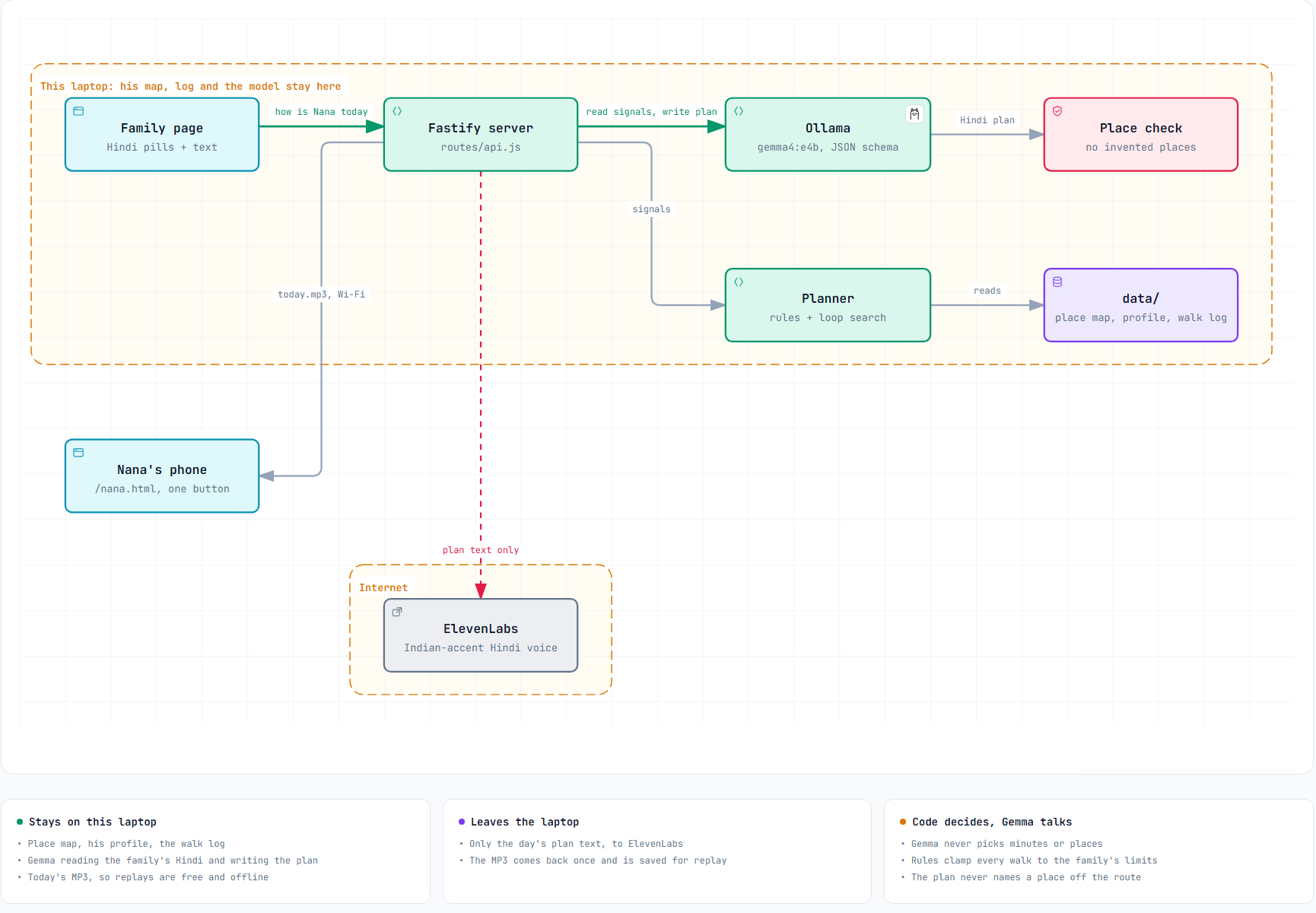The file [scratchpad] has been updated successfully. (file state is current in your context — no need to Read it back)The README changed on disk while I was working, so you probably edited it. Checking that my diagram edit sits correctly with your changes:
$ # Check recent commits and README diff
git log --oneline -3; git diff --stat HEAD -- README.md; git diff HEAD -- README.md | head -602f2437c feat: single plan card, pandal events, weekly goal tracking
a3117bf feat: add walkedToday signal, multi-window hours, new place kinds
76c77d6 feat: add walk planner, API, TTS plan export and Nana UI
warning: in the working copy of 'README.md', LF will be replaced by CRLF the next time Git touches it
README.md | 119 ++++++++++++++++++++++++++++++++++++++++++++++----------------
1 file changed, 89 insertions(+), 30 deletions(-)
warning: in the working copy of 'README.md', LF will be replaced by CRLF the next time Git touches it
diff --git a/README.md b/README.md
index 413b15f..cc6d14d 100644
--- a/README.md
+++ b/README.md
@@ -2,69 +2,128 @@
# Chalo Nana · चलो नाना
-**A daily walk for my grandfather, planned on a laptop, spoken to him in Hindi, and then the phone goes in his pocket.**
+**A daily walk for my grandfather: planned on a laptop, spoken to him once in Hindi, and then the phone goes in his pocket.**
-My Nana's doctor told him to walk at least 30 minutes a day. He can walk. What he doesn't have is a reason to put the reels down at five in the evening. Chalo Nana gives him one: every day a family member taps how he is feeling, a local Gemma model and some plain code turn that into a walk sized for him, through the places he likes and to whatever is happening there today, and he hears it once in a warm Hindi voice. Then the screen is done.
+My Nana's doctor has advised him to walk at least 30 minutes a day. His legs are fine. What he lacks is a reason to put the reels down at five in the evening.
+
+Chalo Nana ("come on, Nana") gives him one. Every day a family member spends 30 seconds tapping how he is. A local Gemma model and some plain code turn that into a walk sized for him, through the places he likes, opening with what's happening there toda
… [4515 more characters trimmed]Nothing conflicts: you'd committed an earlier README (2f2437c), and my changes sit on top. Now the full post update with the diagram image:
[scratchpad] (from line 86)86 - **His phone counted 1,957 steps.** For about 2 km, that would mean a metre per step, which is not my grandfather. Phone pedometers undercount slow walkers. So the post uses the distance from the map, and the log keeps both numbers.
87 - **"A local voice would be more comfortable."** He liked the voice, but it was George, a British voice speaking Hindi. I switched to a young woman's Indian-accent Hindi voice from the ElevenLabs library. That's one line in `.env`, plus one in his profile, because Hindi verbs follow the speaker's gender. In that voice, *"मैं आपको बताता हूँ"* (masculine "let me tell you") sounds wrong, so Gemma now writes as a granddaughter: *"बताती हूँ"*. It also speaks *to* him (*"आप चलिए"*, "you walk") instead of *"हम चलेंगे"* ("we'll walk"), because nobody from the phone is walking with him.
88 - **He doesn't need to be told how to walk.** This was the honest one. He needs a reason, and he needs people. So the plan now **opens with what's happening** at the places on today's route: *"नवरात्रि शुरू हो गई है और दुर्गा पूजा पंडाल सज गया है"* ("Navratri has begun and the Durga Puja pandal is ready"), or *"आज हाट का दिन है, जान-पहचान वाले सब मिलेंगे"* ("it's haat day, you'll meet everyone you know"). Only then does it give the minutes.
89
90 ### Architecture
91
92 *\n\n## What I Built\n\nLast w
… [1234 more characters trimmed]The archify diagram is done and is now in both the README and the DEV draft.
What it shows: a dashed "This laptop: location, map and model stay here" boundary around the family page, Fastify server, Ollama (gemma4:e4b), place check, planner and data/. Outside it:
- Nana's phone, getting today.mp3 over Wi-Fi.
- An "Internet" boundary with ElevenLabs, reached by one red edge, "plan text only".
- OpenStreetMap, dashed, "once, rounded area".
Three cards underneath list what stays on the laptop, what leaves it, and "Code decides, Gemma talks".
Checks
- Validation: archify's showcase profile passes all 9 checks with 0 errors and 0 warnings. One label had to be moved to get there.
- Browser check: passes. No overflow at 1440×900, 1600×1000, 1920×1080 and 2048×1320, and the text stays readable.
- My look: I checked the light and dark PNGs myself. The routes and labels are clean, and the viewer buttons are cropped out.
Files in docs/
- architecture.archify.json: the source, if you want to edit it later.
- architecture.html: an interactive version with pan, zoom and dark mode.
- images/architecture-light.png and images/architecture-dark.png. The README switches between them to match the reader's theme. The post uses the light one.
Left for you
1. Commit and push docs/ and README.md. All the post's images load from GitHub, so they stay broken until you push.
2. Add the two photos in the DEV editor where the TODO comments are, then delete the comments.
3. Read it once and publish before 12:29 IST.
The only optional item left is the agent-session embed. Say if you want it, otherwise the post works without it. Remove that empty My Agent Session heading if you skip it.
OpenStreetMap, dashed, "once, rounded area".
have you forgotten we have discarded this we are not using this service
You're right. The app never uses OpenStreetMap. The planner runs only on the family's place map, so drawing OSM as a live service in the architecture is wrong. Removing it from the diagram:
$ # Remove OSM from diagram spec and revalidate
node -e "
const fs=require('fs');const f='docs/architecture.archify.json';const s=JSON.parse(fs.readFileSync(f,'utf8'));
s.components=s.components.filter(c=>c.id!=='osm');
s.connections=s.connections.filter(c=>c.id!=='fetch');
s.boundaries.find(b=>b.label==='Internet').wraps=['tts'];
s.cards.find(c=>c.title==='Leaves the laptop').items=['Only the day\'s plan text, to ElevenLabs','The MP3 comes back once and is saved for replay'];
fs.writeFileSync(f,JSON.stringify(s,null,2)+'\n');console.log(s.components.map(c=>c.id).join(','))"
cd "~/.claude/skills/archify" && node bin/archify.mjs validate architecture "~/Desktop/Hacktober Fest/touch-grass/docs/architecture.archify.json" --quality showcase --json 2>&1 | node -e 'let s="";process.stdin.on("data",d=>s+=d).on("end",()=>{const r=JSON.parse(s);console.log("ok:",r.ok,"checks:",(r.checks||[]).filter(c=>c.ok).length+"/"+(r.checks||[]).length,"composition:",JSON.stringify(r.composition?.summary));(r.diagnostics||[]).forEach(d=>console.log("-",d.message.slice(0,300)))})'family,server,gemma,check,planner,data,nana,tts
ok: true checks: 9/9 composition: {"errors":0,"warnings":0}
Shell cwd was reset to ~\Desktop\Hacktober Fest\touch-grass$ # Fix card, validate, deliver and visual-check diagram
node -e "
const fs=require('fs');const f='docs/architecture.archify.json';const s=JSON.parse(fs.readFileSync(f,'utf8'));
s.cards.find(c=>c.title==='Stays on this laptop').items[0]='Place map, his profile, the walk log';
s.boundaries[0].label='This laptop: his map, log and the model stay here';
fs.writeFileSync(f,JSON.stringify(s,null,2)+'\n');"
cd "~/.claude/skills/archify" && D="~/Desktop/Hacktober Fest/touch-grass/docs" && node bin/archify.mjs validate architecture "$D/architecture.archify.json" --quality showcase --json 2>&1 | node -e 'let s="";process.stdin.on("data",d=>s+=d).on("end",()=>{const r=JSON.parse(s);console.log("validate ok:",r.ok,(r.checks||[]).filter(c=>c.ok).length+"/"+(r.checks||[]).length,JSON.stringify(r.composition?.summary))})' && node bin/archify.mjs deliver architecture "$D/architecture.archify.json" "$D/architecture.html" --quality showcase --json 2>&1 | node -e 'let s="";process.stdin.on("data",d=>s+=d).on("end",()=>{const r=JSON.parse(s);console.log("deliver ok:",r.ok)})' && node bin/archify.mjs visual-check "$D/architecture.html" --json 2>&1 | node -e 'let s="";process.stdin.on("data",d=>s+=d).on("end",()=>{const r=JSON.parse(s);console.log("visual-check:",r.status,"diagnostics:",r.diagnostics.length)})'validate ok: true 9/9 {"errors":0,"warnings":0}
deliver ok: true
visual-check: pass diagnostics: 0
Shell cwd was reset to ~\Desktop\Hacktober Fest\touch-grass$ # Recrop diagram PNGs and remove sidecars
SP="[scratchpad]"; D="~/Desktop/Hacktober Fest/touch-grass/docs"; for t in light dark; do powershell -NoProfile -ExecutionPolicy Bypass -File "$SP/crop-arch.ps1" "$D/architecture.visual-check.2048x1320.$t.png" "$D/images/architecture-$t.png"; done; rm -f "$D"/architecture.visual-check.*; ls "$D" "$D/images"~/Desktop/Hacktober Fest/touch-grass/docs:
architecture.archify.json
architecture.html
images
~/Desktop/Hacktober Fest/touch-grass/docs/images:
architecture-dark.png
architecture-light.png
banner.png
nana-button.png
step1-how-is-nana.png
step2-todays-walk-dark.png
step2-todays-walk.png~/Desktop/Hacktober Fest/touch-grass/docs/images/architecture-light.png[screenshot shown to the agent]~\Desktop\Hacktober Fest\touch-grass\README.md
--- replace ---
Nana's phone gets today.mp3 over Wi-Fi, and only the plan text goes out to ElevenLabs. OpenStreetMap is downloaded once, as a rounded area." src=
--- with ---
Nana's phone gets today.mp3 over Wi-Fi, and only the plan text goes out to ElevenLabs." src=The file ~\Desktop\Hacktober Fest\touch-grass\README.md has been updated successfully.[scratchpad]
--- replace ---
Nana's phone gets today.mp3 over Wi-Fi. Only the plan text goes out to ElevenLabs, and OpenStreetMap was downloaded once as a rounded area.]
--- with ---
Nana's phone gets today.mp3 over Wi-Fi. Only the plan text goes out, to ElevenLabs.]The file [scratchpad] has been updated successfully.[scratchpad]
--- replace ---
- **His location stays home.** His house coordinates, his map and his walk log never leave my laptop. The model runs there. The one OpenStreetMap request asks for a rounded area a few kilometres wide, not a pin on his house.
--- with ---
- **His life stays home.** His map, his profile and his walk log never leave my laptop, and the model runs there too. No location is sent anywhere: the map is a file the family wrote, not a GPS track.The file [scratchpad] has been updated successfully.OpenStreetMap|OSM|rounded in [scratchpad]60:### Plan A: OpenStreetMap. It knew one road, and it was the wrong one
62:My plan was to download his neighbourhood from OpenStreetMap once, build a graph of walkable streets, and search it for a loop. I wrote the downloader and pointed it at his village.
70:The OSM downloader stays in the repo for towns that are mapped. For his village, the gap is now on my list to fix the right way: by adding his lanes to OpenStreetMap.
115:- **The map is open, so I can fix it.** OSM didn't know his lanes. With a closed map I would just wait. With OSM I can add them, and the next family in his village gets them too.[scratchpad]
--- replace ---
The OSM downloader stays in the repo for towns that are mapped. For his village, the gap is now on my list to fix the right way: by adding his lanes to OpenStreetMap.
--- with ---
So the app doesn't use OpenStreetMap at all. The map it plans on is the family's own file. For his village, the gap in OSM is now on my list to fix the right way: by adding his lanes to it.The file [scratchpad] has been updated successfully.[scratchpad]1 *This is a submission for the [Hacktoberfest Open-Source AI Challenge: Week 1](https://dev.to/challenges/hacktoberfest-week1-2026-10-05)*
2
3 ## What I Built
4
5 Last week I built [Padh Ke Batao](https://dev.to/rahullkumr/padh-ke-batao-an-ai-that-reads-my-grandfathers-documents-to-him-on-a-laptop-with-no-gpu-3818) for my Nana, my maternal grandfather: a local model that reads his letters and explains them to him in Hindi. It won Best Use of ElevenLabs, and more importantly, he loved the voice. So when this week's theme said *get people off the screen*, I knew who it was for.
6
7 Nana's doctor has advised him to walk at least 30 minutes a day. He is not frail. He cycles a few kilometres and walks to the market. But these days his evenings go to reels and serials on his phone. Nothing is wrong with his legs. What's missing is a reason to get up at five o'clock.
8
9 **Chalo Nana** (चलो नाना, "come on, Nana") gives him that reason, once a day, in a voice he likes:
10
11 1. Someone in the family spends 30 seconds tapping how he is today: *घुटने में दर्द है* (knee pain), *धूप तेज़ है* (strong sun), *आज बाज़ार हो आए हैं* (already went to the market), and where he wants to go.
12 2. A local **Gemma** model reads that Hindi, plain code decides how much walking is safe today and picks a loop through the places he likes, and Gemma writes it the way a granddaughter would say it.
13 3. **ElevenLabs** turns it into a short Hindi voice note. Nana presses one big button on his phone,
… [11026 more characters trimmed]{
"id": 4833352,
"title": "Chalo Nana: my grandfather walked 2 km to the Navratri pandal, and his phone stayed in his pocket",
"ai_disclosure_level": "some_ai",
"body_markdown": "[post body]"
}{"Ok":{"id":4833352,"title":"Chalo Nana: my grandfather walked 2 km to the Navratri pandal, and his phone stayed in his pocket","description":"A local Gemma model and a few rules turn \"how is Nana today?\" into a walk sized for him, spoken in Hindi by ElevenLabs. Then the phone goes in his pocket.","tag_list":["devchallenge","hf26challenge","ai","opensource"],"user":{"name":"Rahul Kumar","username":"rahullkumr"},"body_markdown":"*This is a submission for the [Hacktoberfest Open-Source AI Challenge: Week 1](https://dev.to/challenges/hacktoberfest-week1-2026-10-05)*\n\n## What I Built\n\nLast w
… [1234 more characters trimmed]Fixed. The app doesn't use OpenStreetMap, and nothing shows it as a live service any more.
Changed
- Diagram: OpenStreetMap and its dashed edge are gone. It now shows everything on the laptop, plus Nana's phone over Wi-Fi and ElevenLabs as the only outside service. I re-rendered and re-checked it: showcase validation passes 9/9 with 0 warnings, the browser check passes, and both PNGs are re-cropped.
- Diagram cards: "Leaves the laptop" now lists only the plan text to ElevenLabs. "Stays on this laptop" no longer says "home location", since the app never uses his coordinates. The boundary label now reads "his map, log and the model stay here".
- DEV draft:
- The privacy bullet no longer mentions an OSM request. It now reads "No location is sent anywhere: the map is a file the family wrote."
- The Plan A section now says plainly that the app doesn't use OpenStreetMap at all.
- The image alt text no longer mentions OSM.
- README: the image alt text no longer mentions OSM.
Kept on purpose: the post's "Plan A: OpenStreetMap" story, as history. It's the honest "what broke" part, and it explains why the place map exists. The "map is open, so I can fix it" bullet also stays, since it's about adding his lanes to OSM later.
Your call: scripts/fetch-area.js and its two README mentions are still in the repo, described as "not used by the planner". Should I delete the script and those mentions too, or keep them as the record of Plan A?
I added the two pics, pandal and the dps (screenshot), both cartoonized by ai so the real identity is not revealed
Nice. Before I touch the draft again I need to check where you added them, so a later update from me doesn't overwrite your images. Checking both the repo and the DEV draft:
$ # List images and working tree changes
ls -la --time-style=+%H:%M docs/images/; git status --short | headtotal 6532
drwxr-xr-x 1 rahul 197609 0 23:36 .
drwxr-xr-x 1 rahul 197609 0 23:34 ..
-rw-r--r-- 1 rahul 197609 133182 23:34 architecture-dark.png
-rw-r--r-- 1 rahul 197609 136295 23:34 architecture-light.png
-rw-r--r-- 1 rahul 197609 118256 01:48 banner.png
-rw-r--r-- 1 rahul 197609 2706682 22:42 dps.png
-rw-r--r-- 1 rahul 197609 53886 20:54 nana-button.png
-rw-r--r-- 1 rahul 197609 2832224 23:05 pandal.png
-rw-r--r-- 1 rahul 197609 266524 20:55 step1-how-is-nana.png
-rw-r--r-- 1 rahul 197609 204935 20:55 step2-todays-walk-dark.png
-rw-r--r-- 1 rahul 197609 207872 20:55 step2-todays-walk.png
M README.md
M examples/walker.example.json
M public/js/nana.js
M src/config.js
M src/prompts/speech.js
M src/routes/api.js
?? docs/architecture.archify.json
?? docs/architecture.html
?? docs/images/architecture-dark.png
?? docs/images/architecture-light.png{
"id": 4833352
}dev.to API returned error status: 404 Not Found for article 4833352{
"state": "unpublished",
"per_page": 5
}{"Ok":[{"id":4833352,"title":"Chalo Nana: my grandfather walked 2 km to the Navratri pandal, and his phone stayed in his pocket","description":"A local Gemma model and a few rules turn \"how is Nana today?\" into a walk sized for him, spoken in Hindi by ElevenLabs. Then the phone goes in his pocket.","tag_list":["devchallenge","hf26challenge","ai","opensource"],"user":{"name":"Rahul Kumar","username":"rahullkumr"},"body_markdown":"*This is a submission for the [Hacktoberfest Open-Source AI Challenge: Week 1](https://dev.to/challenges/hacktoberfest-week1-2026-10-05)*\n\n## What I Built\n\nLast
… [1234 more characters trimmed]~\Desktop\Hacktober Fest\touch-grass\docs\images\pandal.png[screenshot shown to the agent]~\Desktop\Hacktober Fest\touch-grass\docs\images\dps.png[screenshot shown to the agent]$ # Check images tracked and pushed to GitHub
git ls-files docs/images; git log --oneline -1; curl -s -o /dev/null -w "pandal raw: %{http_code}\n" https://raw.githubusercontent.com/Rahullkumr/touch-grass/main/docs/images/pandal.png; curl -s -o /dev/null -w "dps raw: %{http_code}\n" https://raw.githubusercontent.com/Rahullkumr/touch-grass/main/docs/images/dps.png; curl -s -o /dev/null -w "step1 raw: %{http_code}\n" https://raw.githubusercontent.com/Rahullkumr/touch-grass/main/docs/images/step1-how-is-nana.pngdocs/images/banner.png
docs/images/nana-button.png
docs/images/step1-how-is-nana.png
docs/images/step2-todays-walk-dark.png
docs/images/step2-todays-walk.png
2f2437c feat: single plan card, pandal events, weekly goal tracking
pandal raw: 404
dps raw: 404
step1 raw: 200$ # Make compressed JPG copies of the two photos
SP="[scratchpad]"; cat > "$SP/tojpg.ps1" <<'EOF'
param($src, $dst, [int]$maxW = 1400)
Add-Type -AssemblyName System.Drawing
$img = [System.Drawing.Image]::FromFile($src)
$scale = [Math]::Min(1.0, $maxW / $img.Width)
$w = [int]($img.Width * $scale); $h = [int]($img.Height * $scale)
$bmp = New-Object System.Drawing.Bitmap $w, $h
$g = [System.Drawing.Graphics]::FromImage($bmp)
$g.InterpolationMode = [System.Drawing.Drawing2D.InterpolationMode]::HighQualityBicubic
$g.DrawImage($img, 0, 0, $w, $h)
$codec = [System.Drawing.Imaging.ImageCodecInfo]::GetImageEncoders() | Where-Object { $_.MimeType -eq 'image/jpeg' }
$params = New-Object System.Drawing.Imaging.EncoderParameters 1
$params.Param[0] = New-Object System.Drawing.Imaging.EncoderParameter ([System.Drawing.Imaging.Encoder]::Quality), 85L
$bmp.Save($dst, $codec, $params)
$g.Dispose(); $bmp.Dispose(); $img.Dispose()
EOF
D="~/Desktop/Hacktober Fest/touch-grass/docs/images"; powershell -NoProfile -ExecutionPolicy Bypass -File "$SP/tojpg.ps1" "$D/pandal.png" "$D/pandal.jpg" 1086; powershell -NoProfile -ExecutionPolicy Bypass -File "$SP/tojpg.ps1" "$D/dps.png" "$D/nana-with-children.jpg" 1448; ls -la "$D"/*.jpg; git status --short docs/-rw-r--r-- 1 rahul 197609 377148 Oct 11 23:38 ~/Desktop/Hacktober Fest/touch-grass/docs/images/nana-with-children.jpg
-rw-r--r-- 1 rahul 197609 354756 Oct 11 23:38 ~/Desktop/Hacktober Fest/touch-grass/docs/images/pandal.jpg
?? docs/architecture.archify.json
?? docs/architecture.html
?? docs/images/architecture-dark.png
?? docs/images/architecture-light.png
?? docs/images/dps.png
?? docs/images/nana-with-children.jpg
?? docs/images/pandal.jpg
?? docs/images/pandal.pngJPGs are about 360 KB each, down from 2.7 MB. Now into the post, replacing the two TODO lines:
[scratchpad]
--- replace ---
<!-- TODO(Rahul): pandal photo here -->
<!-- TODO(Rahul): cartoonized group photo with the children here -->
--- with ---

*The pandal he loved: "it looks like a real temple".*
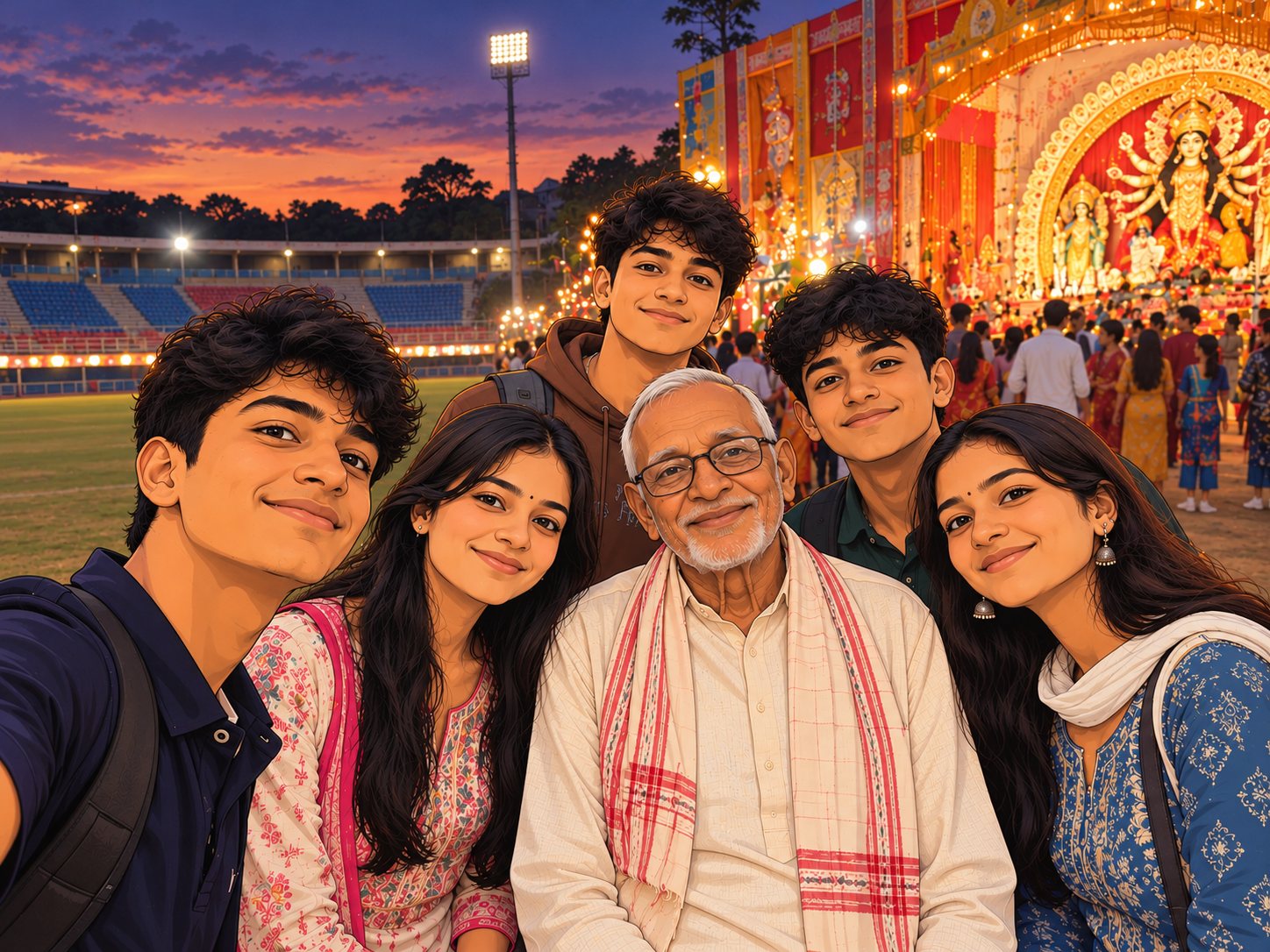
*The fifteen extra minutes: a selfie the children took with Nana at the stadium, the pandal behind them.*
*Both pictures are our own photos from the walk, cartoonized with AI so that nobody's real face or exact place ends up online.*The file [scratchpad] has been updated successfully. (file state is current in your context — no need to Read it back)~\Desktop\Hacktober Fest\touch-grass\README.md
--- replace ---
11 October 2026, the first evening of Navratri. The plan: home, the stadium (sit five minutes), the Durga Puja pandal next to it, back past the stadium, home.
--- with ---
11 October 2026, the first evening of Navratri. The plan: home, the stadium (sit five minutes), the Durga Puja pandal next to it, back past the stadium, home.
| The pandal | The fifteen extra minutes |
|---|---|
|  |  |
<sub>Our own photos from the walk, cartoonized with AI so no real faces or exact places are online.</sub>The file ~\Desktop\Hacktober Fest\touch-grass\README.md has been updated successfully. (note: the file had been modified on disk since you last read it — the edit applied cleanly, but the file contains other changes not in your context. Read it before edits that depend on surrounding content.){
"id": 4833352,
"title": "Chalo Nana: my grandfather walked 2 km to the Navratri pandal, and his phone stayed in his pocket",
"ai_disclosure_level": "some_ai",
"body_markdown": "[post body]"
}{"Ok":{"id":4833352,"title":"Chalo Nana: my grandfather walked 2 km to the Navratri pandal, and his phone stayed in his pocket","description":"A local Gemma model and a few rules turn \"how is Nana today?\" into a walk sized for him, spoken in Hindi by ElevenLabs. Then the phone goes in his pocket.","tag_list":["devchallenge","hf26challenge","ai","opensource"],"user":{"name":"Rahul Kumar","username":"rahullkumr"},"body_markdown":"*This is a submission for the [Hacktoberfest Open-Source AI Challenge: Week 1](https://dev.to/challenges/hacktoberfest-week1-2026-10-05)*\n\n## What I Built\n\nLast w
… [1234 more characters trimmed]Both pictures are now in the post and the README.
Where they go
- In the DEV post: right after Nana's line about everyone staring at their phones.
- The pandal, captioned "The pandal he loved: 'it looks like a real temple'."
- The group selfie, captioned "The fifteen extra minutes: a selfie the children took with Nana at the stadium, the pandal behind them."
- Then one line saying both are your photos from the walk, cartoonized with AI so no real faces or exact places end up online.
- In the README: a side-by-side table in "The first real walk", with the same note.
I used compressed copies: pandal.jpg and nana-with-children.jpg, about 360 KB each instead of 2.7 MB. Your original PNGs are untouched. You don't need to commit them; nothing references them.
Before publishing, in order:
1. Commit and push docs/ and README.md. Right now pandal.jpg, nana-with-children.jpg and both architecture-*.png files return 404 on GitHub, so the post would show broken images. The screenshots already pushed are fine.
2. Open the draft preview after pushing and check that every image loads.
3. Remove the two leftover TODO comments, unless you want a video or the agent session: the optional demo-video comment, and the agent-session one under "My Agent Session". If you skip the session, delete that heading too.
4. Publish before 12:29 IST.
I still need your answer on scripts/fetch-area.js: keep it as the record of Plan A, or delete it along with its README mentions?
what is this: I still need your answer on scripts/fetch-area.js: keep it as the record of Plan A, or delete it along with its README mentions?
It's a leftover from the OpenStreetMap idea, and I need to know whether to keep it.
What the file is: scripts/fetch-area.js is the script I wrote at the start. It downloaded the map of Nana's area from OpenStreetMap, and that download came back with only the highway and ponds. After that, we dropped OpenStreetMap and switched to the family's place map.
Why it's still there: I never deleted it. The app doesn't use it at all; the planner reads only data/places.json. But the file is still in the repo, and the README mentions it in two places:
1. "Why a place map, not OpenStreetMap streets" links to it.
2. "Run it" explains npm run fetch-area.
package.json also has a fetch-area command for it.
The choice:
- Keep it: it's proof of the "Plan A" story in the post. A judge reading "I wrote the downloader and pointed it at his village" can open the script and see it.
- Delete it: the repo then contains only what the app actually uses, with no unused code.
My recommendation: delete it. The post tells the Plan A story fine without the file, and it avoids exactly the confusion you caught earlier, where OSM looked like part of the app. If you agree, I'll remove the script, the fetch-area command in package.json, the OSM settings in .env.example (HOME_LAT, HOME_LON, AREA_RADIUS_M), and the two README mentions. Your data/area.json download stays on your laptop; git ignores it anyway.
Delete or keep?
yes delete
fetch-area|HOME_LAT|HOME_LON|AREA_RADIUS|area\.json|OpenStreetMap|OSM|Overpass in ~\Desktop\Hacktober Fest\touch-grass.env.example:3:HOME_LAT=
.env.example:4:HOME_LON=
.env.example:6:AREA_RADIUS_M=1800
.gitignore:6:# Private data: cached OSM area around home, family rest spots, walker profile, walk log
src\config.js:10:export const HOME_LAT = Number(process.env.HOME_LAT);
src\config.js:11:export const HOME_LON = Number(process.env.HOME_LON);
src\config.js:12:export const AREA_RADIUS_M = Number(process.env.AREA_RADIUS_M) || 1800;
package.json:4: "description": "A gentle daily walk sized for one grandparent: OpenStreetMap loop planned on the laptop, spoken in Hindi by a local Gemma model.",
package.json:8: "fetch-area": "node --env-file-if-exists=.env scripts/fetch-area.js",
scripts\fetch-area.js:1:// One-time download of the neighbourhood from OpenStreetMap (Overpass API).
scripts\fetch-area.js:2:// Saves data/area.json; daily planning then runs offline from that file.
scripts\fetch-area.js:5:// and the radius grown to cover it, so Overpass only sees "a few km around this part of town".
scripts\fetch-area.js:7:// Usage: npm run fetch-area (uses HOME_LAT / HOME_LON / AREA_RADIUS_M from .env)
scripts\fetch-area.js:8:// npm run fetch-area -- --force (re-download even if data/area.json exists)
scripts\fetch-area.js:11:import { HOME_LAT, HOME_LON, AREA_RADIUS_M, DATA_DIR } from '../src/config.js';
scripts\fetch-area.js:18:if (!Number.isFinite(HOME_LAT) || !Number.isFinite(HOME_LON)) {
scripts\fetch-area.js:19: console.error('Set HOME_LAT and HOME_LON in .env first (long-press the house in Google Maps).');
scripts\fetch-area.js:23:const out = join(DATA_DIR, 'area.json');
scripts\fetch-area.js:32:const lat = Math.round(HOME_LAT * 100) / 100;
scripts\fetch-area.js:33:const lon = Math.round(HOME_LON * 100) / 100;
scripts\fetch-area.js:34:const radius = AREA_RADIUS_M + 800;
… [970 more characters trimmed]$ # Delete unused OSM download script
rm scripts/fetch-area.js && ls scriptsplan-cli.js~\Desktop\Hacktober Fest\touch-grass\package.json
--- replace ---
"description": "A gentle daily walk sized for one grandparent: OpenStreetMap loop planned on the laptop, spoken in Hindi by a local Gemma model.",
--- with ---
"description": "A gentle daily walk sized for one grandparent: planned on the laptop over the family's place map, spoken in Hindi by a local Gemma model.",The file ~\Desktop\Hacktober Fest\touch-grass\package.json has been updated successfully. (file state is current in your context — no need to Read it back)~\Desktop\Hacktober Fest\touch-grass\package.json
--- replace ---
"fetch-area": "node --env-file-if-exists=.env scripts/fetch-area.js",
--- with ---
The file ~\Desktop\Hacktober Fest\touch-grass\package.json has been updated successfully. (file state is current in your context — no need to Read it back)~\Desktop\Hacktober Fest\touch-grass\.env.example1 # Home of the person walking. Long-press the house in Google Maps and copy the numbers.
2 # This file is an example; put real values in .env, which git ignores.
3 HOME_LAT=
4 HOME_LON=
5 # How far around home to download the map, in metres.
6 AREA_RADIUS_M=1800
7
8 # ElevenLabs voice that reads the plan aloud.~\Desktop\Hacktober Fest\touch-grass\src\config.js1 // Every setting the app reads from the environment, with defaults. See .env.example.
2 import { fileURLToPath } from 'node:url';
3 import { resolve } from 'node:path';
4
5 export const HOST = process.env.HOST || '127.0.0.1';
6 export const PORT = Number(process.env.PORT) || 3000;
7
8 // Home of the person walking. Kept in .env (git-ignored), never sent anywhere except
9 // the one-time map download, which asks for a box around it.
10 export const HOME_LAT = Number(process.env.HOME_LAT);
11 export const HOME_LON = Number(process.env.HOME_LON);
12 export const AREA_RADIUS_M = Number(process.env.AREA_RADIUS_M) || 1800;
13
14 const ROOT = fileURLToPath(new URL('../', import.meta.url));
15 export const DATA_DIR = resolve(ROOT, process.env.DATA_DIR || 'data');
16 export const EXAMPLES_DIR = resolve(ROOT, 'examples');~\Desktop\Hacktober Fest\touch-grass\.gitignore1 # Secrets and Nana's home location
2 .env
3 .env.*
4 !.env.example
5
6 # Private data: cached OSM area around home, family rest spots, walker profile, walk log
7 data/
8
9 # Dependencies
10 node_modules/
11 .agents/
12
13 # Agent tooling (installed skills, not app code)
14 .claude/
15 skills-lock.json
16 ~\Desktop\Hacktober Fest\touch-grass\.env.example
--- replace ---
# Home of the person walking. Long-press the house in Google Maps and copy the numbers.
# This file is an example; put real values in .env, which git ignores.
HOME_LAT=
HOME_LON=
# How far around home to download the map, in metres.
AREA_RADIUS_M=1800
# ElevenLabs voice that reads the plan aloud.
--- with ---
# This file is an example; put real values in .env, which git ignores.
# ElevenLabs voice that reads the plan aloud.The file ~\Desktop\Hacktober Fest\touch-grass\.env.example has been updated successfully.~\Desktop\Hacktober Fest\touch-grass\src\config.js
--- replace ---
// Home of the person walking. Kept in .env (git-ignored), never sent anywhere except
// the one-time map download, which asks for a box around it.
export const HOME_LAT = Number(process.env.HOME_LAT);
export const HOME_LON = Number(process.env.HOME_LON);
export const AREA_RADIUS_M = Number(process.env.AREA_RADIUS_M) || 1800;
--- with ---
The file ~\Desktop\Hacktober Fest\touch-grass\src\config.js has been updated successfully.~\Desktop\Hacktober Fest\touch-grass\.gitignore
--- replace ---
# Secrets and Nana's home location
.env
.env.*
!.env.example
# Private data: cached OSM area around home, family rest spots, walker profile, walk log
data/
--- with ---
# Secrets
.env
.env.*
!.env.example
# Private data: place map, walker profile, walk log, today's plan and audio
data/The file ~\Desktop\Hacktober Fest\touch-grass\.gitignore has been updated successfully. (file state is current in your context — no need to Read it back)~\Desktop\Hacktober Fest\touch-grass\README.md (from line 60)60 7. **After the walk**, the family logs steps, minutes, rests and how he felt. A weekly line shows the doctor's goal against real walks.
61
62 ### Why a place map, not OpenStreetMap streets
63
64 The first version downloaded his neighbourhood from OpenStreetMap ([`scripts/fetch-area.js`](scripts/fetch-area.js)). For his village it returned ten road segments, nine of them the highway he should never walk along, plus fourteen ponds. No lanes, no temple, no stadium.
65
66 Villages give directions as places and minutes anyway ("mandir se dam paanch minute"). So that's the map: places, whether he can sit there, when each one is lively, and the minutes between them at his pace, timed on a real walk.
67
68 ```jsonc
69 // data/places.json (excerpt; see examples/places.example.json)
70 { "id": "pandal", "name": "दुर्गा पूजा पंडाल", "kind": "pandal", "sit": null,
71 "hours": [[17, 23]], "likes": 2, "whenOpen": "नवरात्रि शुरू हो गई है और दुर्गा पूजा पंडाल सज गया है" }
72
73 { "a": "stadium", "b": "pandal", "minutes": 2, "highway": false, "uphill": false, "shade": false }
74 ```
75
76 ## Run it
77
78 You need Node 22.9+, [Ollama](https://ollama.com), about 7 GB of disk for the model, and an ElevenLabs API key (text-to-speech permission is enough). It runs on a CPU. On an i7 laptop with no GPU it takes about 9 s to read the Hindi and about 25 s to write the plan.
79
80 ```bash
81 ollama pull gemma4:e4b
82 npm install
83 cp .env.example .env # add ELEVENLABS_API_KEY and ELEV
… [3122 more characters trimmed]~\Desktop\Hacktober Fest\touch-grass\README.md
--- replace ---
The first version downloaded his neighbourhood from OpenStreetMap ([`scripts/fetch-area.js`](scripts/fetch-area.js)). For his village it returned ten road segments, nine of them the highway he should never walk along, plus fourteen ponds. No lanes, no temple, no stadium.
--- with ---
The first plan was to download his neighbourhood from OpenStreetMap and route over its streets. For his village it returned ten road segments, nine of them the highway he should never walk along, plus fourteen ponds. No lanes, no temple, no stadium. So the app doesn't use OpenStreetMap at all.The file ~\Desktop\Hacktober Fest\touch-grass\README.md has been updated successfully.~\Desktop\Hacktober Fest\touch-grass\README.md
--- replace ---
3. Check the map without the model: `npm run plan -- 30 10 --slow --no-uphill` prints the best loop for 30 minutes with a rest every 10.
`npm run fetch-area` downloads the OSM streets around `HOME_LAT`/`HOME_LON` once, into `data/area.json`. It sends a rounded area, not the house. The planner doesn't use street data yet; it's there to see what OSM knows about your area, and to start from if you build street routing.
--- with ---
3. Check the map without the model: `npm run plan -- 30 10 --slow --no-uphill` prints the best loop for 30 minutes with a rest every 10.
The file ~\Desktop\Hacktober Fest\touch-grass\README.md has been updated successfully.~\Desktop\Hacktober Fest\touch-grass\README.md
--- replace ---
That's the home coordinates, the place map, the profile, the walk log and today's audio.
--- with ---
That's the place map, the profile, the walk log, today's audio and the API key. No home coordinates are needed or stored.The file ~\Desktop\Hacktober Fest\touch-grass\README.md has been updated successfully.~\Desktop\Hacktober Fest\touch-grass\README.md
--- replace ---
scripts/ fetch-area (OSM), plan-cli (planner without the model)
--- with ---
scripts/plan-cli.js the planner without the model, to check a mapThe file ~\Desktop\Hacktober Fest\touch-grass\README.md has been updated successfully.$ # Verify code still loads and no references remain
node --check src/config.js && node --input-type=module -e "import('./src/routes/api.js').then(()=>console.log('api imports ok'))" && node scripts/plan-cli.js 30 10 | tail -2; grep -rn "fetch-area\|HOME_LAT\|AREA_RADIUS" --include=*.js --include=*.json --include=*.md --include=.env.example . 2>/dev/null | grep -v node_modules | grep -v "^./data"; grep -c "HOME_LAT" .envapi imports ok
stop बगीचा after 15 min: pass by
walk 30 min + rest 0 min = 30 min, ~1.3 km (estimate)
1$ # Show full planner output for 30 min case
node scripts/plan-cli.js 30 10; node -e "const w=require('./data/walker.json');console.log('restMinutes in profile:',w.restMinutes)"(your place map) {
maxMinutes: 30,
restEveryMinutes: 10,
restMinutes: 5,
avoidUphill: 'prefer',
preferShade: false,
pace: 'normal',
wantPlaces: [ 'temple', 'market', 'dam', 'park' ]
}
2 loops checked
घर -> बगीचा 15 min shade (1 standing pause)
बगीचा -> घर 15 min shade (1 standing pause)
stop बगीचा after 15 min: pass by
walk 30 min + rest 0 min = 30 min, ~1.3 km (estimate)
restMinutes in profile: 5~\Desktop\Hacktober Fest\touch-grass\src\planner\loops.js (from line 70)70 const notes = [];
71 let score = 0;
72 let sinceRest = 0;
73 let walked = 0;
74 const visited = new Set();
75 const reused = new Set();
76 const seenLinks = new Set();
77
78 for (const step of loop.links) {
79 const link = map.links[step.i];
80 const minutes = Math.round(link.minutes * slowFactor); // the family's own times are only to a minute anyway
81 if (seenLinks.has(step.i)) reused.add(step.i);
82 seenLinks.add(step.i);
83
84 // A long link with nowhere to sit gets a standing pause in the middle.
85 const pauses = Math.floor((sinceRest + minutes) / (settings.restEveryMinutes * 1.25));
86 legs.push({
87 from: step.from,
88 to: step.to,
89 minutes,
90 uphill: Boolean(link.uphill),
91 shade: Boolean(link.shade),
92 standingPauses: pauses,
93 });
94 walked += minutes;
95 sinceRest += minutes;
96 if (pauses) {
97 score -= pauses * 4;
98 sinceRest = (sinceRest) % (settings.restEveryMinutes * 1.25);
99 }
100 if (link.uphill && settings.avoidUphill === 'prefer') score -= 8;
101 if (settings.preferShade && !link.shade) score -= minutes * 0.4;
102
103 const place = byId.get(step.to);
104 if (step.to === 'home') break;
105
106 const open = isOpen(place, now);
107 const firstVisit = !visited.has(place.id);
108 visited.add(place.id);
109 if (firstVisit && open) {
110 score += (place.likes || 0) * 6;
111 // Asked for today
… [1581 more characters trimmed]~\Desktop\Hacktober Fest\touch-grass\src\planner\loops.js
--- replace ---
let sinceRest = 0;
let walked = 0;
--- with ---
let sinceRest = 0; // minutes since he last sat down
let sincePause = 0; // minutes since he last sat or stopped to breathe
let walked = 0;The file ~\Desktop\Hacktober Fest\touch-grass\src\planner\loops.js has been updated successfully.~\Desktop\Hacktober Fest\touch-grass\src\planner\loops.js
--- replace ---
// A long link with nowhere to sit gets a standing pause in the middle.
const pauses = Math.floor((sinceRest + minutes) / (settings.restEveryMinutes * 1.25));
legs.push({
--- with ---
// A long stretch gets standing pauses on the way. A seat at the end replaces the last one:
// he should sit on the bench he is walking to, not stop to breathe just before it.
const pauseEvery = settings.restEveryMinutes * 1.25;
const total = sincePause + minutes;
const seatAhead = canSit(byId.get(step.to));
const pauses = seatAhead ? Math.max(0, Math.ceil(total / pauseEvery) - 1) : Math.floor(total / pauseEvery);
sincePause = total - pauses * pauseEvery;
legs.push({The file ~\Desktop\Hacktober Fest\touch-grass\src\planner\loops.js has been updated successfully.~\Desktop\Hacktober Fest\touch-grass\src\planner\loops.js
--- replace ---
sinceRest += minutes;
if (pauses) {
score -= pauses * 4;
sinceRest = (sinceRest) % (settings.restEveryMinutes * 1.25);
}
--- with ---
sinceRest += minutes;
score -= pauses * 4;The file ~\Desktop\Hacktober Fest\touch-grass\src\planner\loops.js has been updated successfully.~\Desktop\Hacktober Fest\touch-grass\src\planner\loops.js
--- replace ---
score -= Math.max(0, sinceRest - settings.restEveryMinutes) * 3;
sinceRest = 0;
} else if (firstVisit) {
--- with ---
score -= Math.max(0, sinceRest - settings.restEveryMinutes) * 3;
sinceRest = 0;
sincePause = 0;
} else if (firstVisit) {The file ~\Desktop\Hacktober Fest\touch-grass\src\planner\loops.js has been updated successfully.$ # Test planner after standing-pause fix
echo "== 30/10 (bug case)"; node scripts/plan-cli.js 30 10 | tail -n +11; echo "== 45/20 pandal check"; node --input-type=module -e "
import { loadPlaces } from './src/services/store.js';
import { planLoop } from './src/planner/loops.js';
const map=await loadPlaces();
const r=planLoop(map,{maxMinutes:45,restEveryMinutes:20,restMinutes:5,avoidUphill:'no',preferShade:false,pace:'normal',wantPlaces:['stadium','pandal']},{now:new Date('2026-10-11T18:00:00+05:30'),speedMps:0.71});
console.log(r.legs.map(l=>l.to+(l.standingPauses?'('+l.standingPauses+'p)':'')).join(' > '), r.stops.map(s=>s.at+':'+s.restMinutes).join(' '), r.walkMinutes+'+'+r.restMinutes);"; echo "== example village 40/12"; DATA_DIR=/nonexistent node scripts/plan-cli.js 40 12 | tail -n +11== 30/10 (bug case)
घर -> चाय की टपरी 10 min shade
चाय की टपरी -> घर 10 min shade
stop चाय की टपरी after 10 min: sit 5 min on टपरी की बेंच
walk 20 min + rest 5 min = 25 min, ~0.9 km (estimate)
== 45/20 pandal check
stadium > pandal > stadium > home(1p) stadium:5 pandal:0 48+5
== example village 40/12
घर -> महतो जी की चाय दुकान 9 min shade
महतो जी की चाय दुकान -> मैदान 5 min shade
मैदान -> बाँध 8 min
बाँध -> पीपल का पेड़ 9 min shade
पीपल का पेड़ -> घर 7 min shade
stop महतो जी की चाय दुकान after 9 min: sit 4 min on दुकान की बेंच
stop मैदान after 14 min: pass by
stop बाँध after 22 min: sit 4 min on बाँध के पास पत्थर
stop पीपल का पेड़ after 31 min: sit 4 min on पीपल के नीचे चबूतरा
walk 38 min + rest 12 min = 50 min, ~1.7 km (estimate)$ # Stop server to reload
PID=$(netstat -ano | grep ':3000 ' | grep LISTENING | awk '{print $5}' | head -1); [ -n "$PID" ] && taskkill //PID $PID //F >/dev/null; echo stoppedstopped$ # Restart Chalo Nana server
node --env-file=.env src/server.js > "[scratchpad]" 2>&1Command running in background with ID: bjto7a64w. Output is being written to: [scratchpad] You will be notified when it completes. To check interim output, use Read on that file path.$ # Verify server and list changed files
sleep 4; curl -s -o /dev/null -w "state %{http_code}\n" http://127.0.0.1:3000/api/state; git status --shortstate 200
M .env.example
M .gitignore
M README.md
A docs/architecture.archify.json
A docs/architecture.html
A docs/images/architecture-dark.png
A docs/images/architecture-light.png
A docs/images/dps.png
A docs/images/nana-with-children.jpg
A docs/images/pandal.jpg
A docs/images/pandal.png
M examples/walker.example.json
M package.json
M public/js/nana.js
D scripts/fetch-area.js
M src/config.js
M src/planner/loops.js
M src/prompts/speech.js
M src/routes/api.jsDeleted. The OSM code is gone, and the app no longer has any notion of a home location.
Removed
- scripts/fetch-area.js.
- The fetch-area command in package.json, whose description no longer says "OpenStreetMap loop".
- HOME_LAT, HOME_LON and AREA_RADIUS_M from src/config.js and .env.example.
- README: both mentions of the script are gone. "Why a place map" now says plainly the app doesn't use OpenStreetMap. Privacy now says "No home coordinates are needed or stored", and the project layout lists only plan-cli.js.
- .gitignore: the comment no longer mentions an OSM cache.
Also fixed a real planner bug, found while checking. On a stretch longer than his rest interval, the planner added a "standing pause", and that pause also cancelled the sit-down at the bench at the end of the stretch. Nana would have been told to stop and breathe just before a bench, then walk past it. Now the bench at the end replaces that last standing pause. Tested on his map and the example village, and the pandal route is unchanged. The server is restarted with the fix.
Two optional clean-ups on your side:
- .env still has your HOME_LAT/HOME_LON lines, and data/area.json (the old OSM download) is still on disk. Nothing uses them any more. Both are git-ignored, so they're safe, but deleting them removes Nana's coordinates from the laptop entirely.
- The original PNGs: you've staged dps.png and pandal.png, about 5.5 MB together. Nothing references them; the post and README use the JPG copies. Unstage them if you want a lighter repo: git restore --staged docs/images/dps.png docs/images/pandal.png.
Then: commit and push, check the draft preview to make sure the images load, remove the leftover TODO comments, and publish before 12:29 IST.
Prize Categories
- Best Use of Gemma: Gemma reads the family's Hindi and writes the spoken plan, locally on a CPU-only laptop, with code deciding everything safety-related.
- Best Use of ElevenLabs: the daily voice note is the whole interface for Nana, in the Indian accent he asked for, with only the plan text leaving the laptop.